This document contains proprietary and confidential information of Integra LifeSciences Corporation. Integra’s confidential information may not be used, disclosed or reproduced without the prior wrien consent of Integra LifeSciences Corporation.
CUSA® Clarity System Service and Maintenance Manual Page 17 of 117 0645403-2-EN
The Seings Screen contains a listing of available languages and systems information. The system information provides the soware, IB firmware, UM
firmware, UC firmware, operating system version numbers, and the device serial number. There is also an Extract Log buon to download system log
files for service help.
2.2.1 Touchscreen Display and Functions
The Touchscreen layout consists of the Main Screen, Setup Tasks Screen, Seings Screen, and Online Help Screen.
Main Screen
To access the Main Screen, press the Main Screen buon from any other screen.
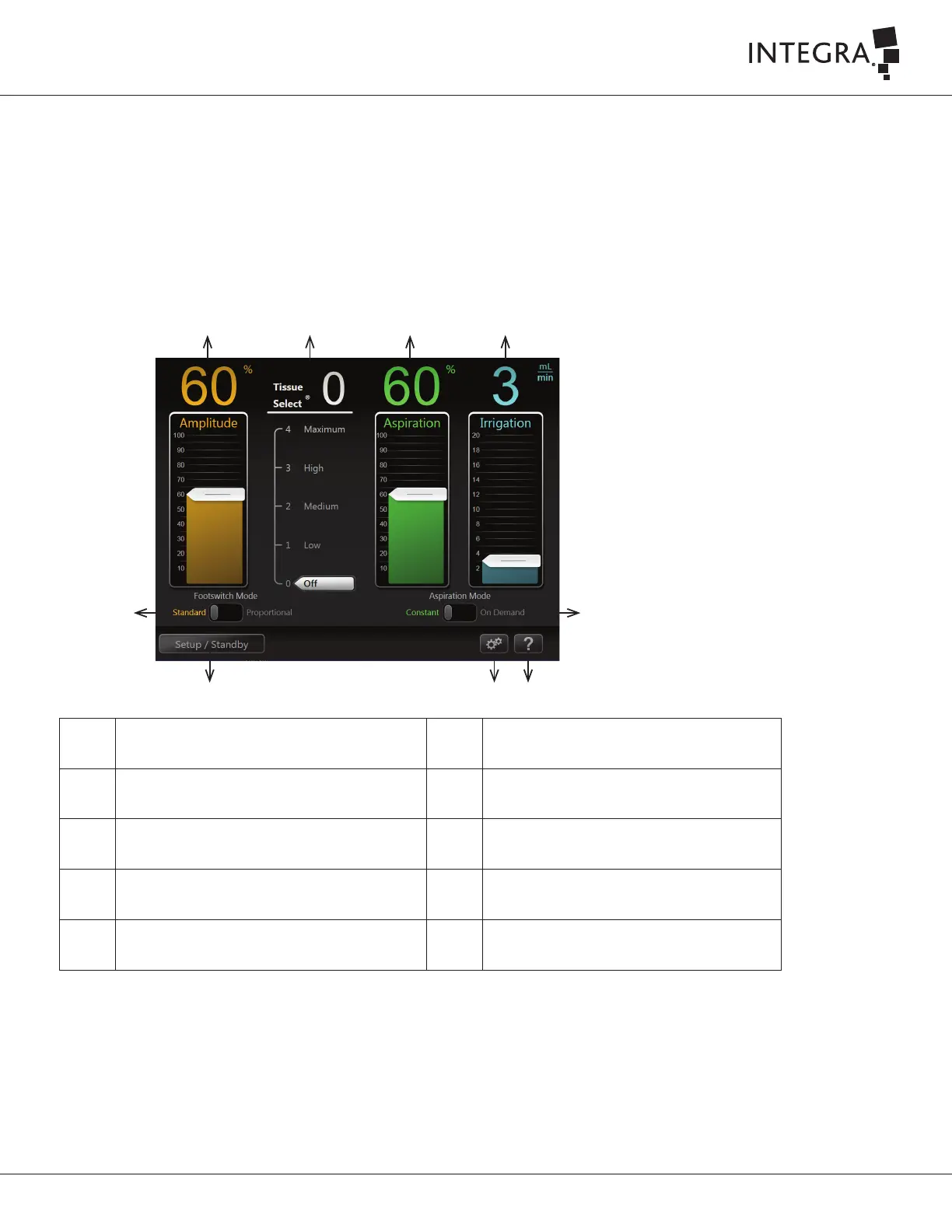
The Main Screen contains ultrasonic control scales for amplitude, Tissue Select® feature, aspiration, and irrigation, slide buons for the footswitch and
aspiration modes, and buons to open the setup tasks, seings, and online Help screens.
➀ ➁ ➂ ➃
➄
➅➆
➇
➈
➀
Amplitude Control Scale
➅
Online Help Buon
➁
Tissue Select Control Scale
➆
Seings Buon
➂
Aspiration Control Scale
➇
Setup / Standby Buon
➃
Irrigation Control Scale
➈
Footswitch Mode Slide Buon
➄
Aspiration Mode Slide Buon



 To Next Page