50
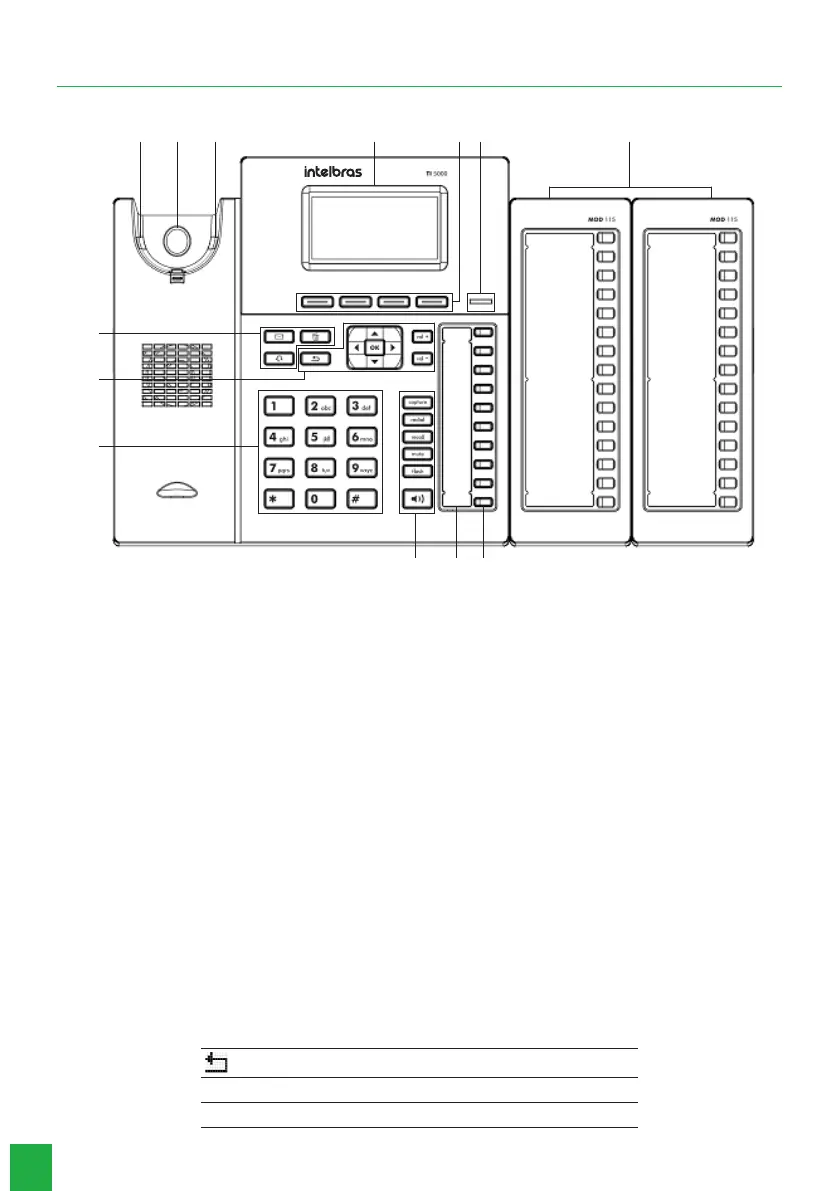
2. Functions
1
5 6 4
10
8
9
7
BA 2 3 11
1. Display.
2. Selection keys: they adapt or change value, depending on which menu the user is in.
3. Light indication: signals that the terminal is receiving a call or that there are new unanswered calls to be viewed.
4. Programmable keys: the function of each key can be dened by the user.
5. Keys with xed functions:
» Capture: press to make a general capture at the PABX, which can be reprogrammed according to the type of capture
you want to make.
» Redial: press to call the last number dialed.
» Recall: press to enable the PABX callback function.
» Mute: press the
Mute
key, during the conversation, to interrupt the audio transmission.
» Flash: during a call, press this key to transfer the call to another person.
» Speakerphone: allows you to make and receive calls through the terminal’s speakerphone.
6. Speakerphone´s Microphone.
7. Alphanumeric keyboard.
8. Fixed function keys:
» Messages: allows the user to directly access the voicemail interface.
» Headset: allows you to make and receive calls through a headset (optional).
» Delete: allows you to delete information from your handset, such as: phone book numbers, call logs, and characters
mistakenly entered during programming.
9. Navigation and volume keys:
Ok Enters the selected option
Returns to the previous screen, exits a programming or a selected option
Moves the cursor to the right
Moves the cursor to the left



 To Next Page