69
After selecting the name in the PABX’s phone book, press the selection key . In this situation, the terminal goes
directly to the option of adding a record to the terminal’s phone book, and the screen with the name that was selected in
the PABX’s phone book search is displayed.
The following procedures are the same as described for the other cases of adding a number to the phone book, with the
selection of ring type, speed dial (shortcut) and exit route. The phone number will already be lled in with the PABX’s
phone book value, and the user can edit it, if necessary.
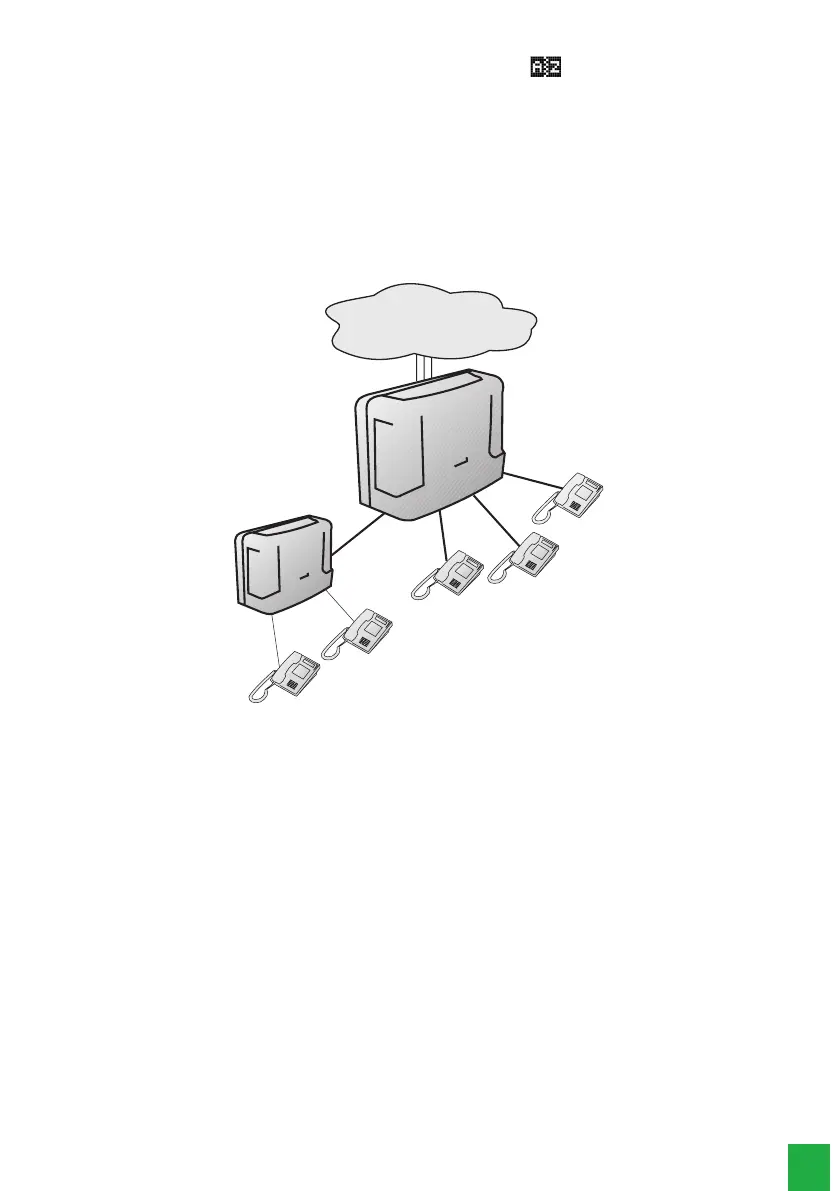
5.10. Operation of the phone book when the PABX is in subsystem
In case the terminal is installed in an extension of a PABX that is a subsystem of another PABX, some observations
regarding the numbers stored in the phone book are necessary.
Public exchange
B1
B2
A1
A2
A3
Operation scenario
Considering the illustration, the procedure to register a number in the phone book of terminal B1 should be:
» To add the extension number of B2 to the phone book, the procedure does not change, that is, just record the number
of B1, without route denition (internal extension).
» To add the extension number of A3 to the phone book, you must dene an access route, because A3 is external to
PABX B.
» To add an external number to the phone book, in addition to establishing the route (from PABX B), the PABX route
number (0, 81, 82, ...) must be added to the phone book before the external number. Pause characters (,) are required
so that the TI waits for the trunk circuit to be taken before continuing dialing.
Example: TI phone book with external interurban number using route “0” of PABX A:
0 _ 0 X X 4 8 3 2 8 1 9 5 0 0
5.11. Calls originated through the phone book
After selecting the desired phone book entry, press the
Dial
selection key to start dialing.
» If the phone book query occurred with the handset on-hook, the terminal activates the speakerphone, if the headset
is connected it will be activated, and will then dial the selected number (displaying the information related to the call),
exiting the query mode of the phone book.
» If the phone book query occurred with the handset off-hook, the terminal will dial the selected number (displaying the
information regarding the call), exiting the phone book query mode. If the extension is unreachable, the terminal resumes
the dial tone before dialing the number.



 To Next Page