51
Moves the cursor up or to the previous screen
Moves the cursor down or to the next screen
Vol +
Vol –
Adjusts the audio volume of the handset, headset, speakerphone, and ringer
10. The hook of the Smart Terminal works through an infrared system that, when suffering an interruption of a light beam
between point A and B, tells the TI 5000 that the handset is on hook. This interruption may occur by placing the handset
on the hook or by placing your index nger on the area marked by a circle.
10. 15-key programmable module (MOD 115).
The programmable keys of this module leave the factory with a differentiated programming for each PABX, that is,
programmed to access an extension line. It is up to the user to congure them according to his needs. Each module comes
with a standard label, where the user can write the function that will be associated with each key. The indicator light of
each key works according to the programmed function.
Note: sold separately.
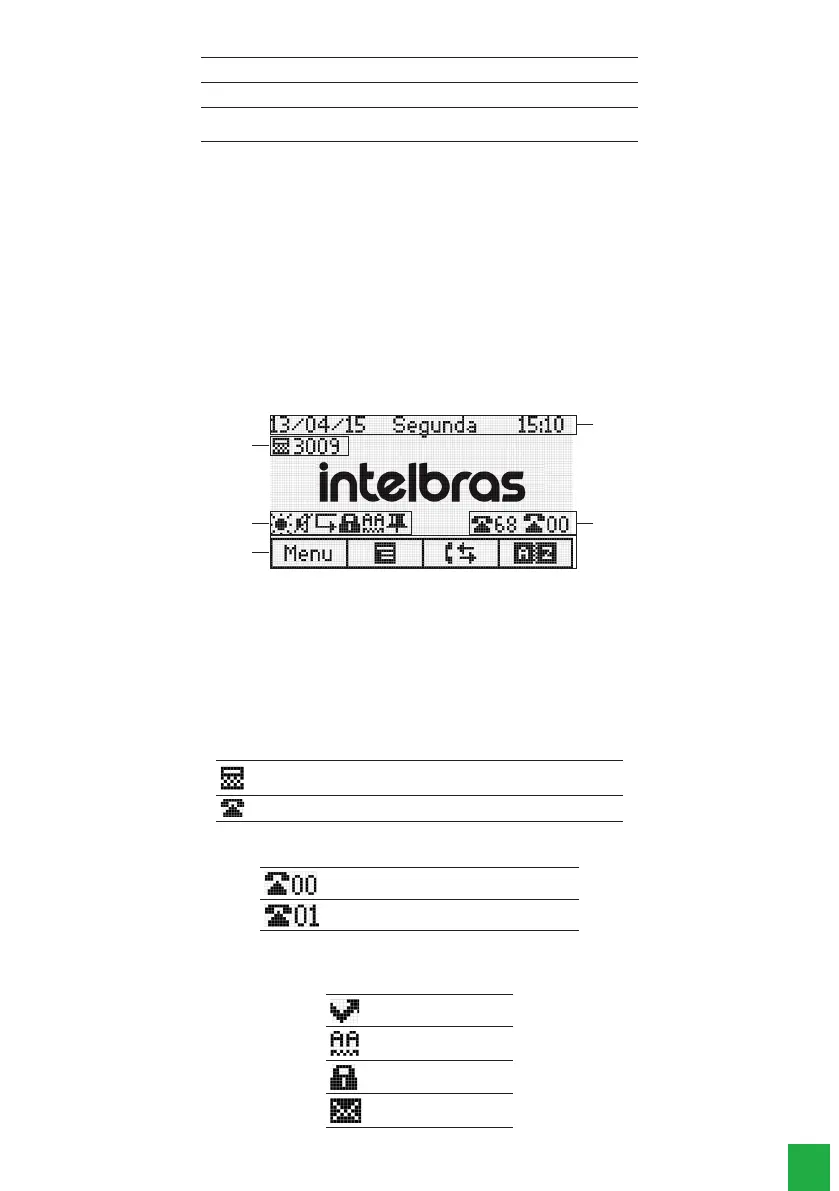
2.1. Display
The TI 5000 has a monochromatic graphic display with 128 × 64 pixel resolution.
1
3
2
4
5
1. Date, day of the week, and time, respectively.
2. Operating mode that the extension is in (operator or common) and the extension number.
3. Number of free and busy external lines.
4. Signaling Icons.
5. Functions related to the terminal’s selection keys.
2.2. Icons
Terminal operation status icons:
Indicates that the terminal is installed in an extension with the operator
function
Indicates that the terminal is installed as a common extension
When the extension is programmed as an operator extension the following icons appear on the screen:
Indicates the number of external busy lines
Indicates the number of free external lines
Function icons
They indicate the currently programmed functions.:
Missed calls
Automatic Attendance
Programmed padlock
Unread Message



 To Next Page