93
12X Speed CD-ROM Drive (CDSK156)
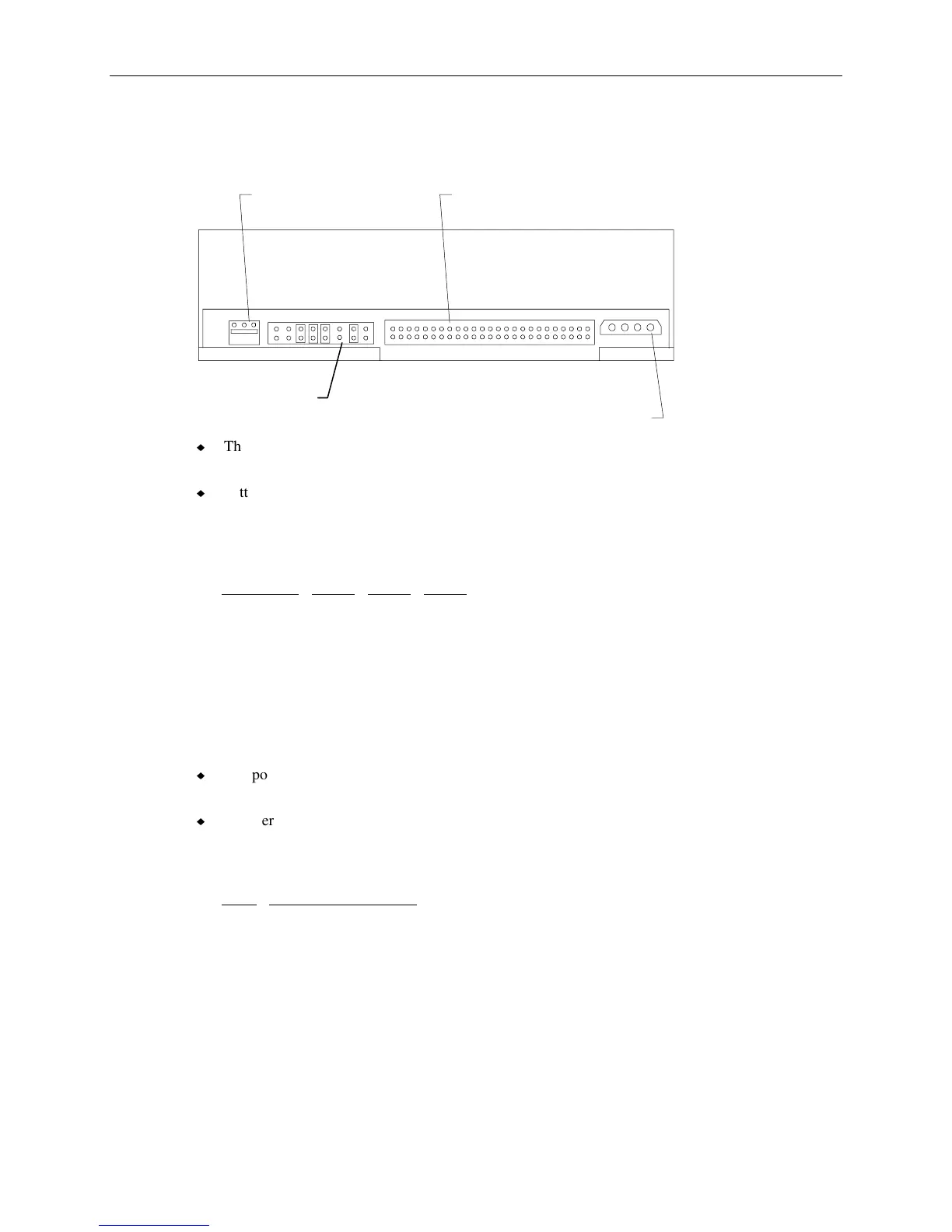
The following figure shows the back of the 12X CD-ROM drive.
Audio Connector
Mode Select
Header
Power
Connector
SCSI Connector
u
The SCSI connector uses MCBL102A and connects to J26 on the I/O expansion board. Refer to
the table “J26, MCBL102A, SCSI” on page 63 for the cable pinout.
u
Settings for mode select header, which sets SCSI ID, termination, parity, and other drive
functionality are printed on the CD-ROM drive. Default SCSI ID for the drive is 4 and
termination is disabled (termination is provided by the SCSI cable). The following table shows the
SCSI ID selection.
SCSI ID
ID1 ID2 ID4
0 Off Off Off
1 On Off Off
2 Off On Off
3 OnOnOff
4 Off Off On
5 On Off On
6 Off On On
u
The power connector uses MCBL085A power supply cable from the power distribution board.
See the table “J8, MCBL085A, SCSI Drive Power” on page 73 the for pinout.
u
InterServe 650, 660 and StudioZ RAX systems do not use an audio cable attached to the CD-ROM
drive. However, the drive’s audio playback can be used if an audio adapter is installed and
connected to the drive. The following table shows the audio connector pinout.
Pin
Signal
1 Ground
2 Right Sound Channel
3 Left Sound Channel



 To Next Page