27
Cable Handlers
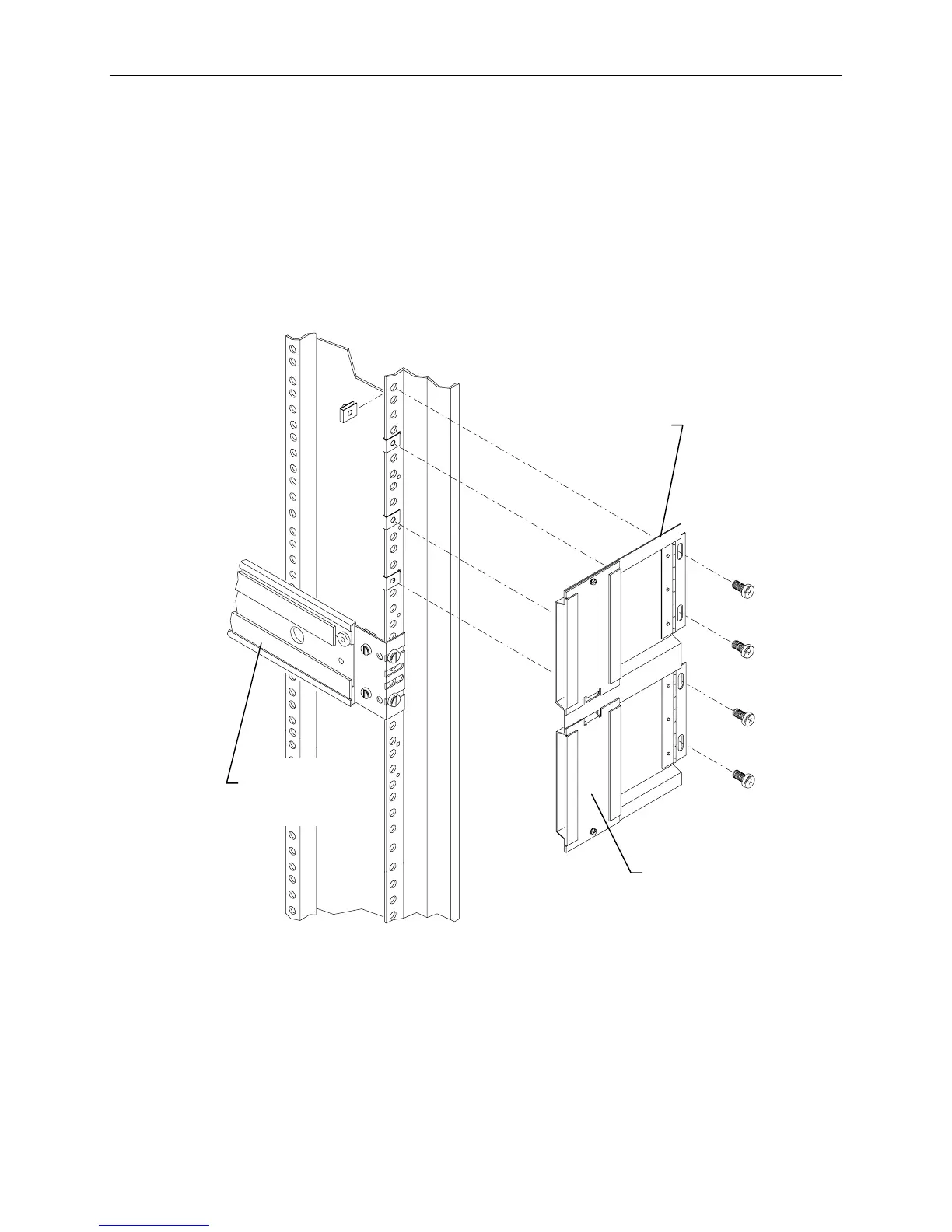
To install cable handlers:
1. Extend the base unit to provide room in the back of the rack for installing the cable handlers.
2. On a rear mounting post, count 5 holes above the top of the base unit rail and attach a tinnerman
nut. Count an additional 4, 5, and 4 holes and attach tinnerman nuts. Repeat this for the other rear
post. Refer to the following figure.
3. Attach the cable handler to the rail using four screws. The part of the cable handler that comes off
(for inserting cables) must face the rack walls. Refer to the following figure.
Cable
Handler
Base Unit
Rail
This side faces
rack wall
NOTE Most cables that attach to the system base unit must be inserted into one of the cable handlers. The
cable handlers allow the base unit to be extended without risk of damaging cables or pulling them out
of other devices. The following figure shows how the cables are inserted.



 To Next Page