Wireless Access Point
User Guide
Configuring AP to synchronizing with internet time
The AP automatically synchronizes its system time with a time server of the internet, which
enables the AP to correct its system time automatically after being connected to the
internet.
For details about how to connect the AP to the internet, refer to Quick setup.
Procedures:
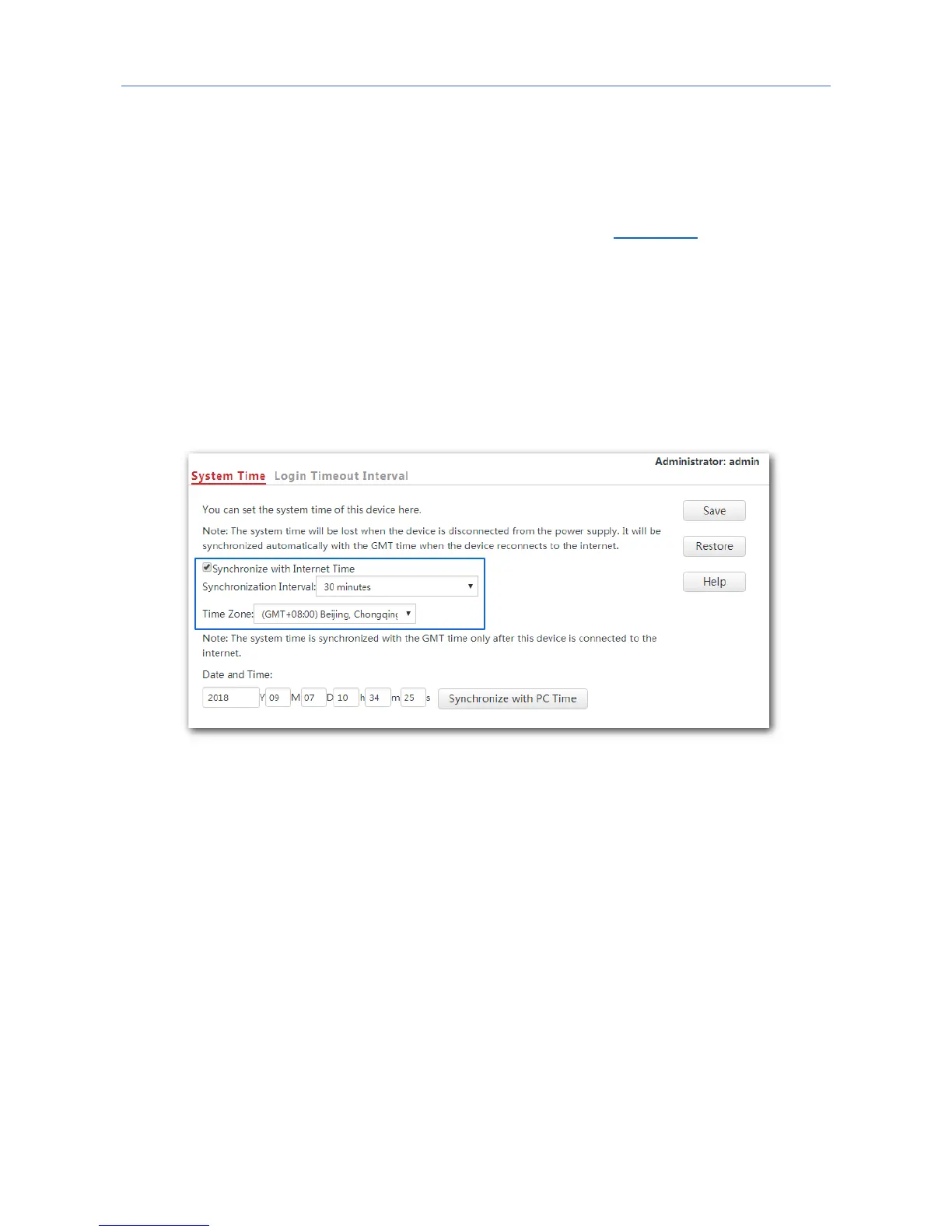
1. Click Tools > Date & Time > System Time.
2. Tick the Synchronize with Internet Time box.
3. Synchronization Interval: Select a desired value from the drop-down-list box. The default
value 30 minutes is recommended.
4. Set Time Zone to the time zone of your location.
5. Click Save.
---End
Configuring date and time manually for AP
Users can manually set the system time for APs. If you choose to set date and time for your
AP manually, you need to set the system time each time after the AP reboots.
Procedures:
1. Click Tools > Date & Time > System Time.
2. Enter a correct date and time, or click Synchronize with PC Time to synchronize the
system time of the AP with the system time of the computer used to manage the AP.
3. Click Save.
98



 To Next Page