Wireless Access Point
User Guide
7.6 Access control
7.6.1 Overview
It specifies that you can allow/disallow wireless devices with specified MAC addresses to
access the AP’s WiFi networks. The AP supports the following MAC address filter modes:
− Disable: It indicates that the access control function is disabled.
− Allow: It indicates that only the wireless devices with the specified MAC addresses
can access the specific WiFi network of AP.
− Disallow: It indicates that only the wireless devices with the specified MAC addresses
cannot access the specific WiFi network of AP.
7.6.2 Configuring access control
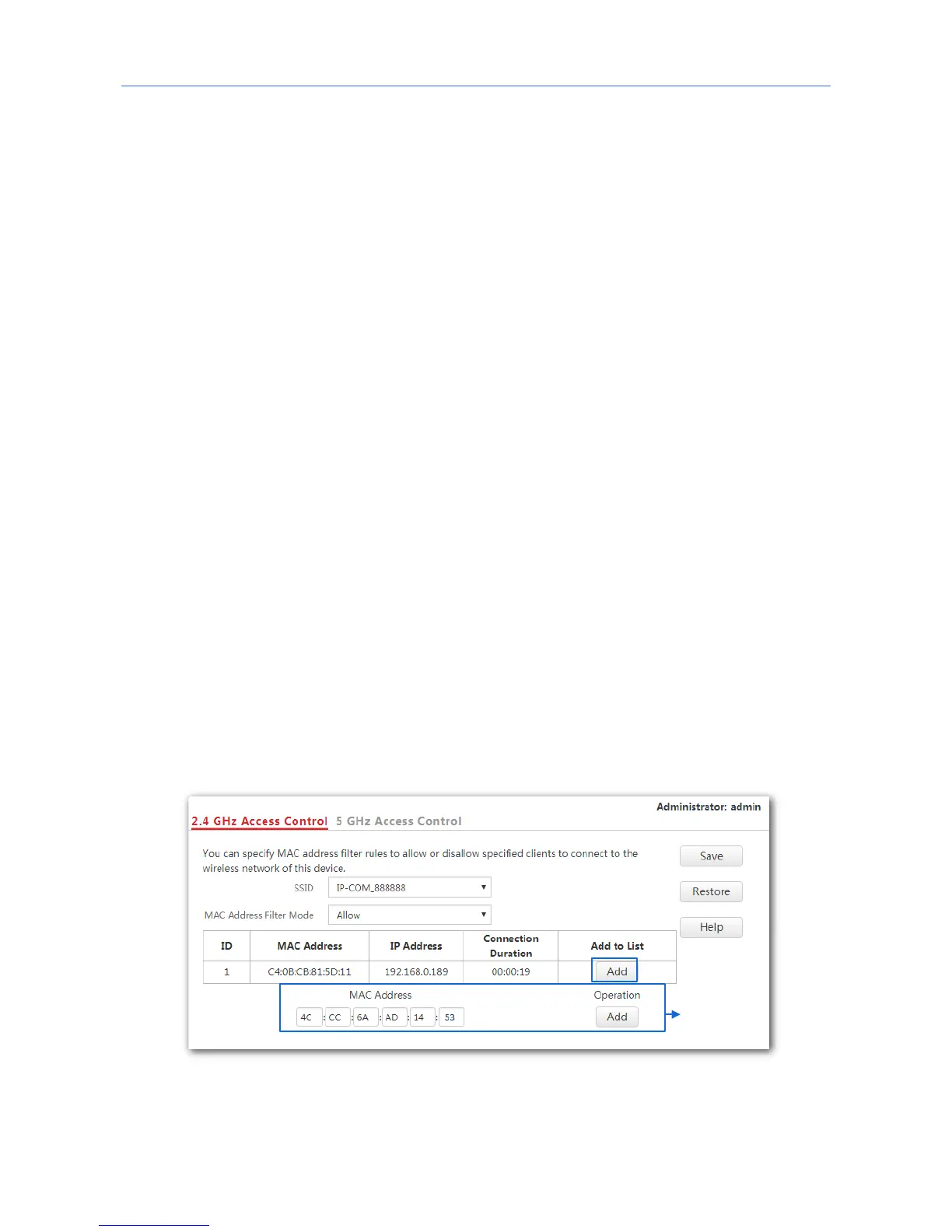
1. Choose Wireless Settings > Access Control.
2. Click a tag page as required, which is 2.4 GHz Access Control in this example.
3. From the SSID drop-down list box, select the SSID on which the address access control
function is implemented.
4. Select an access control mode from the MAC Address Filter Mode drop-down list box.
- If you select Disable, the Access Control function will be disabled.
- If you select Allow or Disallow, enter the MAC addresses you want to control in the
access control list and click Add.
- If you want to control a wireless device that has been connected to the AP, directly
click Add corresponding to the device.
5. Click Save.
---End



 To Next Page