Wireless Access Point
User Guide
5.3 Setting WiFi network in Client+AP mode
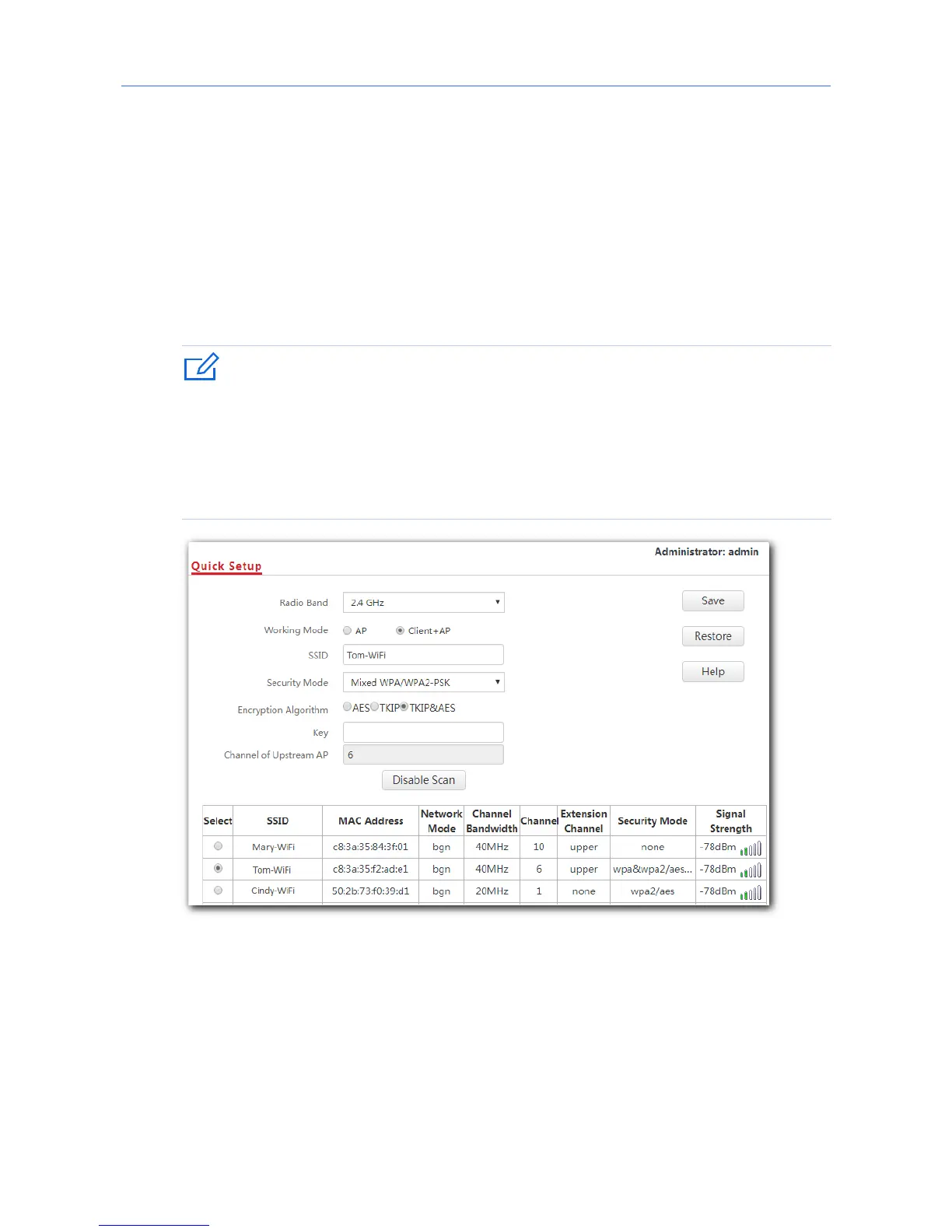
1. Click Quick Setup.
2. Radio Band: Select the radio band according to your requirement, which is 2.4 GHz in this
example.
3. Working Mode: Click Client+AP mode.
4. Click Scan.
5. Select the WiFi network you want to extend from the WiFi network list that appears,
which is Tom-WiFi in this example.
- If no WiFi network is found, click Wireless Settings > Radio Settings to ensure that
Enable Wireless is selected, and try scanning again.
- After a WiFi network is selected, the AP identifies its SSID, security mode, encryption
algorithm, channel of WiFi network and populates them automatically. However,
some other parameters such as Key must be entered yourself.
6. If the WiFi network of the upstream device is encrypted, enter the WiFi password of the
upstream device’s in the Key box. Click Save.
25



 To Next Page