Wireless Access Point
User Guide
7.8 QVLAN settings
7.8.1 Overview
This AP supports the IEEE 802.1q VLAN function and can work with switches supporting that
function to establish multiple VLANs. Devices connecting to VLANs with different VLAN IDs
cannot communicate with each other. By default, the AP’s QVLAN function is disabled.
7.8.2 Configuring the QVLAN settings
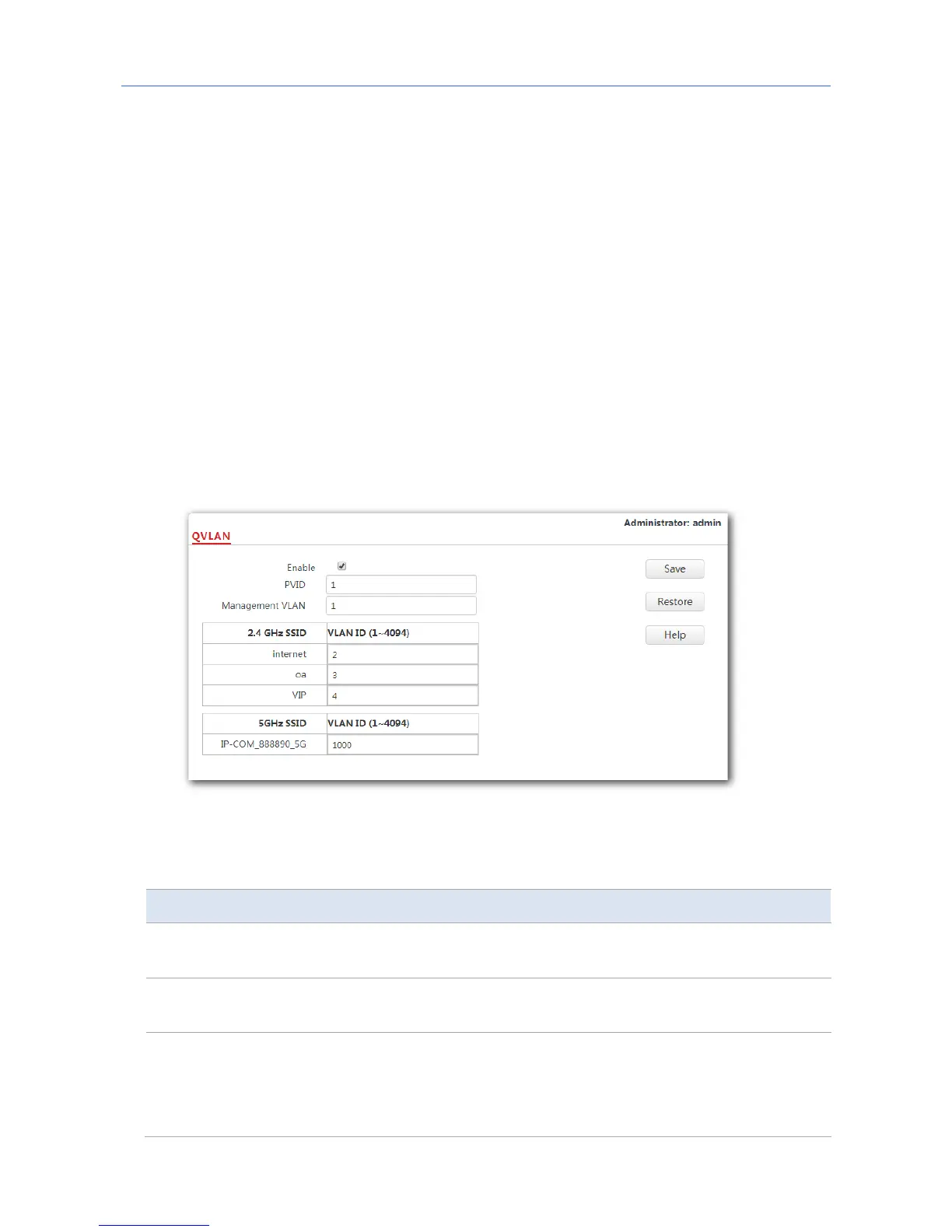
1. Choose Wireless Settings > QVLAN Settings.
2. Set the parameters as required. Generally, you only need to set the Enable, 2.4 GHz SSID
VLAN ID and 5 GHz SSID VLAN ID settings.
3. Click Save.
---End
Parameter description
Parameter Description
Enable
It specifies whether to enable the QVLAN function of the AP. By default,
it is disabled.
PVID
It specifies the ID of the default native VLAN of the trunk port of the AP.
The default value is 1.
Management
VLAN
It specifies the ID of the AP management VLAN. The default value is 1.
After changing the management VLAN, you can manage the AP only after
connecting your computer or AP controller to the new management
VLAN.
81



 To Next Page