Wireless Access Point
User Guide
Air Interface Scheduling
FIFO (First in first out) is used in traditional packet scheduling. In WiFi environment of mixed
rates, high-speed users have stronger transmission capability, higher spectrum efficiency, but
less air interface time, while low-speed users have weaker transmission capability, lower
spectrum efficiency, but more air interface time, which reduces AP's throughput rate and
working efficiency.
Air interface scheduling of this AP distributes downlink transmission time to users fairly,
making users of different speeds get the same downlink transmission time, achieving higher
throughput rate and greater concurrent users for the AP.
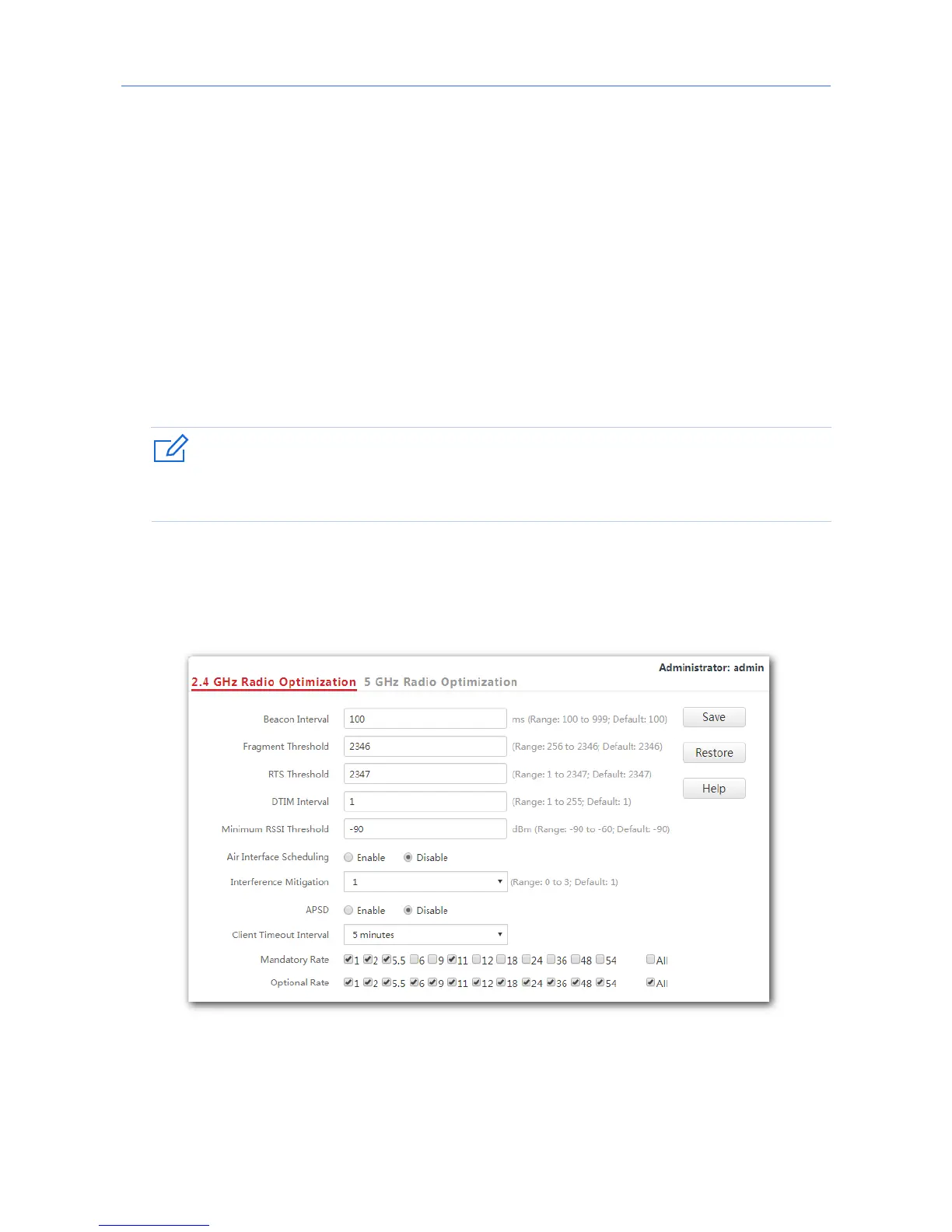
7.3.2 Changing the radio optimization settings
It is recommended to change the settings only under the instruction of professional personnel,
so as to prevent wireless performance from getting worse.
1. Choose Wireless Settings > Radio Optimization.
2. Click a tag page as required, which is 2.4 GHz Radio Optimization in this example.
3. Change the parameter settings as required.
4. Click Save.
---End
68



 To Next Page