Wireless Access Point
User Guide
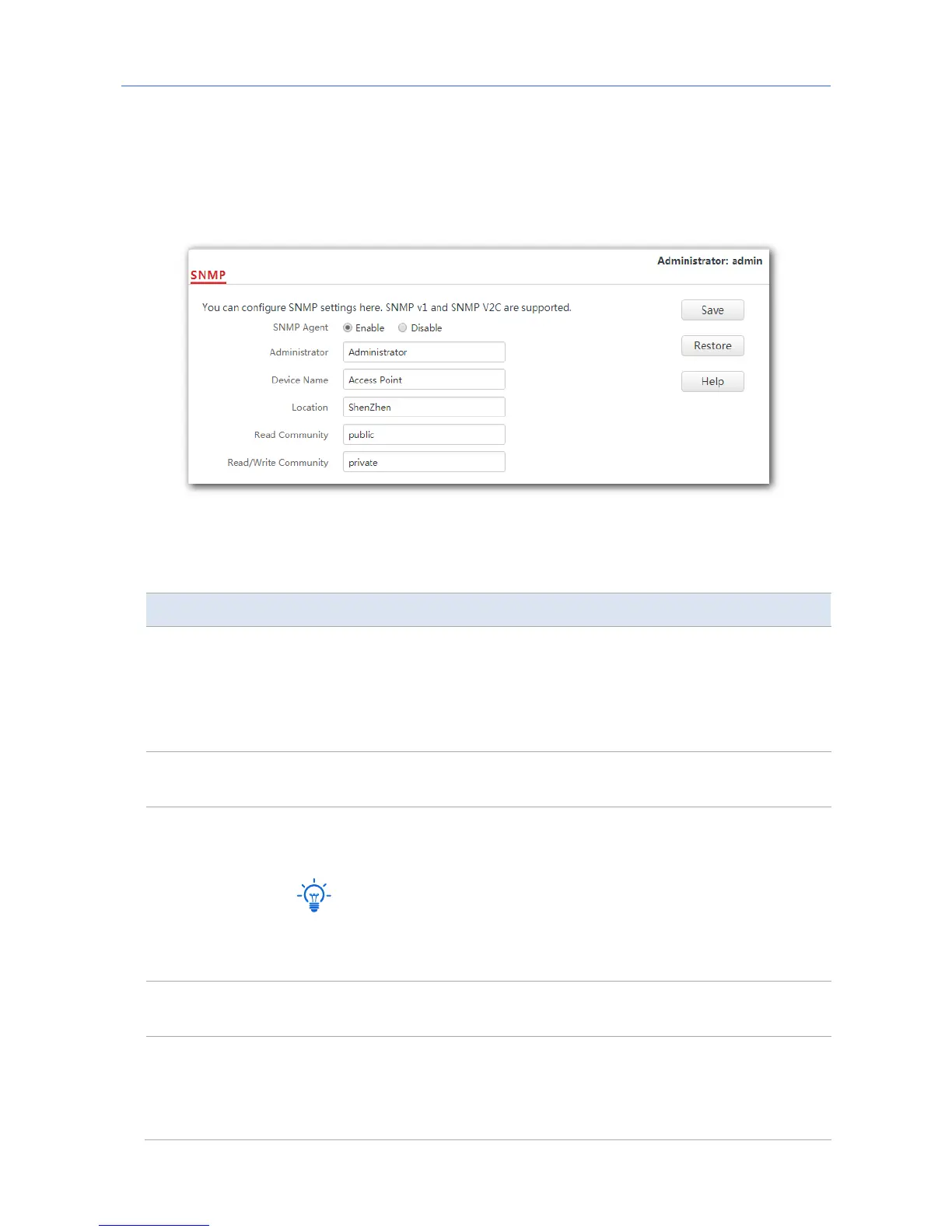
8.2 Configuring the SNMP function
1. Click SNMP and set SNMP Agent to Enable.
2. Set related SNMP parameters.
3. Click Save.
---End
Parameter description
Parameter Description
SNMP Agent
It specifies whether to enable the SNMP agent function of the AP. By
default, it is disabled.
An SNMP manager and the SNMP agent can communicate with each
other only when their SNMP versions are the same. Currently, the SNMP
agent function of the AP supports SNMP V1 and SNMP V2C.
Administrator
It specifies the administrator’s name of the AP. The default name is
Administrator. You can change the administrator’s name if required.
Device Name
It specifies the device name of the AP. By default, the device name is
Access Point. You can change it if required.
You are recommended to change the AP name so that you can
identify your AP easily when managing the AP using SNMP.
Location
It specifies the location where the AP is used. You can change the
location according to your actual situation.
Read Community
It specifies the read password shared between SNMP managers and the
SNMP agent. The default password is public.
The SNMP agent function of the AP allows an SNMP manager to use the
password to read variables in the MIB of the AP.
87



 To Next Page