5 IPEmotion
5.1 PlugIn IPETRONIK-X
5.1.1 Installation
Copy the installation file Setup IPEmotion PlugIN IPETRONIK X.exe to a local subdirectory on your
PC.
In case you do not have this file, at fist visit http://www.ipetronik.com/en/software/plug-ins .
Search the PlugIn IPETRONIK-X and download latest version
Start the file Setup IPEmotion PlugIN IPETRONIK X.exe located on your PC.
Follow the steps provided by the InstallShield Wizard (Confirm the destination folder or define an
individual directory).
5.1.2 Activation
Start IPEmotion.
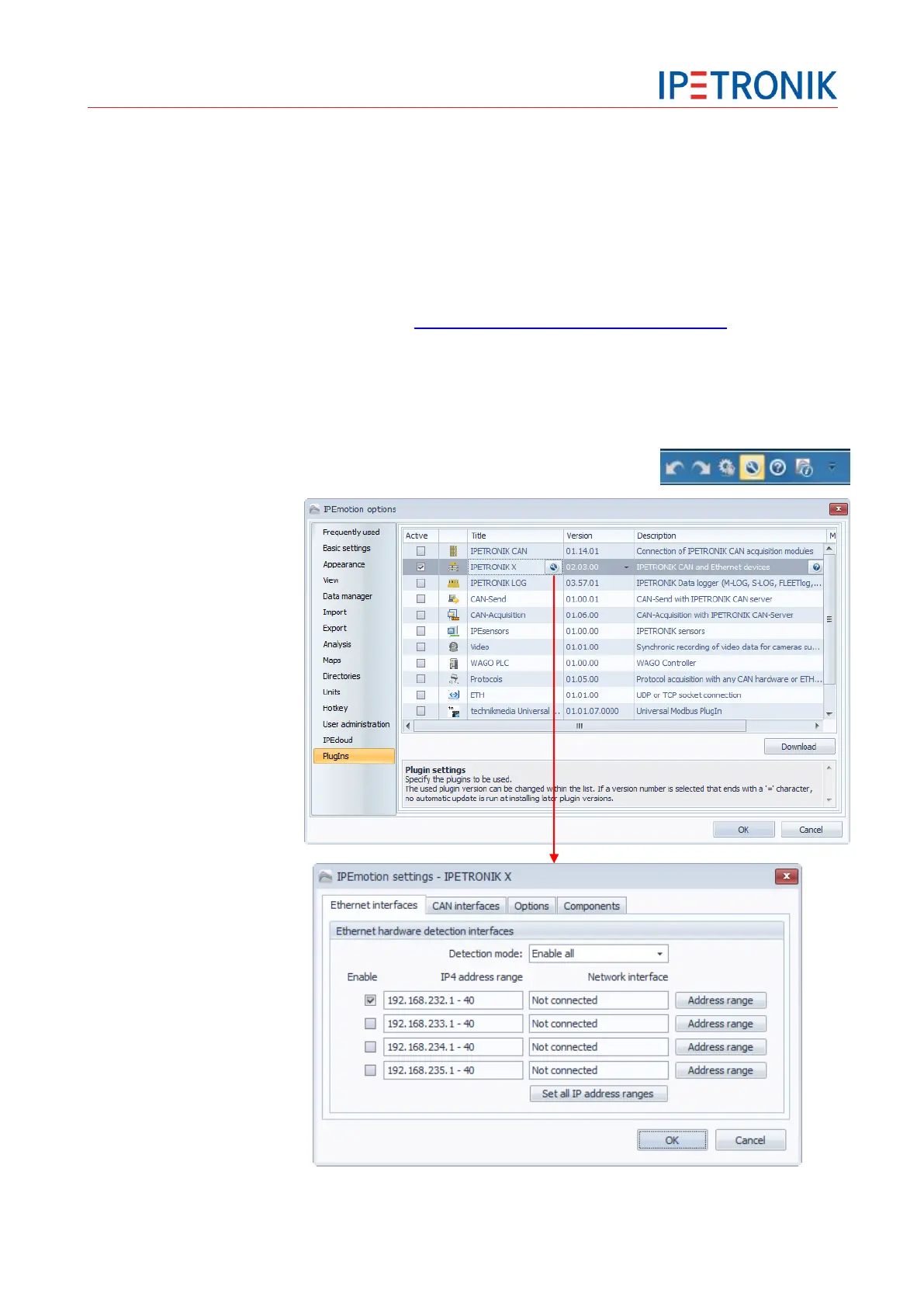
Select Options from the
top icon bar.
Select PlugIns from the
left-hand lower area.
Activate the PlugIn
IPETRONIK-X
Click OK to confirm your
selection.
Open the PlugIn specific
settings by clicking to the
wrench tool symbol if
you need to modify
settings for the ETH or
CAN interface, e.g. to set
the Ethernet IP range.


 To Next Page