Chapter 2 Functions for Each Mode
2.2 PROGRAM Mode
2.2.1 WRAP Tab Added to PLU
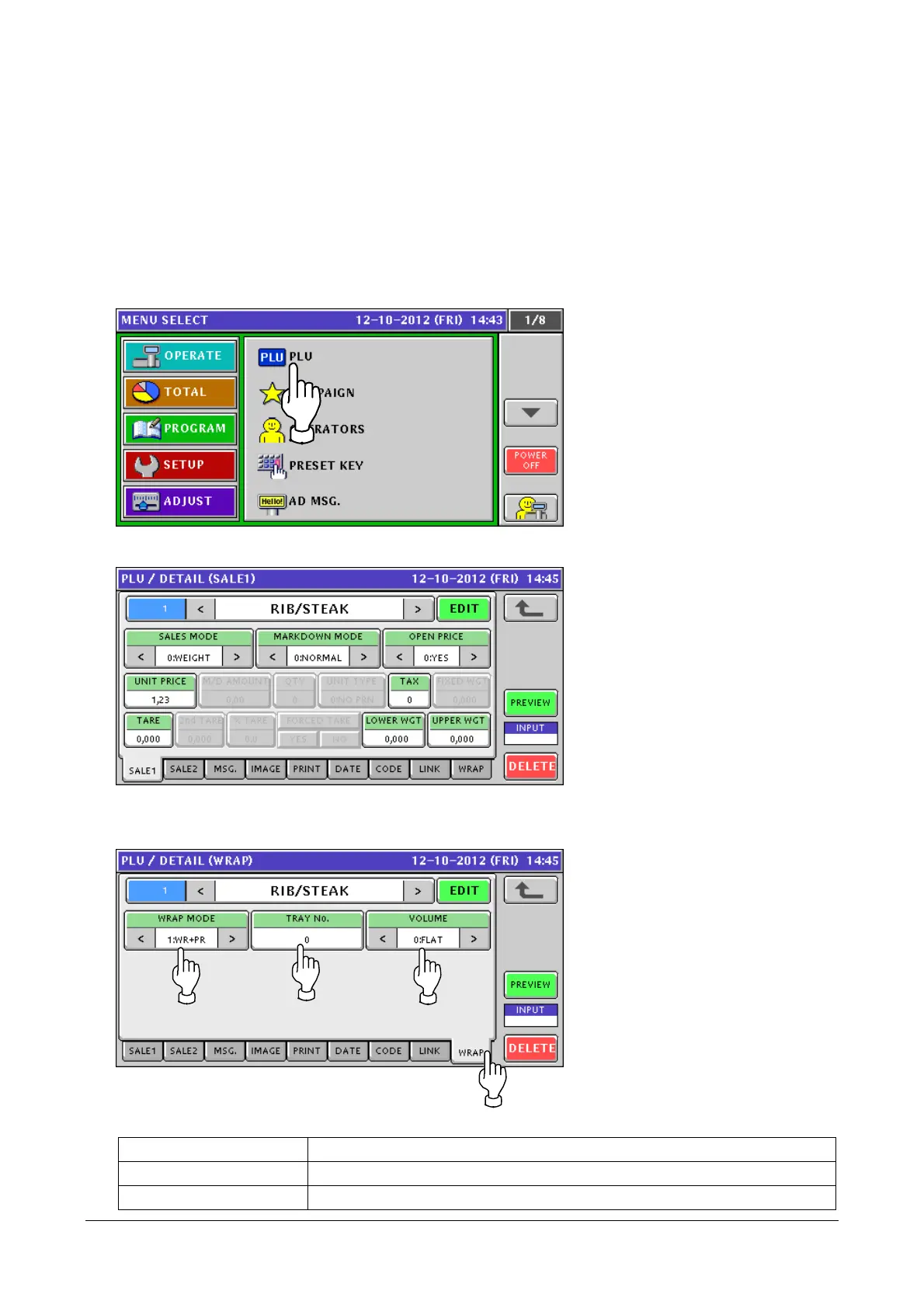
The WRAP tab has been added to PLU. In this screen, you can add [WRAP MODE], [TRAY No], and
[VOLUME] to the product master.
1. Touch [PLU] in the PROGRAM mode screen.
If [PLU] is not displayed, touch ▼ or ▲ button until it appears.
2. The [PLU / DETAIL (SALE1)] screen appears.
3. Touch the [WRAP] tab.
Configure [WRAP MODE], [TRAY No], and [VOLUME].
WRAP MODE Select from [1:WR+PR(initial value)]/[2:PRINT]/[3:WRAP].
TRAY No. Specify a value in a range from 0 to 9999. The initial value is 0.
VOLUME Select from [0:NON (initial value)]/[1:LOW]/[2:MIDDLE]/[3:HIGH].
2-9


 To Next Page
 Loading...