Chapter 2 Functions for Each Mode
2.4.4 WRAPPER Added to Menu
The [WRAPPER] has been added to the ADJUST mode menu. You can configure the wrapper setting
through this function.
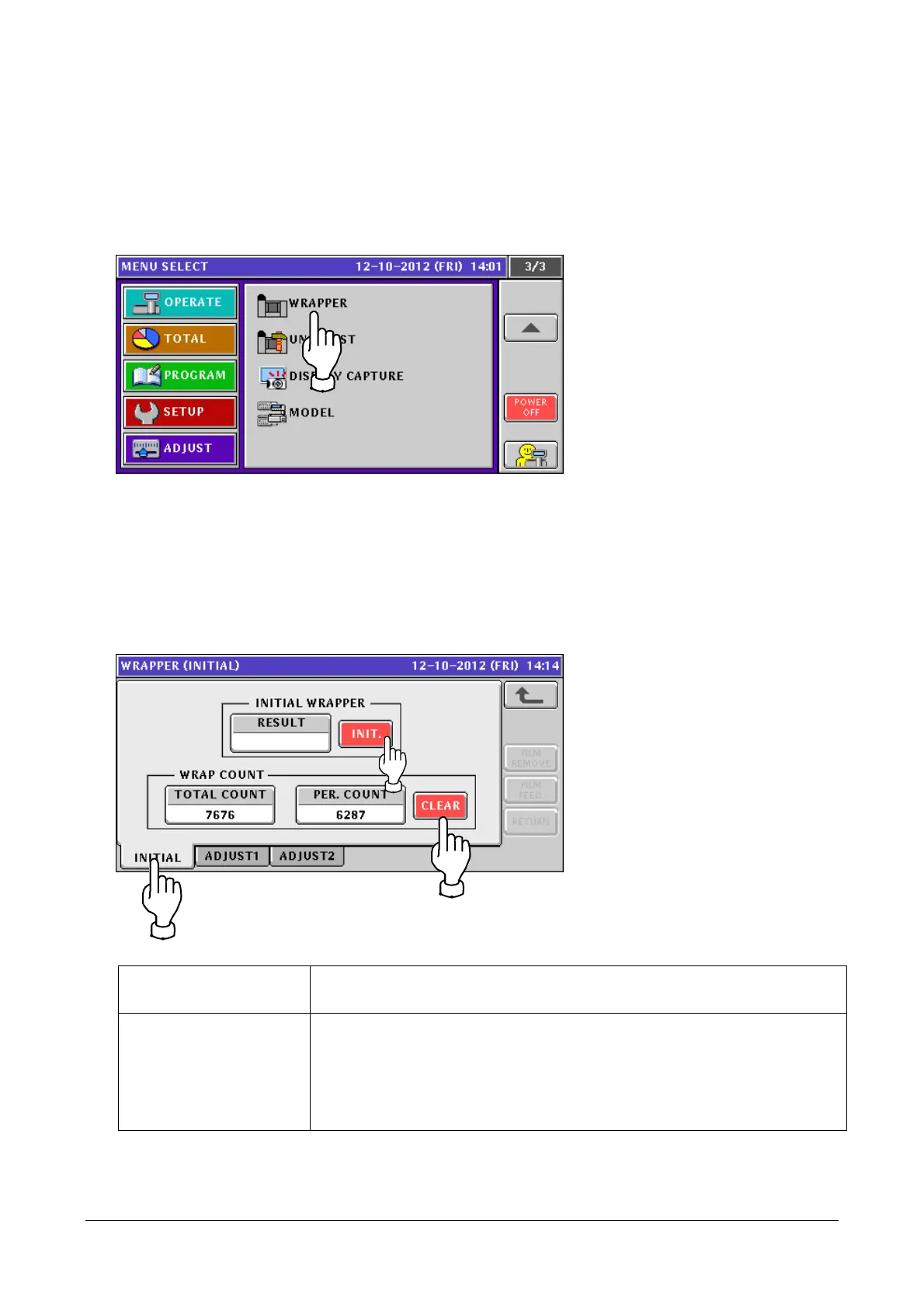
1. Touch [WRAPPER] in the ADJUST mode screen.
If [WRAPPER] is not displayed, touch ▼ or ▲ button until it appears.
2. The [WRAPPER (INITIAL)] screen appears.
You can configure the wrapper setting in each tab.
● To initialize wrapper setting or wrapping count
① Touch the [INITIAL] tab.
② To initialize the wrapper setting, touch the [INIT.] button. To clear the wrapping count, touch the
[CLEAR] button.
INITIAL WRAPPER RESULT: Displays the execution result of the initialization.
INIT. button: Initializes the wrapper setting data.
WRAP COUNT TOTAL COUNT: Displays the accumulated wrapping count.
PER. COUNT: Displays the wrapping count.
CLEAR button: Clears the PER. COUNT wrapping count.
* To clear the TOTAL COUNT wrapping count, enter "495344" and touch
the [CLEAR] button.
2-28


 To Next Page
 Loading...