Chapter 2 Functions for Each Mode
2.3.6 COUNTRY (MISC) Screen Added
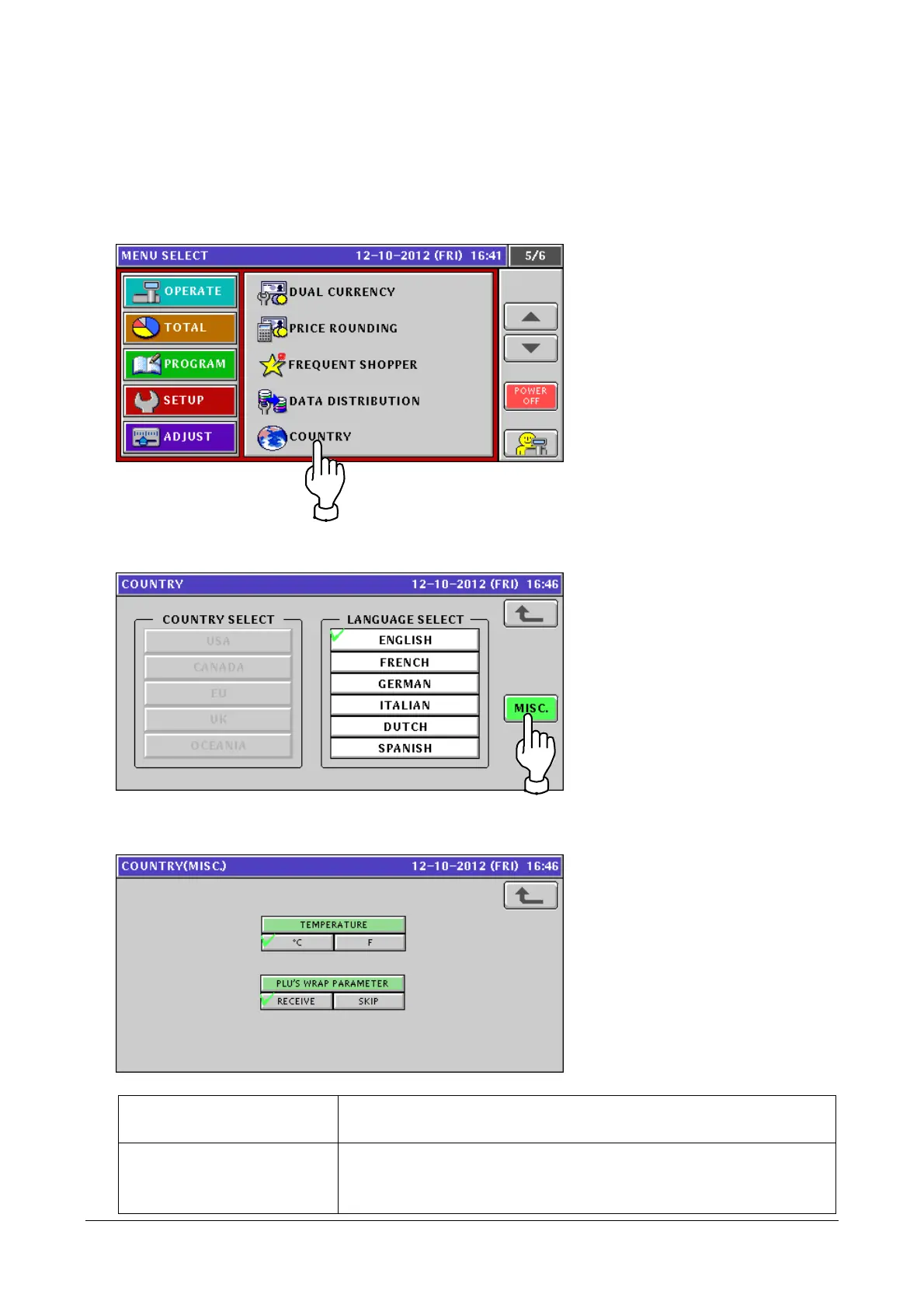
The [COUNTRY(MISC) WRAP] screen has been added to COUNTRY. You can change a temperature unit
and/or configure network connection with the host system.
1. Touch [COUNTRY] in the SETUP mode screen.
If [COUNTRY] is not displayed, touch ▼ or ▲ button until it appears.
2. The [COUNTRY] screen appears.
Touch the [MISC.] button.
3. The [COUNTRY(MISC)] screen appears.
You can change a temperature unit and/or configure network connection.
TEMPERTURE Switches the temperature indication between °C (Celsius) and F
(Fahrenheit).
PLU’S WRAP PARAMETER RECEIVE: When the product master is sent from the host system,
items related to the wrapper (*) are acquired.
* Select this item if the host system supports WM-NANO.
2-21


 To Next Page
 Loading...