Chapter 1 Overview
1.7.5 Cabling between UNI-7 and Wrapper
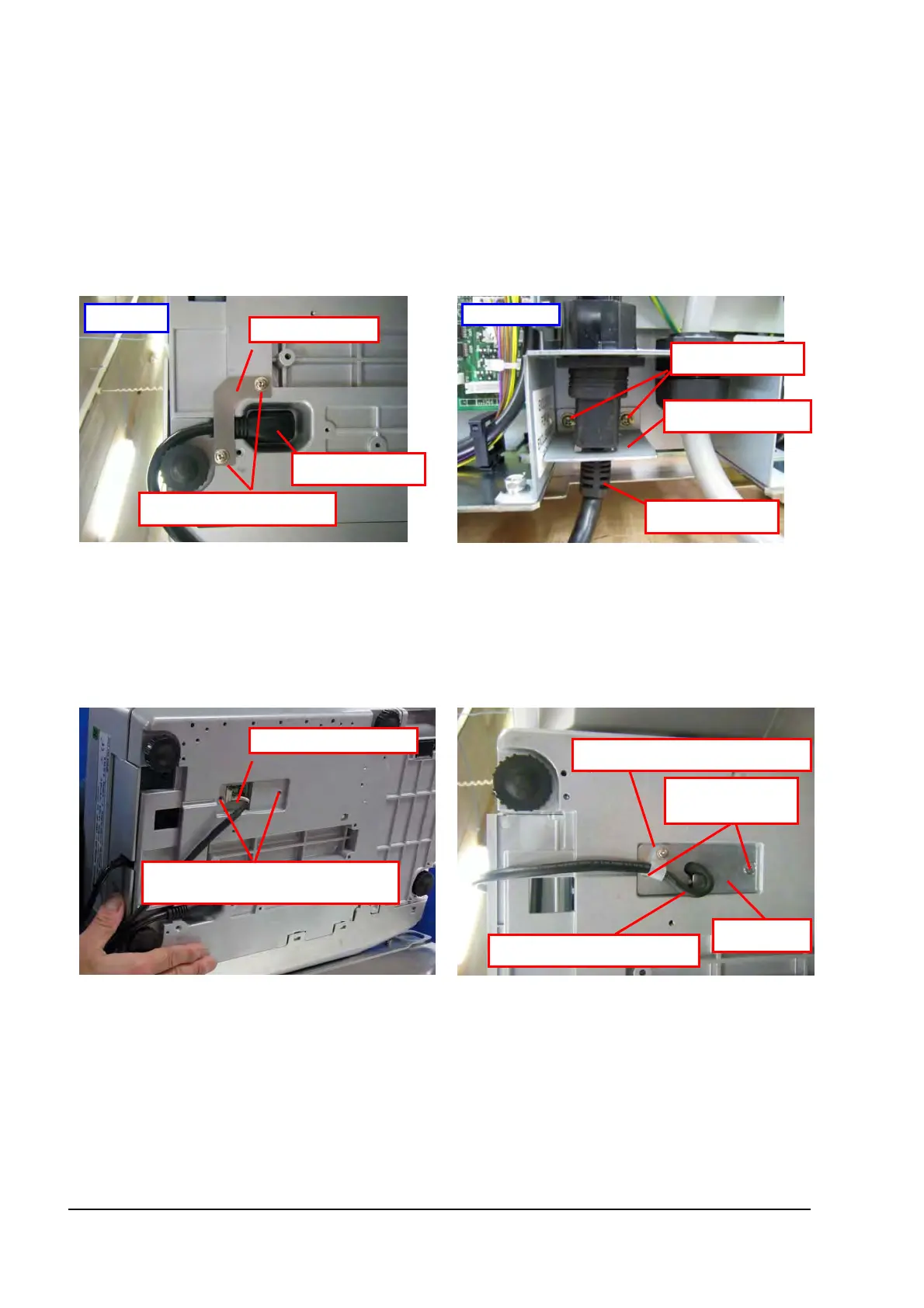
Connect three (3) cables between UNI-7 and the wrapper unit.
●UNI-7 Power Cable
1) Attach the power cable to UNI-7.
To secure the power cable, attach the
L-shaped bracket (accessory of WM-NANO)
with M4 TP screws (accessory of WM-NANO).
2) Connect the power cable to the wrapper unit.
To secure the power cable, use the U-shaped
bracket (accessory of WM-NANO) with M3
SEMS screws (accessory of WM-NANO).
Wrapper end
Power cable
L-shaped bracket
UNI-7 end
M4 TP screws (2)
Power cable
U-shaped bracket
M3 SEMS screws
●Communications Cable for Wrapper
1) Remove the plate and (2) countersunk
screws, and attach the communications cable
to UNI-7.
2) Attach the plate with the (2) countersunk
screws.
Slack off the communications cable and use
with the clamp (with M3 TP screws, accessory
of WM-NANO) to secure the cable on the
plate.
Communications cable
Slack off the power cable
Remove the plate and countersunk
screws
2
.
Countersunk
screws (2)
Plate
Clamp (M3 TP screws)
1-13


 To Next Page
 Loading...