47
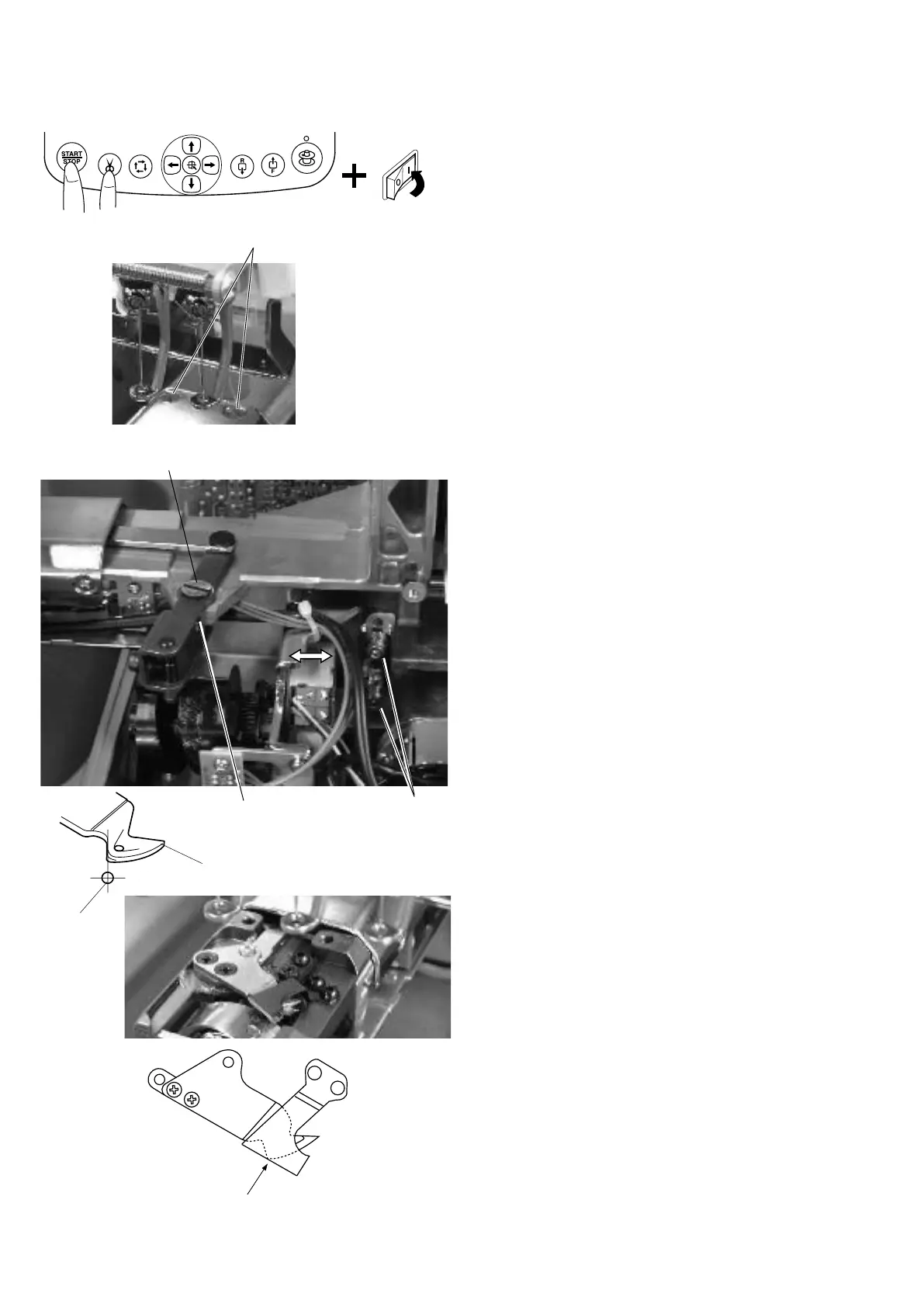
Adjusting the Dynamic Cutter Blade
Pivot pin
Setscrew
Setscrew
Align the point of the dynamic cutter blade with
the edge of the static cutter blade.
1. Remove the spool stand, head set right cover and
left cover (see pages 4 to 6).
2. Remove the setscrews A (2 pcs.) and needle plate.
3. Turn the power switch on while pressing the Start/
Stop button and Thread cutter button at the same time
to open the
Factory Adjusting
window.
Press the
Cut Adjust
key to open the
Cut Motor
adjusting window.
Press
Init
key to move the dynamic cutter blade
forward.
4. Loosen the setscrew and turn the pivot pin to adjust
the position of the dynamic cutter blade so the front tip
of the dynamic cutter blade is in line with the center of
the needle drop position.
NOTE:
If an adjustable allowance is not enough, loosen the set-
screws (2 pcs.) and move the thread cutter drive unit in the
direction of the arrow.
5. Test auto thread cutting with polyester threads size
#120 both in the needle and bobbin.
6. Attach the needle plate with the setscrews A (2pcs.).
7. Attach the parts removed in step 1.
Dynamic cutter blade
Needle
Setscrew A


 To Next Page