SECTION 3 - MACHINE CONTROLS, INDICATORS, AND MACHINE OPERATION
3-24 31217162
NOTE: When navigating the submenus of the display screen, pressing
the joystick trigger will return the view to the operating screen.
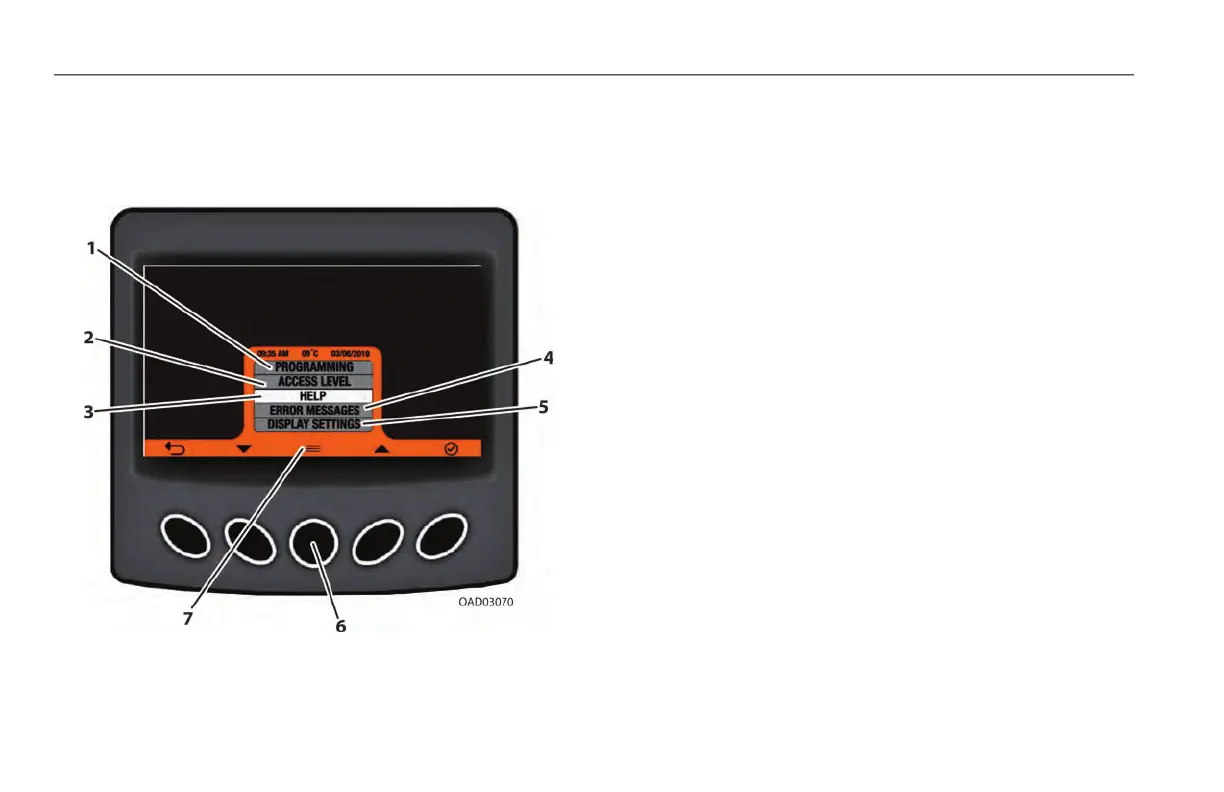
Submenus
1. Programming: Provides the interface for updating software.
A service level access code is needed. Refer to Service and
Maintenance manual for further information.
2. Access Level: Allows for elevated levels of machine access
when a certain code is entered. The machine’s default is
Level 2 - Operator Access (no code necessary).
3. Help: Provides screens that describe the user interface of the
display.
4. Error Messages: Shows the last 25 DTCs logged by the
machine’s control system. Active DTCs will appear with an
asterisk (*) beside the code.
5. Display Settings: Allows operators to adjust display fea-
tures (brightness, contrast, time, date, units, etc.)
6. Menu Select: Press to display submenu screen.
7. Help Menu Select: Press and hold for quick access to Help
(3) screens.



 To Next Page