11
2 Instrument description
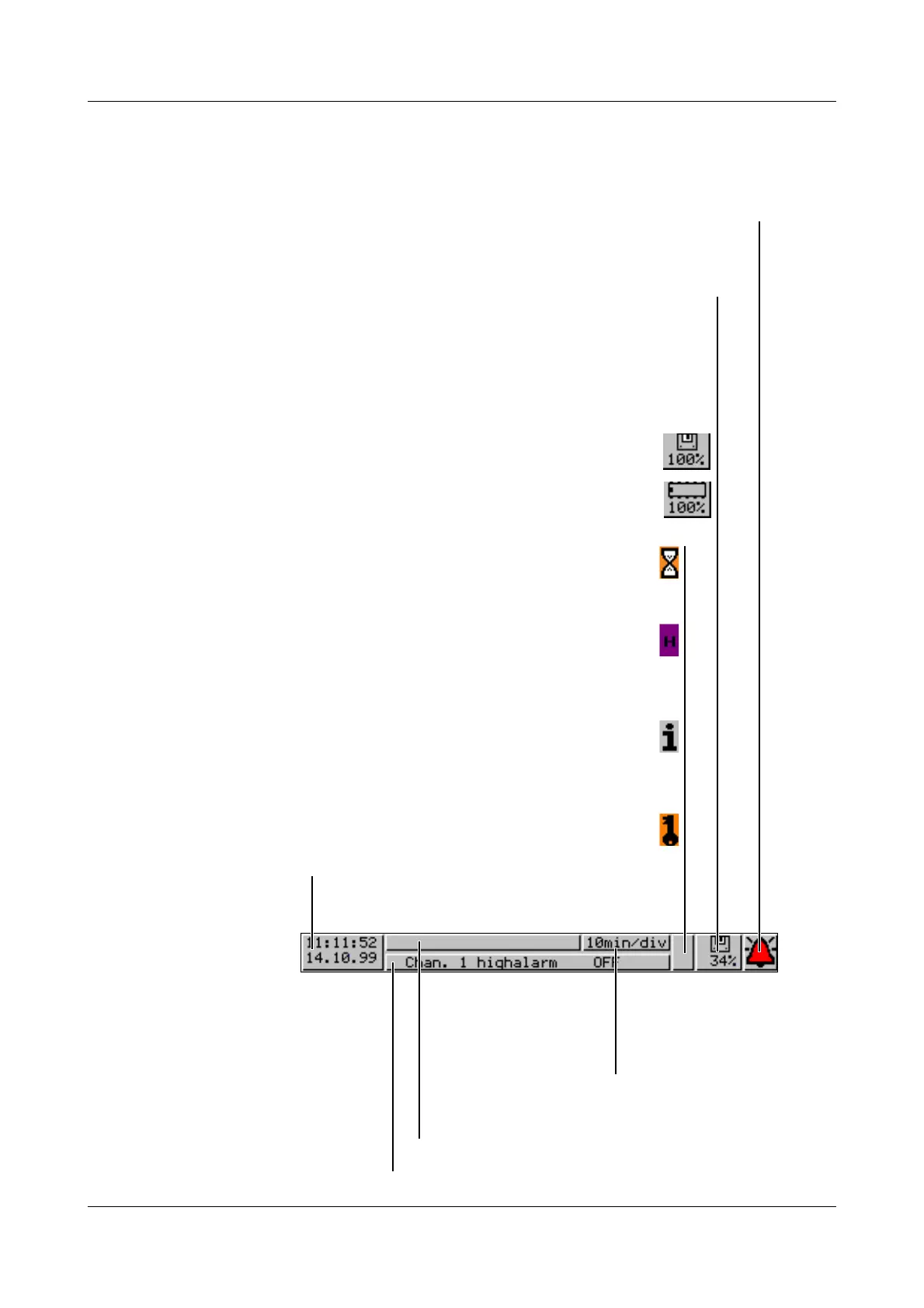
Status line The status line is shown in the upper part of the display. It provides information
on important actions and states.
The status line is always visible, irrespective of the level (operation, parame-
ters, configuration).
Time & Date
shows the actual time and
date
The egg timer appears whenever the instrument is busy and
can therefore not be operated.
The “H” informs you that the indicated measurements are
derived from the past (history). The data saved in the
FLASH memory are shown.
In the event of an error, an “i” flashes here.
The cause of the error can be read out from the instrument
info window (v Chapter 3.7 “Instrument info”).
If the keys are inhibited, a key flashes in this position
Alarm
If an alarm has occured (e. g. out-of-limit),
the (alarm) bell flashes in this field
shows last entry in event list
Instrument name (16 characters max.)
Current diagram speed
Background color:
gray = normal operation,
blue = timed operation,
orange = event operation
Diskette / internal memory
Indicates the free storage capacity of the diskette or the internal
memory in percent. If there is a diskette error, the diskette symbol
flashes. The error message can be checked in the disk manager.
In the event of a “memory alarm”, the field is shown
with a yellow background.
vChapter 3.6 “Disk manager”
Storage capacity of diskette
available internal memory



 To Next Page