English
|
43
HD Radio control features
About HD Radio
• When you connect an HD Radio, Tuner features
of the unit are disabled and changed to HD Radio
tuner features. A portion of the setting methods
including the Tuning Mode will change.
• With the HD Radio tuner, you can use the similar
functions to <Station Preset Memory>, <Auto
Memory Entry>, and <Preset Tuning> of Tuner
features. Refer to Tuner features for how to use
the functions.
Tuning
Selecting the station.
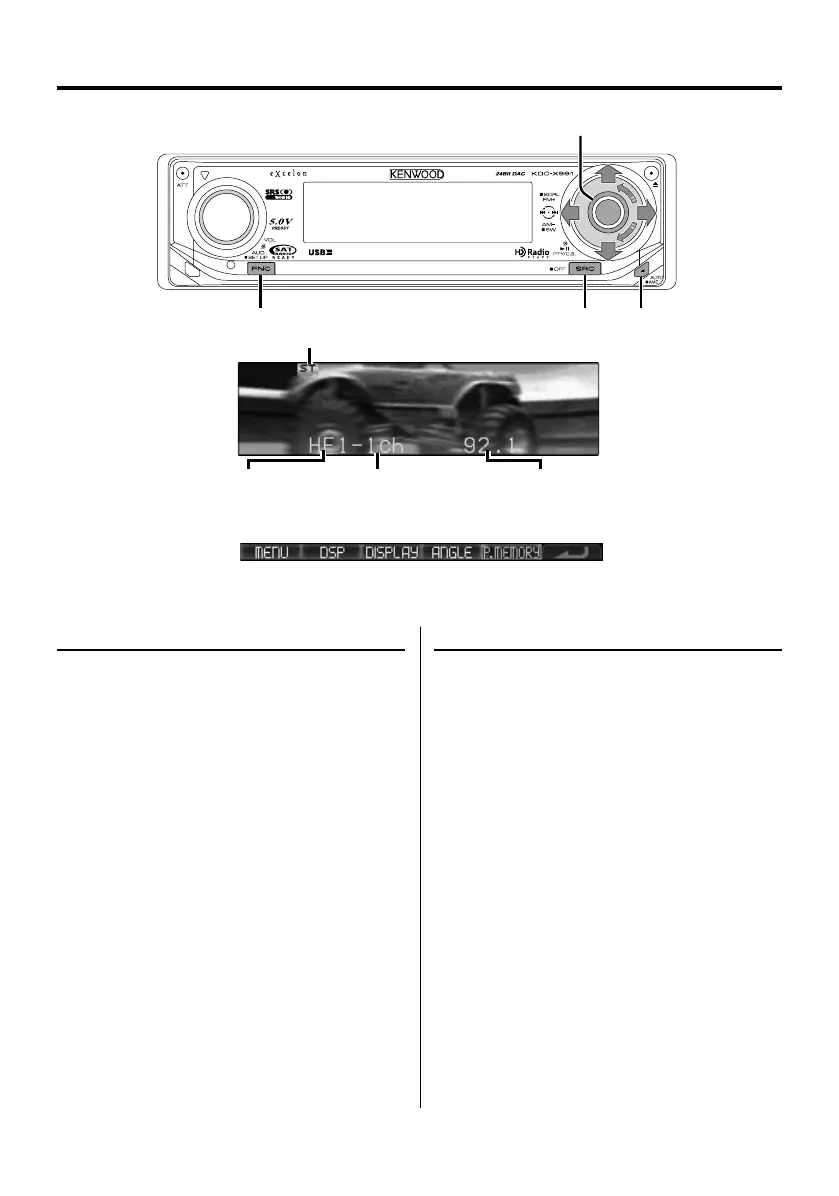
1 Select HD Radio source
Press the [SRC] button.
Select the "HD Radio" display.
2 Select the HD FM band
Push the Control knob toward [FM].
Each time you push the knob to [FM], the band
alternates between the HF1, HF2, and HF3 bands.
Select the HD AM band
Push the Control knob toward [AM].
3 Tune up or down band
Push the Control knob towards [4] or [¢].
FM
AM
D
FNC SRC AUTO/AME
Control knob
Function icon
ST indicator
Band display Preset station number Frequency display
B64-3767-0000KEnglish.indd43B64-3767-0000KEnglish.indd43 07.5.102:16:01PM07.5.102:16:01PM



 To Next Page
 Loading...