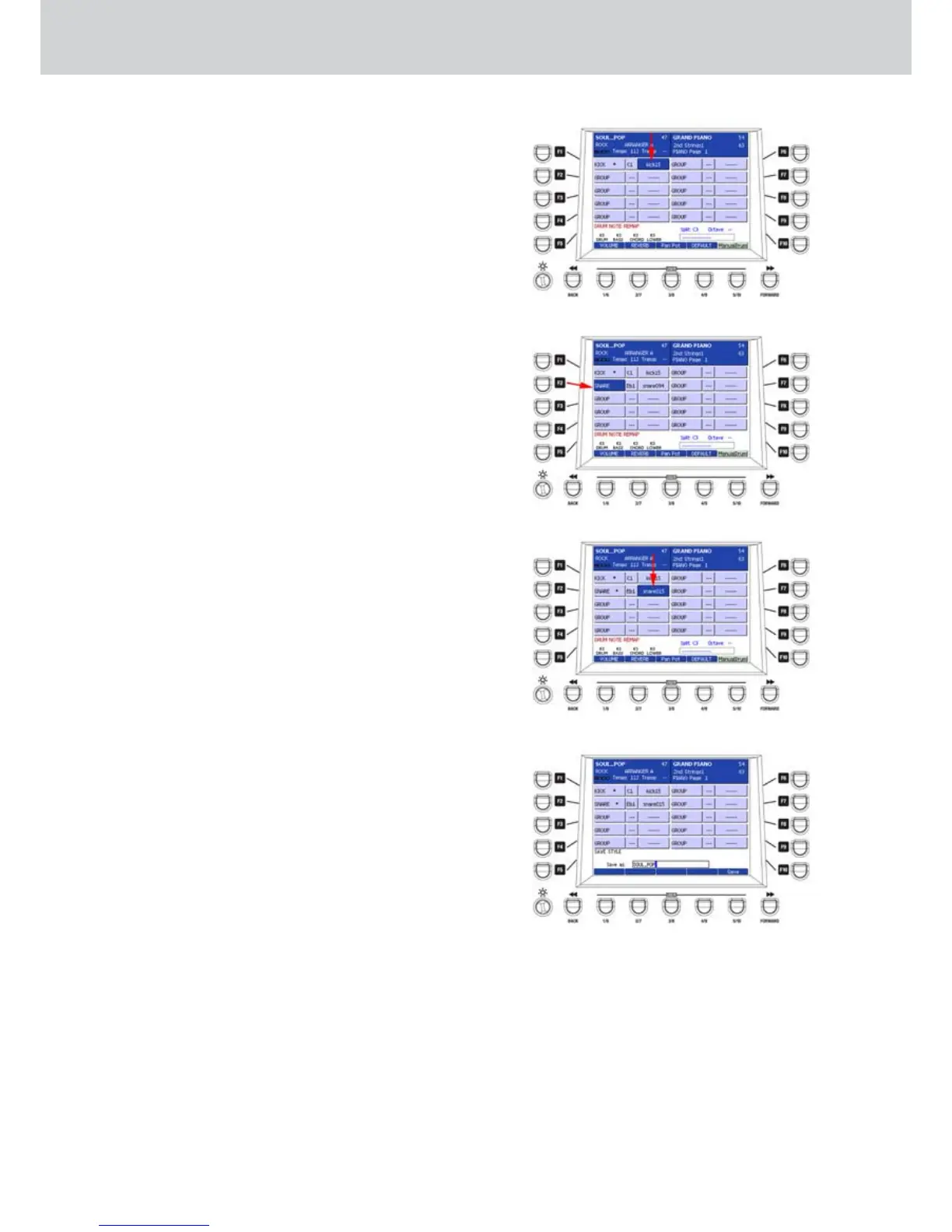
7. By using the DATA/VALUE wheel select “kick15”.
Next to the name of the slot an asterisk (*) will
appear. In our example you will hear the kick
playing an electronic sound (Figure 181).
8. Press F1 once more to move on the selection of
the family of the Drum part, so you can navigate
between different families.
9. Press F1 once more to deselect.
10. Repeat the same procedure for the snare (see
below).
Snare remapping
Press F2 and the Eb1 key on the keyboard (1. Figure
182).
Select “snare015” by using the DATA/VALUE 2.
wheel (Figure 183).
Press F2 twice to deselect.3.
Press F3 to select a new Drum Remap bank.4.
Press the D1 note and select “snare014” by using 5.
the DATA/VALUE wheel.
Press F3 twice to deselect.6.
Hi-Hat remapping
Same procedure for the Hi-Hat. Press F4 and the 1.
F#1 key on the keyboard.
Select “stick09” by using the DATA/VALUE wheel.2.
Storing the Drum Remap
At this point, the style is modified. You can go 1.
on by using the same procedure to remap all the
drum sounds as you like.
Once you are satisfied, press the SAVE button on
2.
the front panel, give a new name to the User style
and press the USER 5 button (SAVE) to store the
changes (Figure 184).
Figure 181
Figure 182
Figure 183
Figure 184
Drum Mixer



 To Next Page