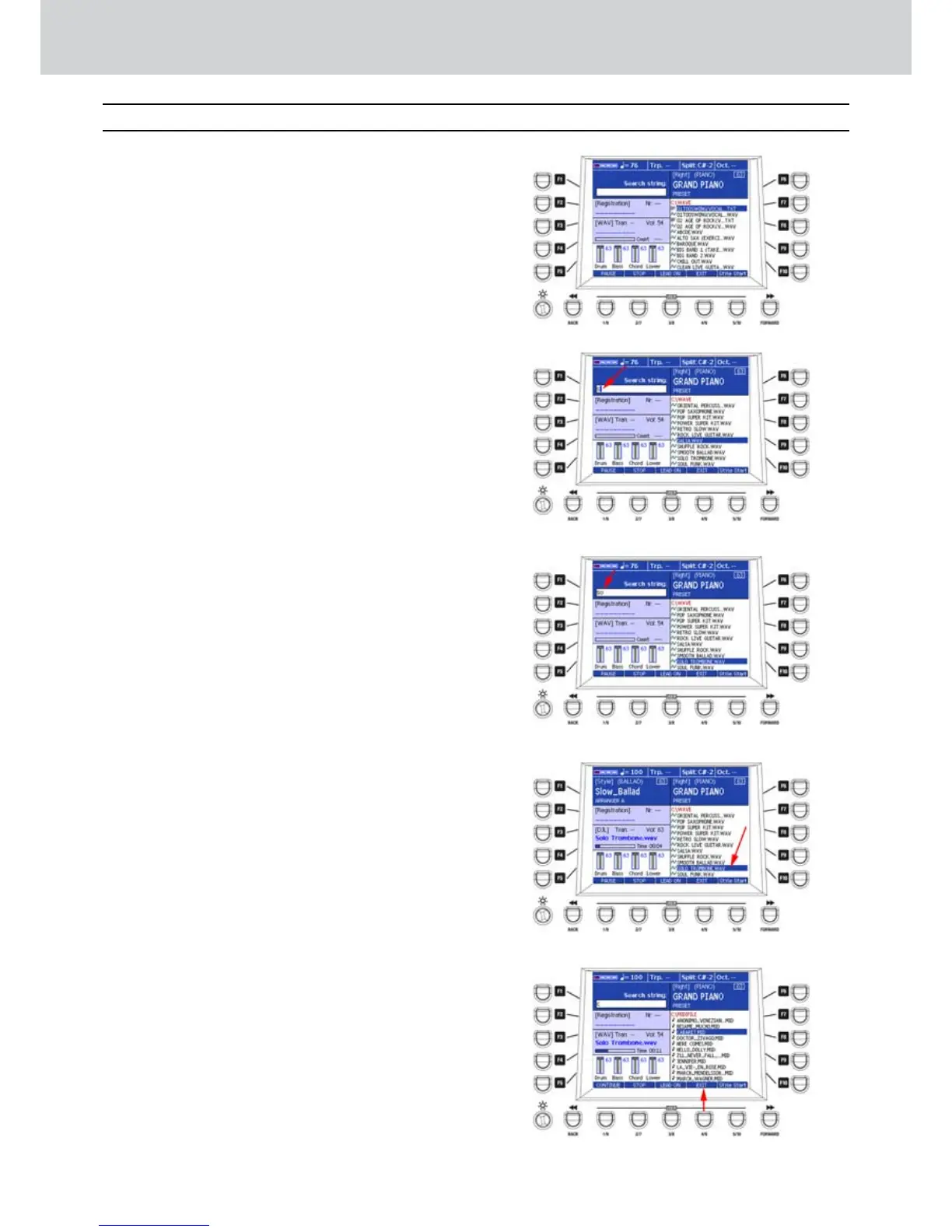
Audya features a useful SEARCH function in
order to search files stored in the internal disk
or in external USB devices. When is the MAIN
VIEW is active, the search engine looks different
from the normal view.
Searching a file in the MAIN VIEW window
▀
Press the SEARCH button.1.
The last open directory of the disc will appear 2.
(Figure 323).
Use the CURSOR3.
§ ¶
buttons
or the DATA/
VALUE wheel and the ENTER button to search a
folder.
Digit the name of a file, even partially, inputting 4.
letters and numbers from the keyboard.
In 5. Figure 324, only the character “S” is inputted,
the engine locates the first entry of the file
name starting with an “S”. The found file will be
highlighted.
In 6. Figure 325, by entering the second character
the engine locates more precisely what you are
looking for.
Repeat inputting characters as you like.7.
When the file you are looking for it’s found, you 8.
can press the ENTER button to start the file. In
Figure 326 is “SOLO TROMBONE.WAV”.
By pressing the EXIT button on the front panel 9.
you can change the search folder on the disc.
By pressing the USER 5 button (EXIT) as shown 10.
by the arrow on Figure 327, you can exit the
search function and return to the ordinary MAIN
VIEW window.
Figure 323
Figure 324
Figure 325
Figure 326
Figure 327
Search (Main View)
Search



 To Next Page