A Registration stores a complete configuration
of the panel. Audya lets you to save two types of
Registrations, SINGLE and BLOCK. By using the
REGISTRATION button on the front panel you
can enter the Registration functions.
Creating a SINGLE REGISTRATION
▀
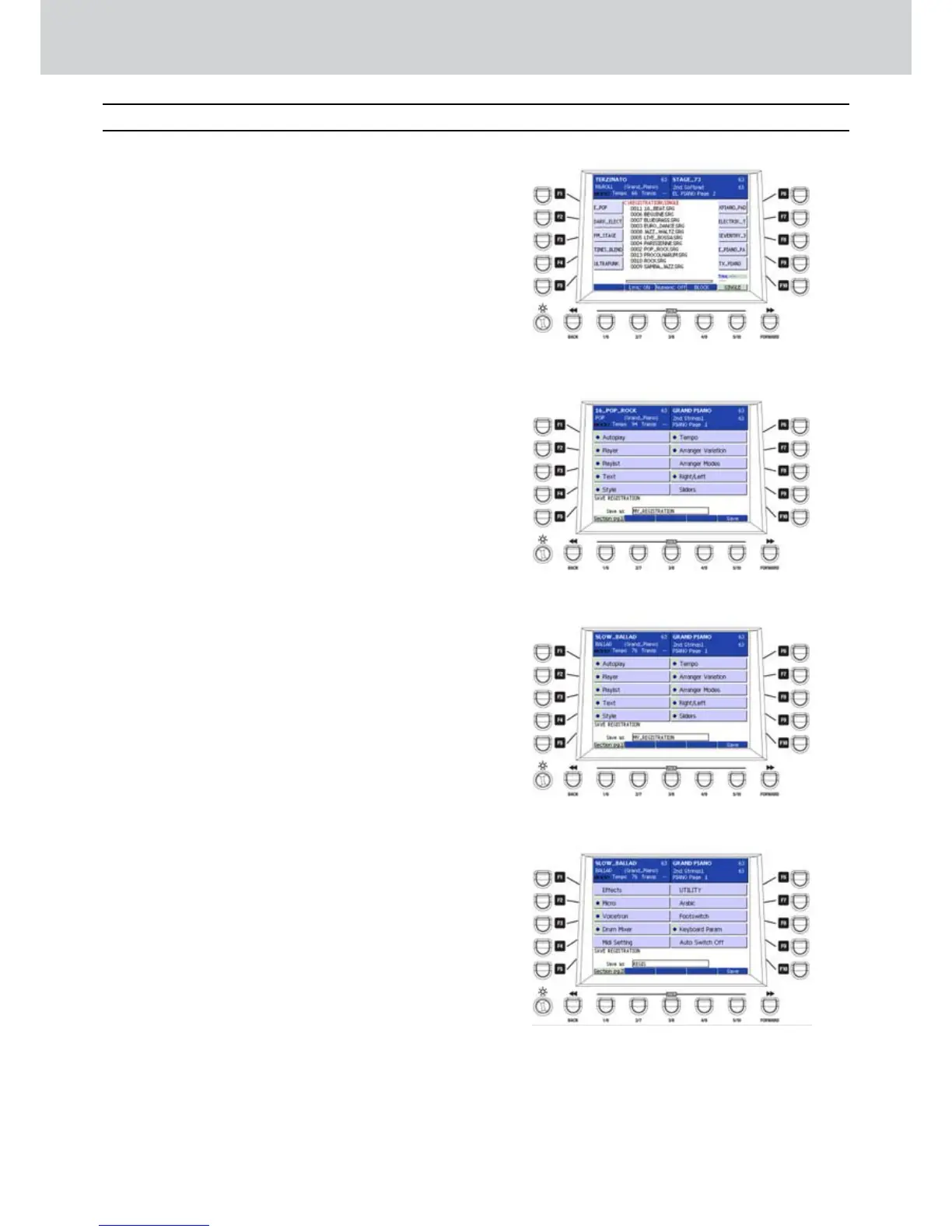
Press the REGISTRATION button to open a screen 1.
like Figure 103. Some demo REGISTRATION files
will appear. In the example, 0001_REGIS.SRG.
If not selected, press the USER 5 button in order 2.
to select the SINGLE option.
Press the SAVE button to give a name to the 3.
REGISTRATION. Digit a name in the text box
by inputting the characters directly from the
keyboard.
In Figure 104 the example is MY_REGISTRATION.
If you want to enable/disable one or more 4.
sections, press the USER 1 button (SECTION
OFF). You can enable the sections (SECTION
ON), by pressing the F1-F10 buttons, as shown in
Figure 105. You can enable/disable the following
sections:
F1 - AUTOPLAY: enables/disables the autoplay
function of the Player.
F2 - PLAYER: remembers the current folder of the
Player.
F3 - PLAYLIST: enables the active Play List when
you save the registration.
F4 - TEXT: stores the active text.
F5 - STYLE: stores the style.
F6 - TEMPO: stores the tempo.
F7 - ARRANGER VARIATION: stores the variation
of the Arranger A, B, C, D
F8 - ARRANGER MODES: stores the Arranger
settings.
F9 - RIGHT/LEFT: stores the right hand and left
hand settings.
F10 - SLIDERS: stores the slider settings.
By pressing the USER 1 button (Section pg.1) you 5.
can enter the second section page (Section pg.2).
Press the F1-F10 buttons to activate the sections,
as shown in Figure 106. You can enable/disable
the following sections:
F1–EFFECTS: Effects settings.
F2–MICRO: Mic settings.
F3–VOICETRON: Voicetron settings.
F4–DRUM MIXER: Drum Mixer settings.
F5–MIDI SETTING: MIDI settings.
F6–UTILITY: Utility page settings.
F7–ARABIC: Arabic scale settings.
F8–FOOTSWITCH: Footswitch settings.
F9–KEYBOARD PARAM: Keyboard parameters
settings.
F10–AUTO SWITCH OFF: Autoswitch settings.
Once enabled/disabled all the sections in 6.
the (Section pg.1 and Section pg.2), you can
press the USER 5 button (SAVE) to store the
REGISTRATION again. An overwrite confirmation
message will appear. By pressing ENTER you will
overwrite the current REGISTRATION, while the
EXIT button cancels the operation.
Figure 103
Figure 104
Figure 105
Figure 106
Registration
Registration



 To Next Page