Drum Set
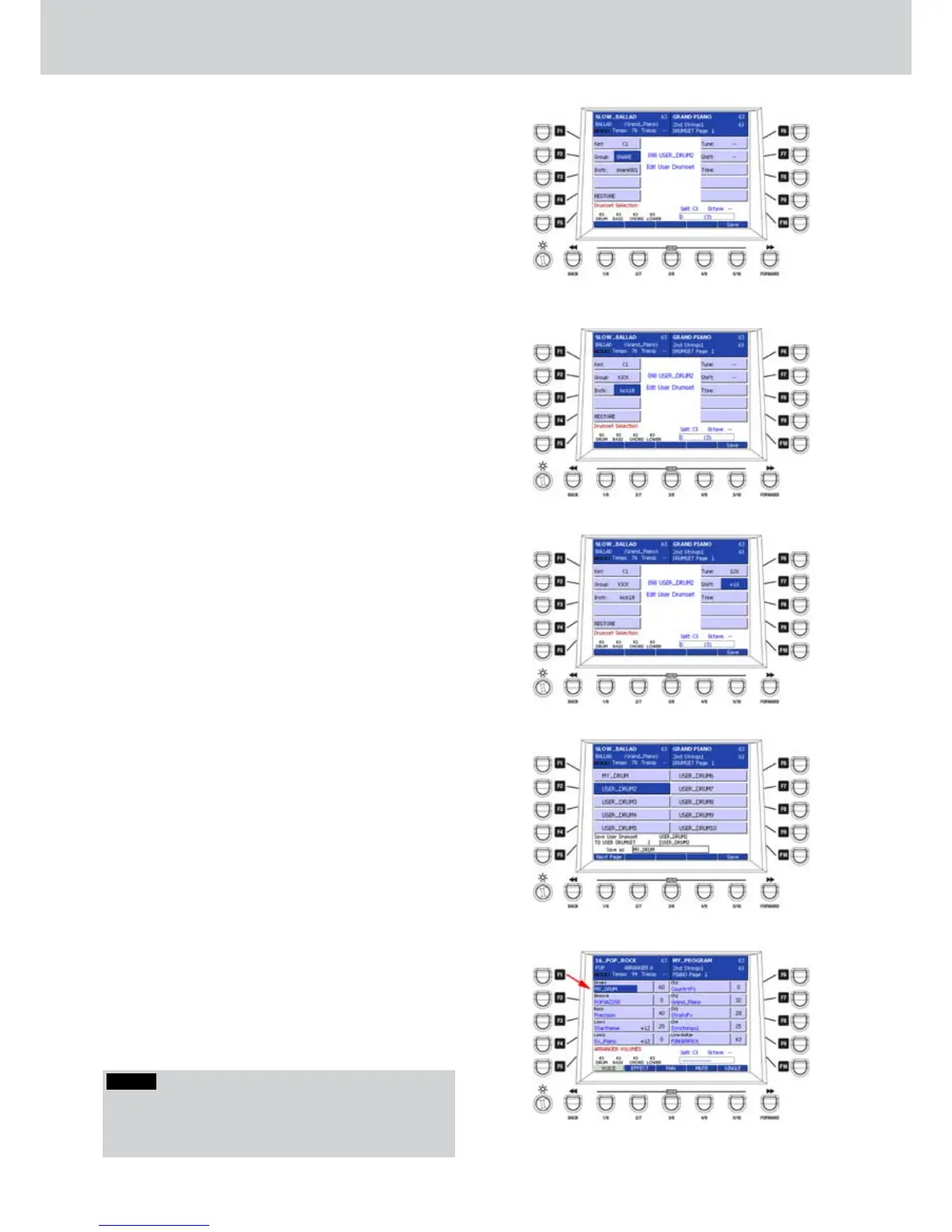
5. Press F2 (GROUP) if you want change the
percussion group (Figure 190) by using the
CURSOR
Ó Á
buttons
or the DATA/VALUE
wheel:
KICK
SNARE
HI-HAT
CYMBAL
TOM
RIMSHOT
LATIN1
LATIN2
LATIN3
CLAP/FX
6. Press F3 (INSTR.) to select an instrument within
the percussion group, by using the CURSOR
Ó Á
buttons
or the DATA/VALUE wheel. In our
example is “kick18” (Figure 191). By pressing the
CURSOR
Ó Á
buttons together you set “empty”
that is no instrument.
7. Press F6 (TUNE) to set the fine tune of the
percussive instrument, by using the CURSOR
Ó
Á
buttons
or the DATA/VALUE wheel. The values
are from 0 to 128 (0-100 cents).
8. Press F7 (SHIFT) to set the pitch by +/- 32
semitones in one semitone step of the percussive
instrument, by using the CURSOR
Ó Á
buttons
or the DATA/VALUE wheel. In Figure 192 the pitch
is +16 semitones.
9. Press the USER 5 button (SAVE) to store the
user DRUM SET, give a name directly from the
keyboard and choose the position where to store.
In Figure 193 the name given to the user DRUM
SET is “MY_DRUM”.
Setting a USER DRUM SET in a style
After you have selected a style, press the STYLE 1.
VIEW button on the front panel.
Press the F1 button to select the drum part of the 2.
style.
If “Audio Drum” is displayed, press F1 again to 3.
select “Drum1”.
By using the CURSOR 4.
Ó Á
buttons
or the
DATA/VALUE wheel select one of the DRUM SET
created by the user. In Figure 194 the selected
USER DRUM SET is “MY_DRUM”.
Figure 190
Figure 191
Figure 192
Figure 193
Figure 194
NOTE
Please see all the DRUM SET lists and the percussive
instruments included into the drum sets in the “Sounds”
section of this manual.



 To Next Page