Features of your vehicle
204
Keys
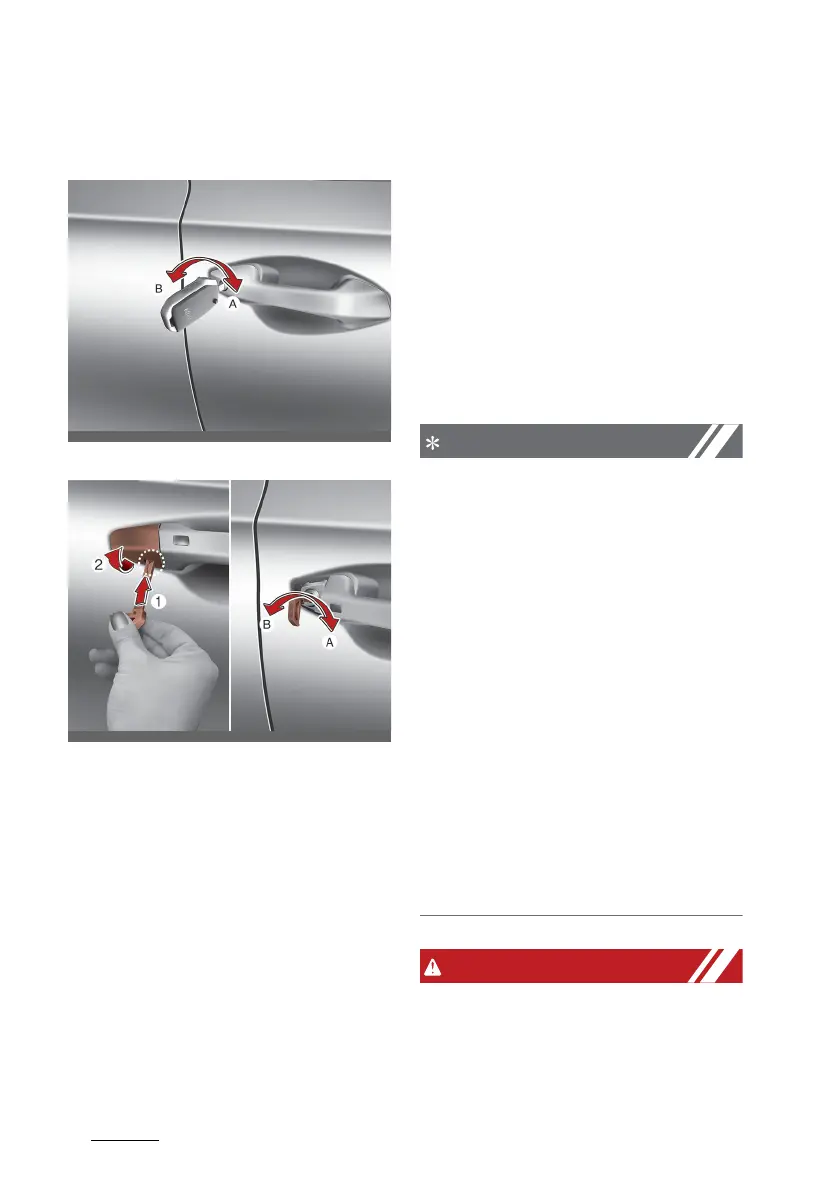
with the mechanical key
Remote key
Smart key
To remove the cover (for smart
key):
1. Pull out the door handle.
2. Press the lever (1) located inside
the bottom part of the cover with
a key or flat-head screwdriver.
3. Push out the cover (2) whilst
pressing the lever.
䳜 Turn the key toward the rear of
the vehicle to unlock and toward
the front of the vehicle to lock.
䳜 If you Lock (A)/Unlock (B) the
driver䳓s door with a key, a driver's
doors will lock/unlock.
䳜 Doors can also be locked and
unlocked with the transmitter.
䳜 Once the doors are unlocked, they
may be opened by pulling the
door handle.
䳜 When closing the door, push the
door by hand. Make sure the
doors are closed securely.
䳜 When removing the cover, be
careful not to lose cover and any
scratches.
䳜 When the key cover freezes and
does not open, lightly tap or indi
-
rectly warm (hand temperature,
etc.) it.
䳜 Do not apply excessive force to
the door and door handle. It may
be damaged.
䳜 If the door is locked/unlocked
multiple times in rapid succession
with either the vehicle key or door
lock switch, the system may stop
operating temporarily in order to
protect the circuit and prevent
damage to system components.
䳜 If you don䳓t close the door
securely, the door may open
again.



 To Next Page