Editing and Creating Setups
Continuous Controller Parameters
35
to a normal curve and the other zone set to the corresponding
reverse curve- itÕs up to you!)
Maximum scale values are +300% and -300%.
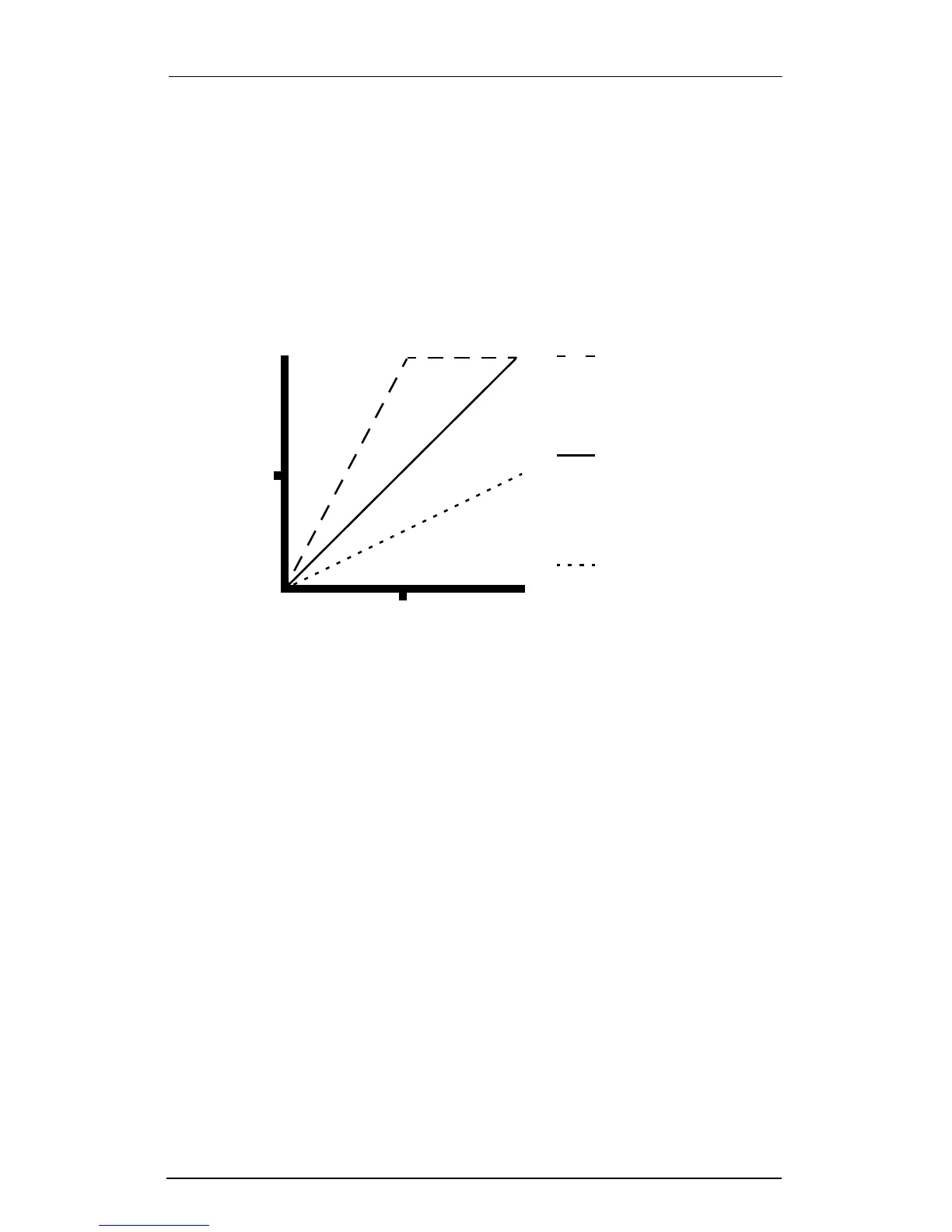
The picture below shows what happens when you change Scale.
Note that Scale is the only parameter changed in this example;
the other parameters are set to their defaults (Offset = 0 and
Curve = none).
Offset (Offs)
This adds or subtracts a constant to the scaled controller, and at
the same time sets minimum or maximum values. If the offset is
25, the minimum value of the controller will be 25. If it is -25 (and
scale is 100%) the Þrst one-Þfth of the controllerÕs movement (25/
127 = about 1/5) will send value of 0, and the maximum value of
the controller will be 102 (= 127-25). The maximum values for
Offset are ±127.
You can think of Scale as being a proportional change to the
Controller, while Offset is an up or down shift. The picture below
shows the effects of Offset. Note that Offset is the only parameter
Scale: 100%
Scale: 50%
As you increase the
controller input, MIDI
Controller increases
proportionally
MIDI Controller never
reaches maximum, even
on maximum controller
value
127
0
127
Controller Input
64
64
Controller Output
Scale: 200%
MIDI Controller reaches
maximum on medium
controller value














 To Next Page