dV-DOSC dV-SUB Manual V3.0 June 2005 72
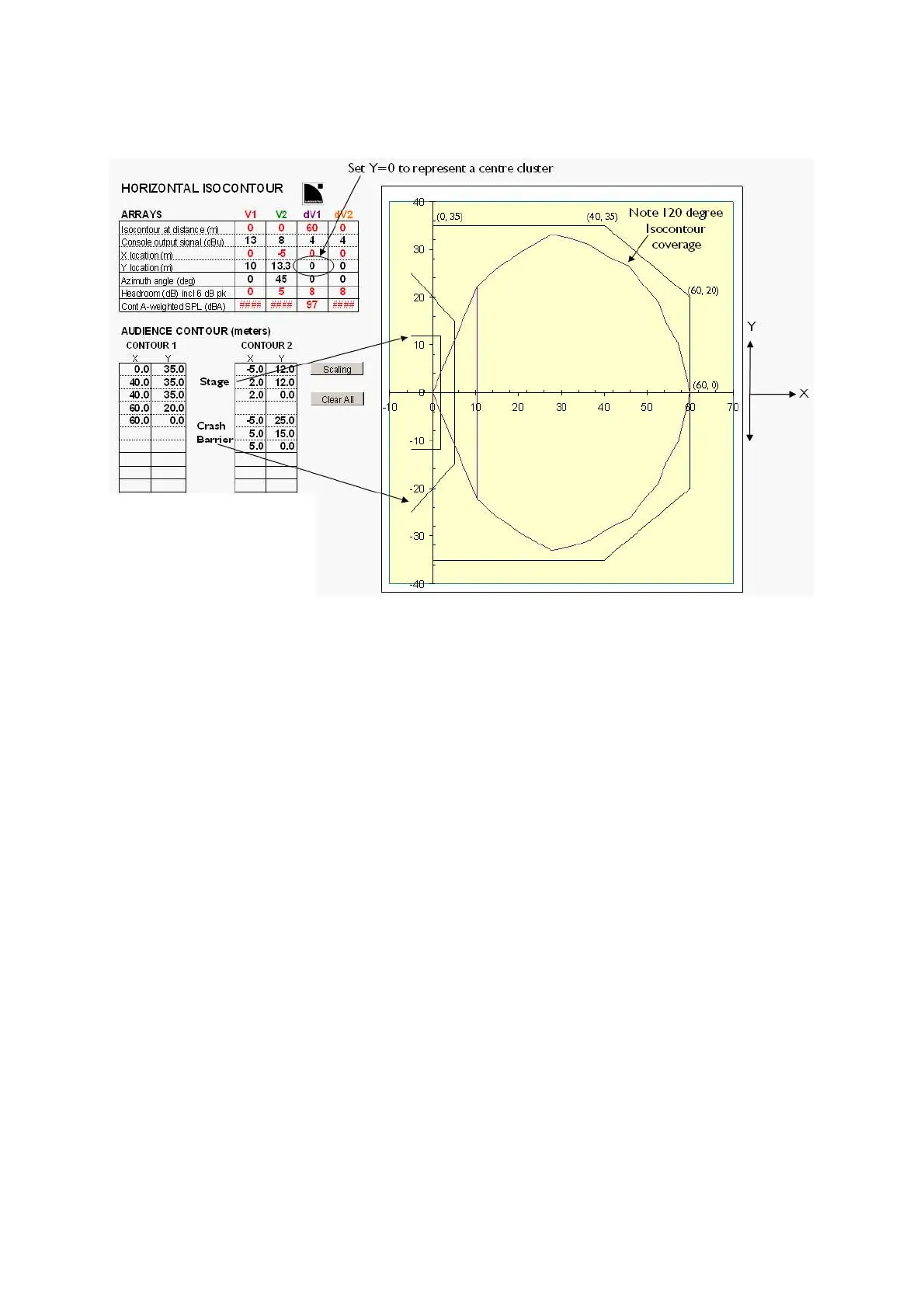
The user can also define the y coordinates for each array (off-center distance) and the azimuth angle in
degrees (i.e., aiming or panning angle of the array). Note: to simulate a centre cluster, simply set ''Y
location'' equal to zero.
Figure 53: dV-DOSC Isocontour
Optimization Procedure
Typically, the optimization procedure begins by using the V-ARRAY1, V-ARRAY2, dV-ARRAY1 or dV-
ARRAY2 cutview sheets to determine the number of array enclosures, inter-enclosure angles, etc. H-
ISOCONT is then used for adjustment of array separation and azimuth panning angles to ensure
adequate audience coverage and stereo imaging at a desired A-weighted SPL. In some cases, when
horizontal coverage is an important design issue, simulation can start with the H-ISOCONT sheet first
in order to predetermine the 0 and 60 degree axes prior to more detailed cutview simulation.
Output Data
Output data is directly displayed as the projection of the horizontal isocontour on the defined
audience area. The A-weighted SPL and amount of headroom in the system are given for each array.
Note that the displayed isocontour for each array is terminated in a line that is referenced to where
coverage starts for the bottom enclosure. Therefore, H-ISOCONT gives a direct indication as to the
areas where coverage is lacking and offstage fill, center fill or delay clusters are required. The overlap
between L, R arrays illustrates which portions of the audience will experience stereo imaging.
Note: It is not possible to simulate the transition between dV-DOSC to V-DOSC isocontours in ARRAY 2004
when dV-DOSC is used for downfill or upfill in conjunction with V-DOSC. In order to simulate this transition,
SOUNDVISION is recommended.



 To Next Page