d2, 2big, and 5big Network 2 User Manual 6
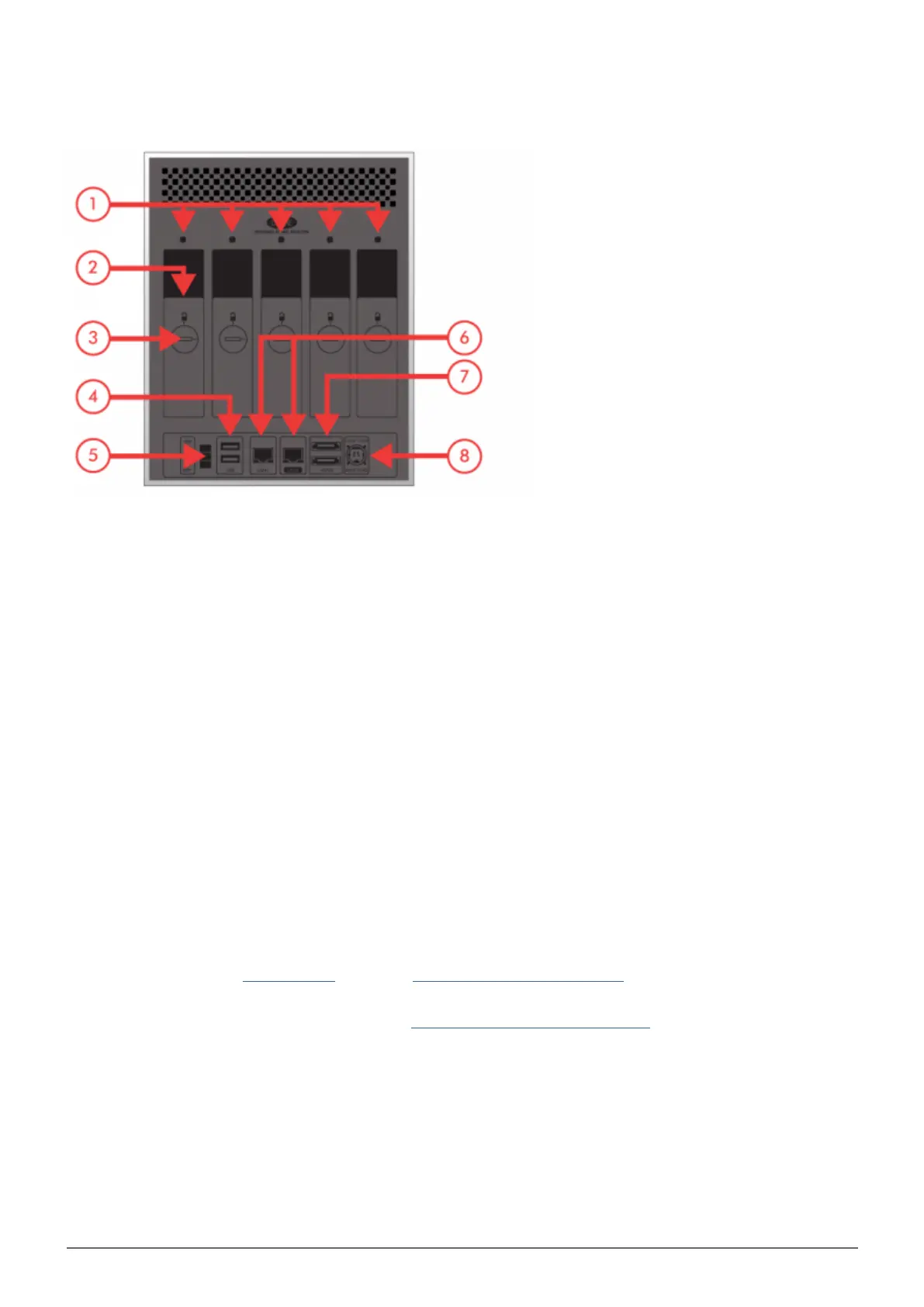
5big Network 2
Drive status LED1.
Drive tray handle2.
Drive lock3.
2x USB 2.0 Expansion4.
ON/OFF5.
2x Gigabit Ethernet6.
2x eSATA Expansion7.
Power Connector8.
POWER BUTTON FUNCTIONS
The multi-function front LED/button allows you to activate/deactivate sleep mode and reset to default.
Activate deep sleep mode: If Deep Sleep Mode is enabled in Dashboard - Eco Management, click the
■
blue button.
Wake from sleep mode: Press the blue button.
■
To wake the drive from Deep Sleep Mode, press the blue button or use the Wake on LAN function in the LaCie
Network Assistant (see Wake on LAN) (see also Dashboard - Eco Management).
Reset to default: This process is explained in Update Product Operating System.
■














 To Next Page