6
LeeBoy Model 8616 Conveyor Paver 6-5
Operation
ENGINE Screen
1
2
3
4
ESC
OK
5
6
7
8
1 2
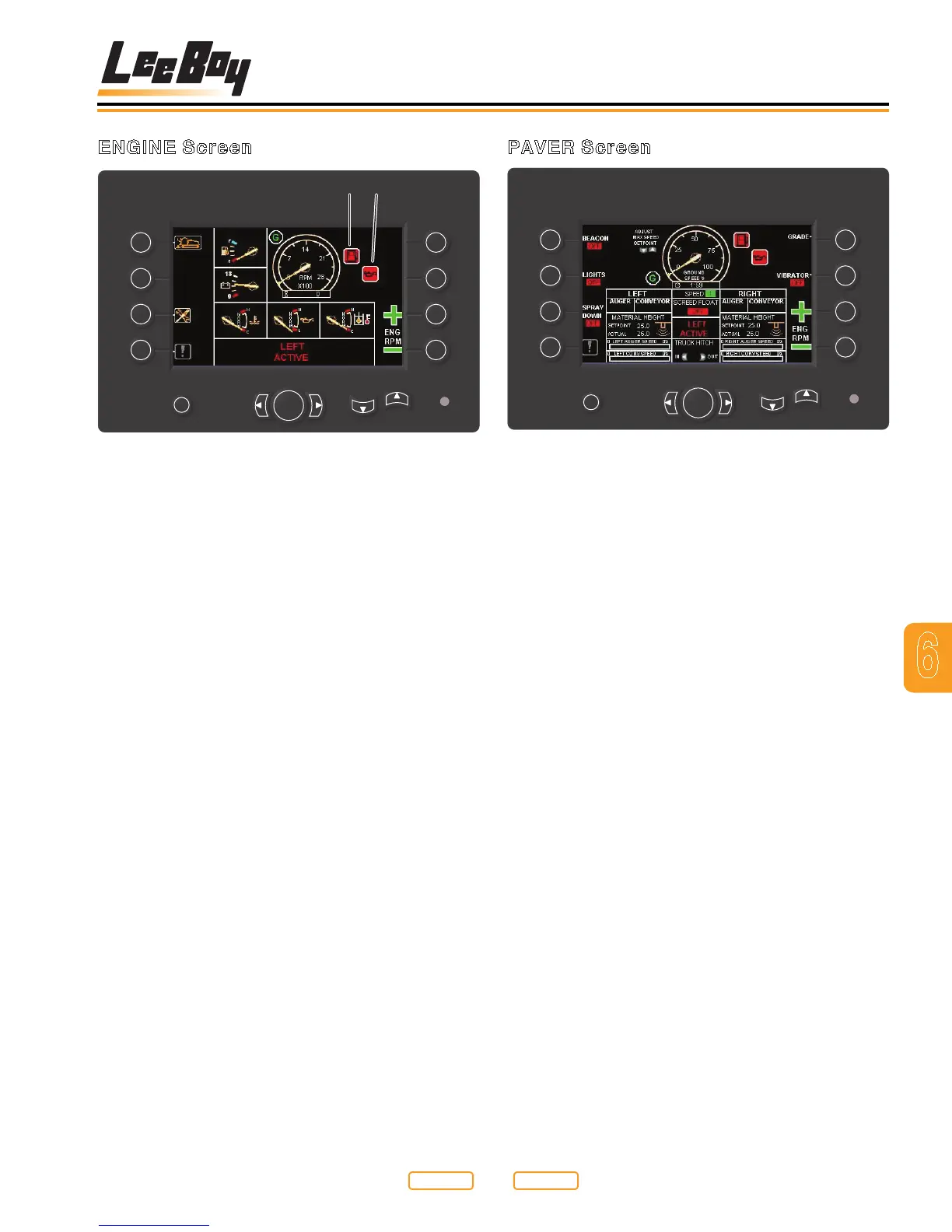
Figure 6-2
1 - Low Fuel Level Warning Light
2 - Oil Pressure Warning Light
The ENGINE screen displays engine information.
Items displayed on the ENGINE screen are:
•FuelGauge-Indicatestheamountoffuelinthetank
•Voltmeter-Indicatesbatteryvoltage
•WaterTemperatureGauge-Indicatesenginecoolant
temperature
•OilPressureGauge-Indicatesengineoilpressure
•HydraulicOilTemperature-Indicateshydraulicsystem
oil temperature
•Tachometer-Indicatesenginespeed
The two red icons displayed beside the tachometer will
illuminate to alert the operator when the fuel level is low
(Figure 6-2,1) or there is a problem with the engine oil
pressure (Figure 6-2,2).
Using buttons on the left side of the screen, the operator
can review other display unit screens, such as:
•Button1-PAVERscreen
•Button3-SETUPScreen
•Button4-FAULTSScreen
To review another screen, press the appropriate button.
If a fault occurs during operation, the “EXCLAMATION
POINT”icon(Button4)willash.PressButton4to
review fault information.
PAVER Screen
1
2
3
4
ESC
OK
5
6
7
8
Figure 6-3
The PAVER screen displays the status of LeeBoy Model
8616 Conveyor Paver functions, maximum ground
speed setting, steering position and whether a console
is active, inactive or paused. There are indicators for the
left and right auger and conveyor Auto or Manual mode,
Material height setting (when in Auto mode), auger and
conveyor speed, Grade Auto or Manual, Vibrator On or
Off and Screed Hold.
The fuel level, battery voltage, coolant temperature,
hydraulic oil temperature, engine oil pressure, park
brake, work lights, beacon light, spray down and
generator warning icons are also displayed.
The ground speed limit can be changed from this
screen. To increase the ground speed limit, press the
UP arrow.
Use the following Paver Screen buttons to access the
following functions:
Button 1 - Beacon lights on/off
Button 2 - Work lights on/off
Button 3 - Spray down on/off
Button4-Faultcodes-switchesdisplaytofaultcode
screen
Button 5 - Grade Auto on/off
Button 6 - Vibrator on/off
Button 7 - Throttle up
Button 8 - Throttle down
Left/Right arrows - Truck Hitch In/Out (Option)
Up/Down arrows - Ground speed percentage, input from
joysticks will be scaled between 0 and this maximum
setting
Return to
Last Viewed
Return to
Thumb Index



 To Next Page