4. OVERVIEW OF THE INSTRUMENT
Note:
Before working with the touch screen, we recommend cali-
brating it first.
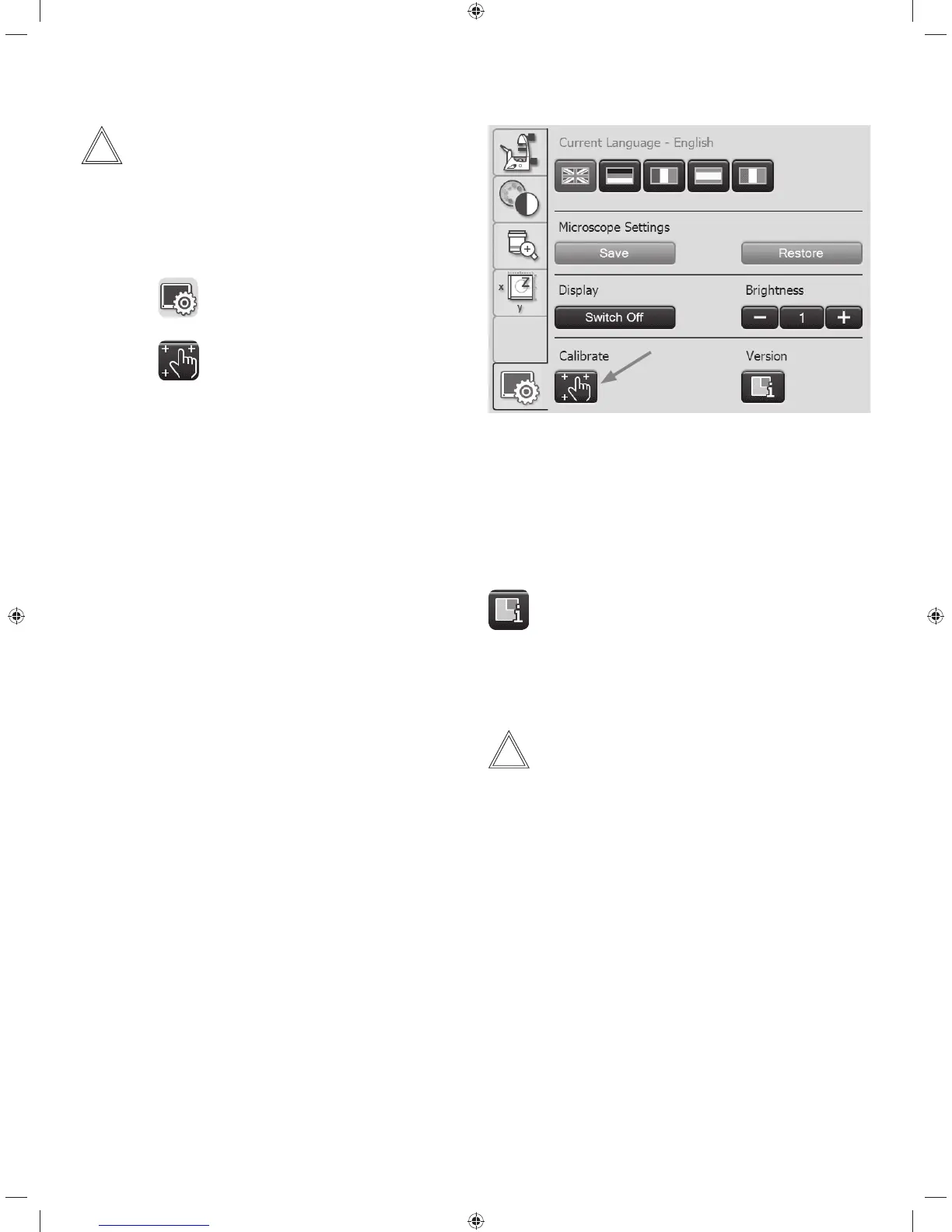
Calibration
t1SFTTUIF
button.
t1SFTTUIF
button.
t'PMMPXUIFJOTUSVDUJPOTBOEQSFTTBMMDPSOFSTPGUIF
working area using your finger. Press and hold the cali-
bration cross until the next cross is displayed. This ad-
justs the sensitivity of the Touch Screen and the pressure
surface to the user.
Other Touch Screen settings:
Language selection
The current language for the display texts is shown, and
you can change it by selecting the corresponding flag.
Saving the microscope settings
In Microscope Settings, press Save to write the cur-
rent microscope settings to a USB stick, inserted into
the left side of the microscope (Service port). Pressing
Load restores all settings.
Display brightness
To prevent unwanted interference from light, you can
switch off the display using the Switch off key. To switch it
back on, simply touch any location on the display.
You can also change the brightness incrementally using the
Brightness key.
Version number
This key shows you the version number of the Touch Screen
software and that of the master firmware of the connected
microscope.
Please have these available for any inquiries.
Note:
The meaning of the other menu items of the navigation bar
is explained in the respective chapters.
35



 To Next Page