9. APPENDIX – OVERVIEW OF TOUCHSCREEN MENUS
9.3 Overview of Touch Screen pictograms
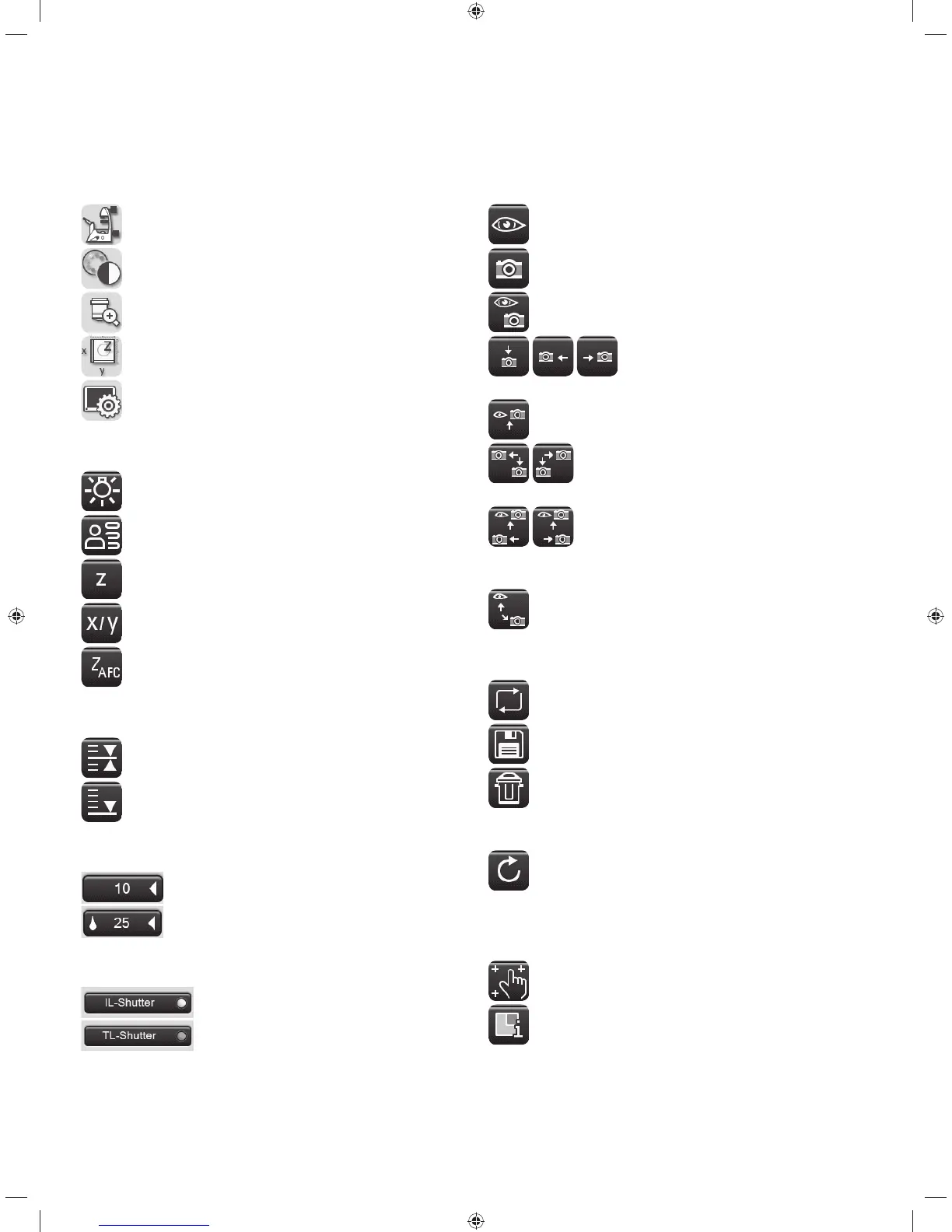
Navigation bar
Basic microscope settings
Contrast method
Magnification
Stage and focus controls
Touch screen settings
Menus
Status/illumination
Memory function
Focus operation
Stage operation
AFC (Adaptive Focus Control)
Z-drive
Focus position
Lower threshold
Objectives
Valid dry objective
Valid immersion objective
Shutter
Incident-light shutter open
Transmitted-light shutter closed
Observation ports
100% eyepiece
100% camera
Eyepiece/camera splitting
100% to lower, left or right port
Top port: eyepiece/camera splitting
Lower port/left or right port split
Left or right port split/top port with further split-
ting
Top port/rear port split
Control
Toggle button
Saving
Delete
For the table: reset working area to the maxi-
mum positioning range of the stage
Reload
For the table: move the current stored position
Various
Touch Screen calibration
Call up the version number
95



 To Next Page