3 User Interface
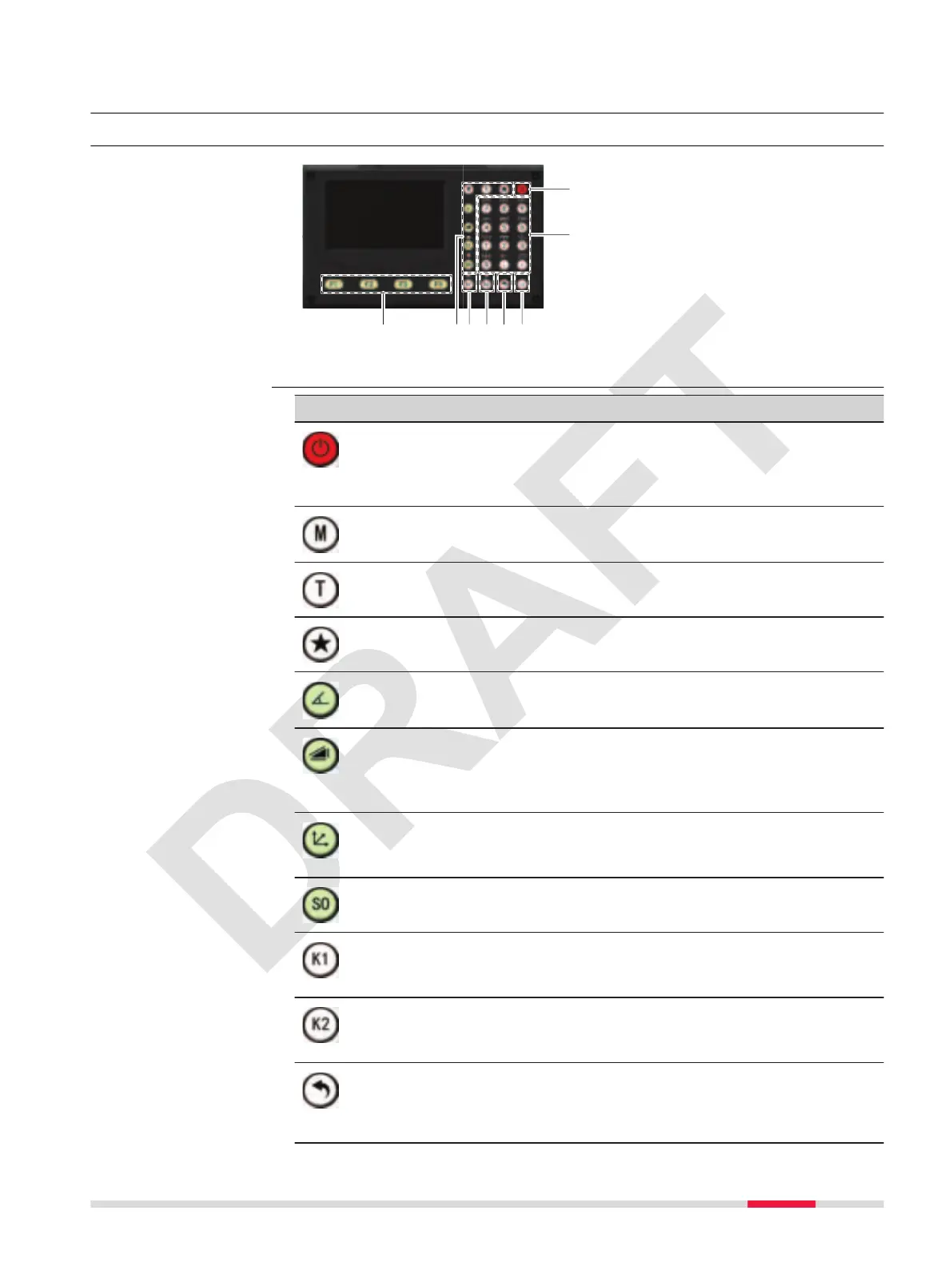
3.1 Keyboard
a Function keys F1 - F4
b Fixed keys
c Short cut key K1, navigation
d Short cut key K2, navigation
e ESC key
f ENTER key
g ON/OFF key
h Number/letter keys
Key Description
If the instrument is already off: Turns on the instrument
when held for 2 s.
If the instrument is already on: Turns to Power Options
menu when held for 2 s.
Enter the Main Menu
Switch between prism and non-prism mode
Favourites key
Quick-access to measurement supporting functions.
Enter the angle survey interface during standard survey
Enter the distance measurement panel during standard sur-
vey
Double click to switch between slope distance and height
difference.
Enter the coordinate measurement panel during standard
survey
Navigation key, up
Enter the set out panel during standard survey
Navigation key, down
User key 1
Programmable with a function from the K1 Setting menu.
Navigation key, left
User key 2
Programmable with a function from the K2 Setting menu.
Navigation key, right
Pressing ESC short: Returns to next higher level. Quits a
screen or edit mode without saving changes.
Pressing ESC long: Returns to the standard survey screen.
Keyboard
Keys
User Interface 23



 To Next Page