PI1 Process Interface (optional)
Power Analyzer NORMA 4000, NORMA 5000 59
EO1111G REV G
To configure the system for motor 1, go to "Configure torque
sensor"
– or –
To configure another motor, press Next ... until the
respective motor code (M2, M3 or M4) is displayed.
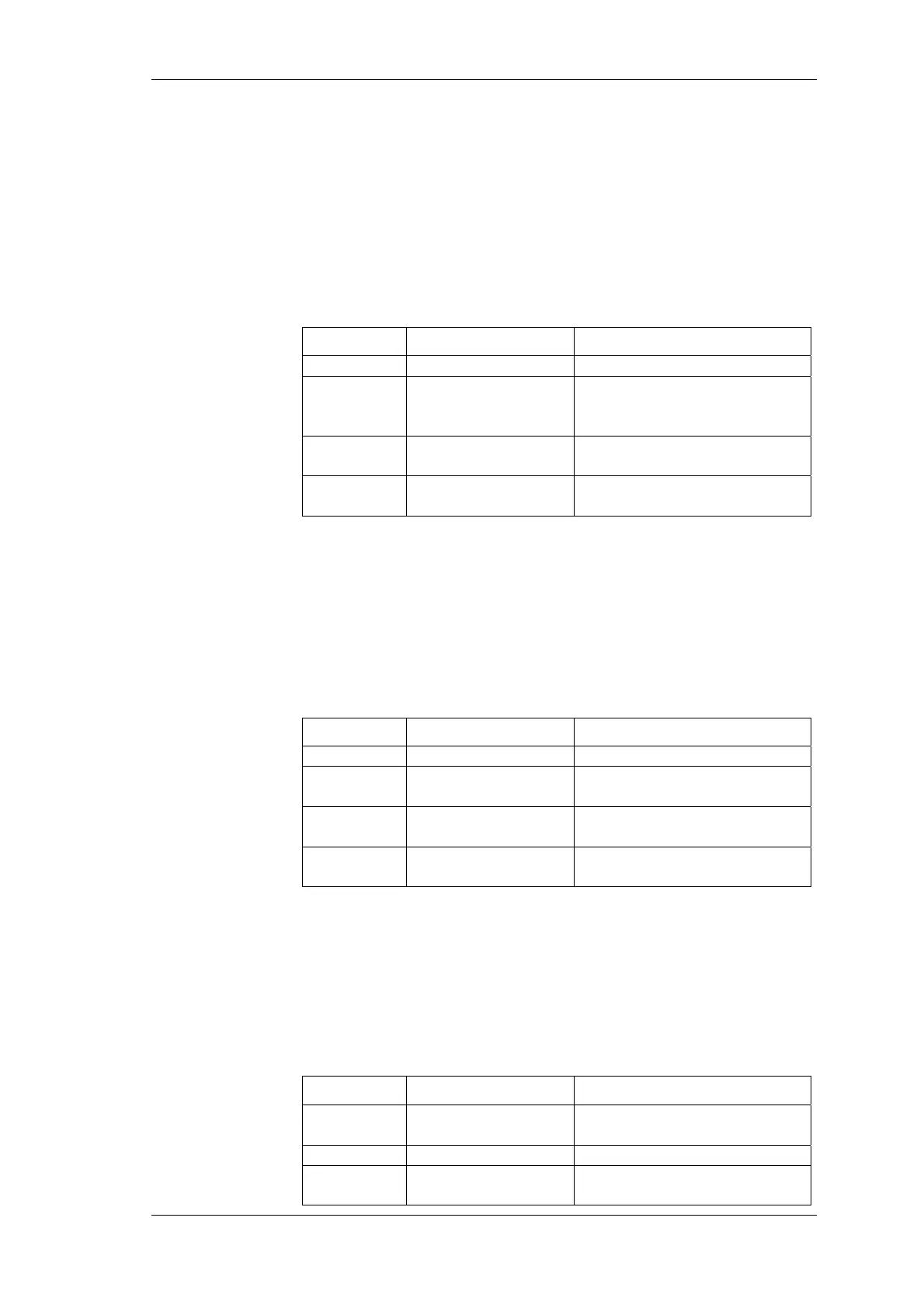
The torque can be measured by means of force transducers or a
torque-measuring shaft. The signal is transferred via a ± 10V AC
output or a frequency output. In line M.. (e.g. for motor 1: M1),
adjust the following settings:
Column Settings Description
Gain 1...
Slope
Unit
Nm/Hz
Nm/V
Depending on force
transducer or sensing shaft
type
Zero 1...
Voltage or frequency
corresponding to speed = 0
Unit
Hz, V
Unit for zero, depending on
sensor type
Move the cursor to a field in line M1 and press Enter.
A list of possible options is displayed.
Select a value and confirm with Enter.
The value is now shown in the display field.
Possible speed sensors are: Incremental encoder (measuring with
TTL / AC output) or an analog signal. In line n.. (e.g. for motor 1:
n1), adjust the settings as follows:
Column Settings Description
Gain 1 ...
Slope
Unit
pul/r
rpm/V
Pulses per revolution
Revolutions per volt
Zero 1 ...
Voltage or frequency
corresponding to speed = 0
Unit
Hz, V
Unit for zero, depending on
sensor type
Move the cursor to a field in line n1 and press Enter.
A list of possible options is displayed.
Select a value and confirm with Enter.
The value is now shown in the display field.
The analyzer can be used for the analysis of both motors and
generators. To configure the device, adjust the settings in line Drv1
(for motor 1):
Column Settings Description
Type MOT
GEN
Motor
Generator
PPairs 1 ... 999
Number of pole pairs
Pref P ... P3
Reference power for
efficiency calculation
Select motor
Configure torque
sensor
Configure speed
sensor
Configure motor
or generator



 To Next Page