DSS-1000 User Manual
53
Adding Cameras
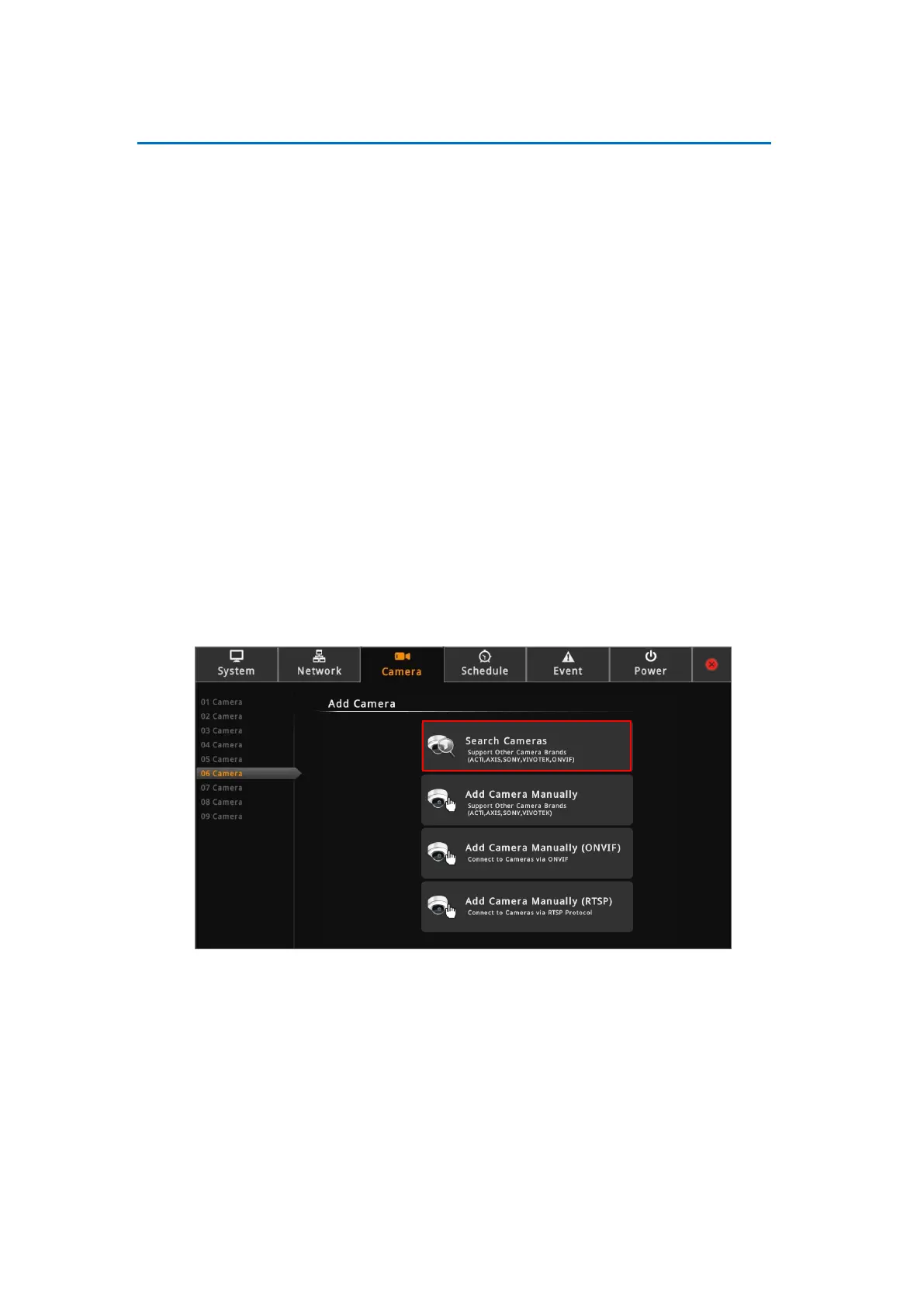
There are three ways to add cameras for viewing:
●By automatically searching the cameras on the network
●By manually entering the IP address of the camera
●By manually entering the IP address of an ONVR-comppliant camera
●By manually entering the IP address of the camera and connect via RTSP protocol
NOTE: DSS-1000 supports third-party cameras. To validate specific camera models that can
be integrated, visit our website.
Searching Cameras to Add
If you do not know the IP address of the camera or you want to add several cameras at the
same time, you can search the cameras connected to the network and choose up to 4, 9, 12 or
16 cameras to connect to DSS-1000. The maximum number of cameras to be added varies
depending on the selected module (see Module on page 44).
1. On the Setup screen, click Camera.
2. Click Search or an empty channel number from the left panel. The Add Camera screen
appears.
3. Click Search Cameras. The Search Cameras screen appears.
4. By default, the camera manufacturer, user account name and password for access are
already filed with default values. If you want to add camera from other manufacturers or
the camera has different account and password, modify these values as needed. The
cameras connected on the network are listed.



 To Next Page