DSS-1000 User Manual
88
Viewing by Preset Point and Tour
NOTE: The Preset Point Panel is available only when PTZ and zoom cameras are selected.
For other cameras, the Preset Point Panel appears blank.
PTZ and zoom cameras can have up to 32 preset points and 32 tours configured on DSS-1000.
A preset point is a user-defined area on the image where the camera is directed at or zoomed
in. A tour is a group of preset points that the camera cycles through at specific interval time.
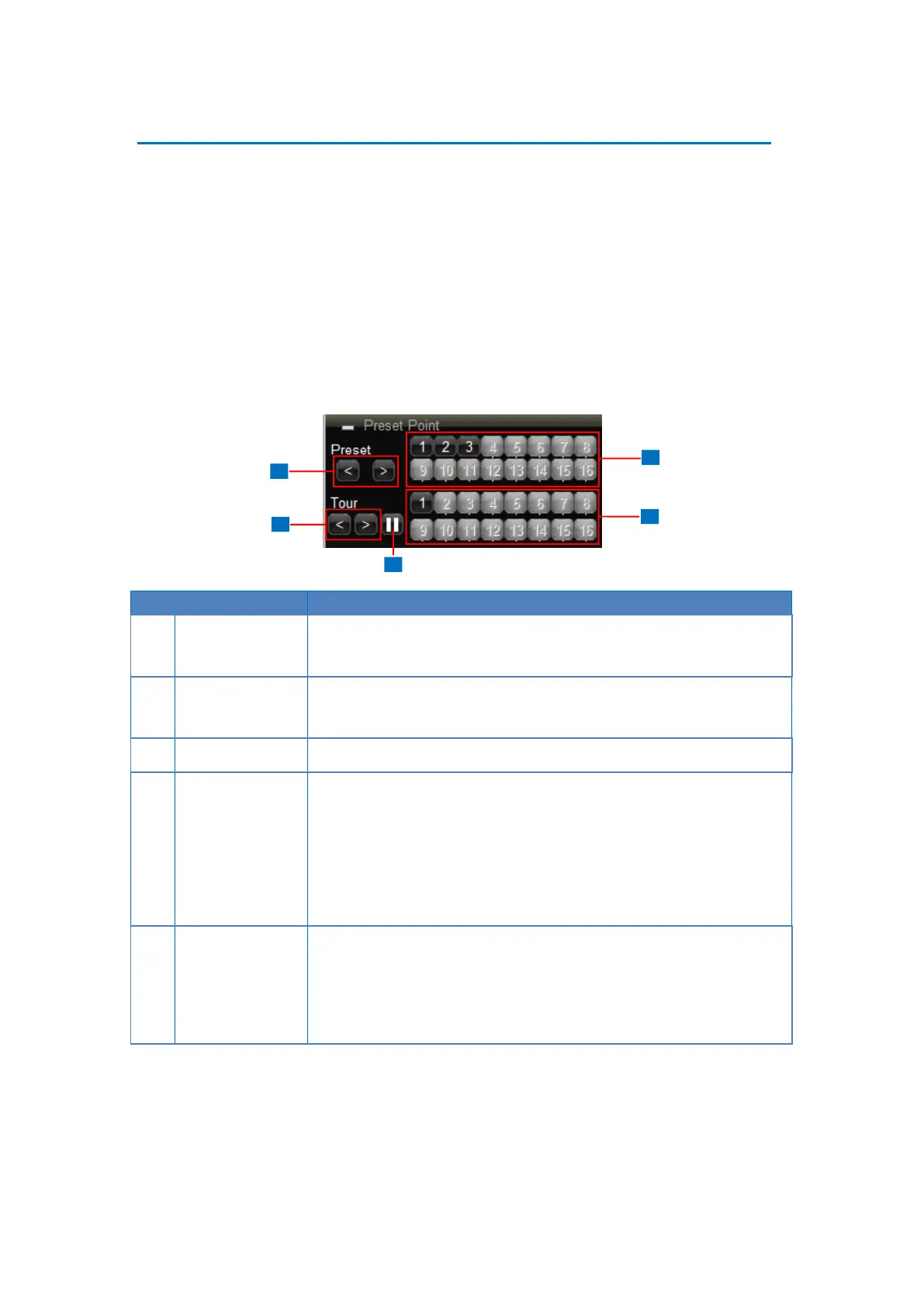
The Preset Point Panel on the Live View screen allows users to view preset points and start
or stop tours. Preset points and tours must be configured first in the Camera Setup screen
(see 3.6 Configuring the Cameras on page 99).
Click < to view preset point 1 ~ 16 buttons or > to view preset point
17 ~ 32 buttons.
Click < to view tour 1 ~ 16 buttons or > to view tour 17 ~ 32 buttons.
When the camera is on tour, click this icon to stop the tour.
The numbers indicate the preset point number. If the button has a:
Black background: The preset point is configured.
Gray background: The preset point is not configured.
Click a number button to display that preset point on the Live View
screen.
The numbers indicate the tour ID. If the button has a:
Black background: The tour is configured.
Gray background: The tour is not configured.
Click a tour ID number to start the tour.



 To Next Page