DSS-1000 User Manual
37
Setting Preset Points
A preset point is a user-defined area where the camera zooms in. Up to 32 preset points can
be configured on DSS-1000. When preset points are created on DSS-1000, they are
automatically synced on the camera side, and vice versa.
On the Live View screen, move the mouse over the bottom of the screen to display the Menu
Panel, then click . You must login as an administrator to have PTZ control access
(see 2.3 The Login Screen on page 33 for details). Then click the Preset Point Tab .
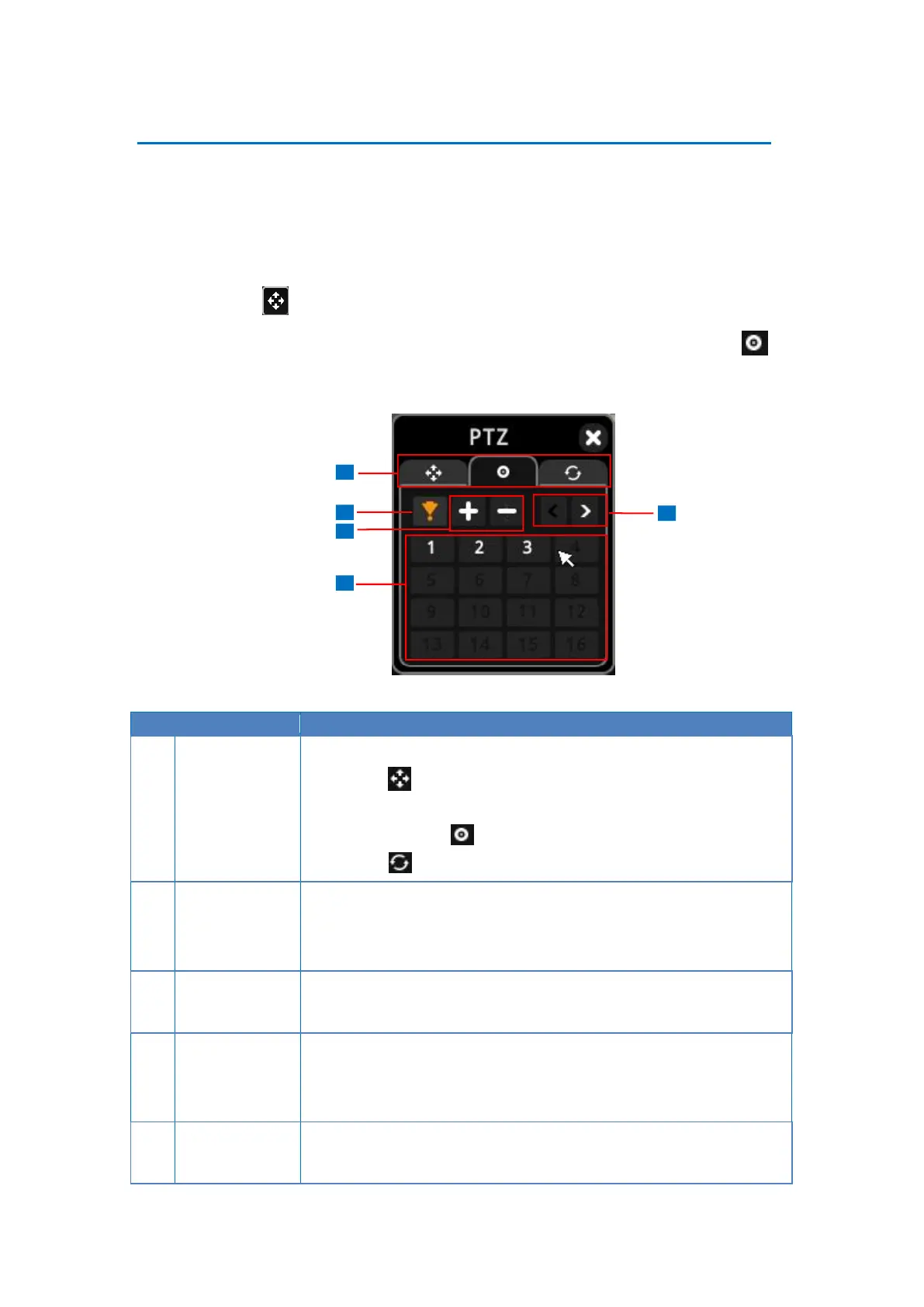
Click the tab to display the page:
PTZ (see 2.4 Using the PTZ Control Panel on page
33).
Preset Points
Tour (see Setting Tours on page 39)
Click to enable “go to” preset mode, then click a preset point number
below to make the camera zoom into the defined preset point. The
orange icon indicates the function is currently selected.
Click + to add a new preset point. See below.
Click – to remove a preset point.
The numbers indicate the preset point ID. Once a preset point is
configured, the number turns white. Up to 32 preset points can be
configured.
Click < to go back the previous page and > to go to the next page.



 To Next Page