Chapter 12 VPN
http://www.level1.com Page 124
NAT, and after the PPTP configuration is complete, the system will automatically generate a
static NAT mapping to TCP 1723 port (which can be viewed in the "Static mapping
information list" of Advanced Configuration->NAT static mapping and DMZ, named as
"PPTP"). Please do not edit, delete them, or it may even cause the PPTP tunnel not to be
connected and not to transmit data.
12.1.3 PPTP server configuration
Enter the VPN configuration ->PPTP page, click <Add a server>in the page as shown in Figure
12_2, and enter the PPTP server page.
12.1.3.1 Global Settings
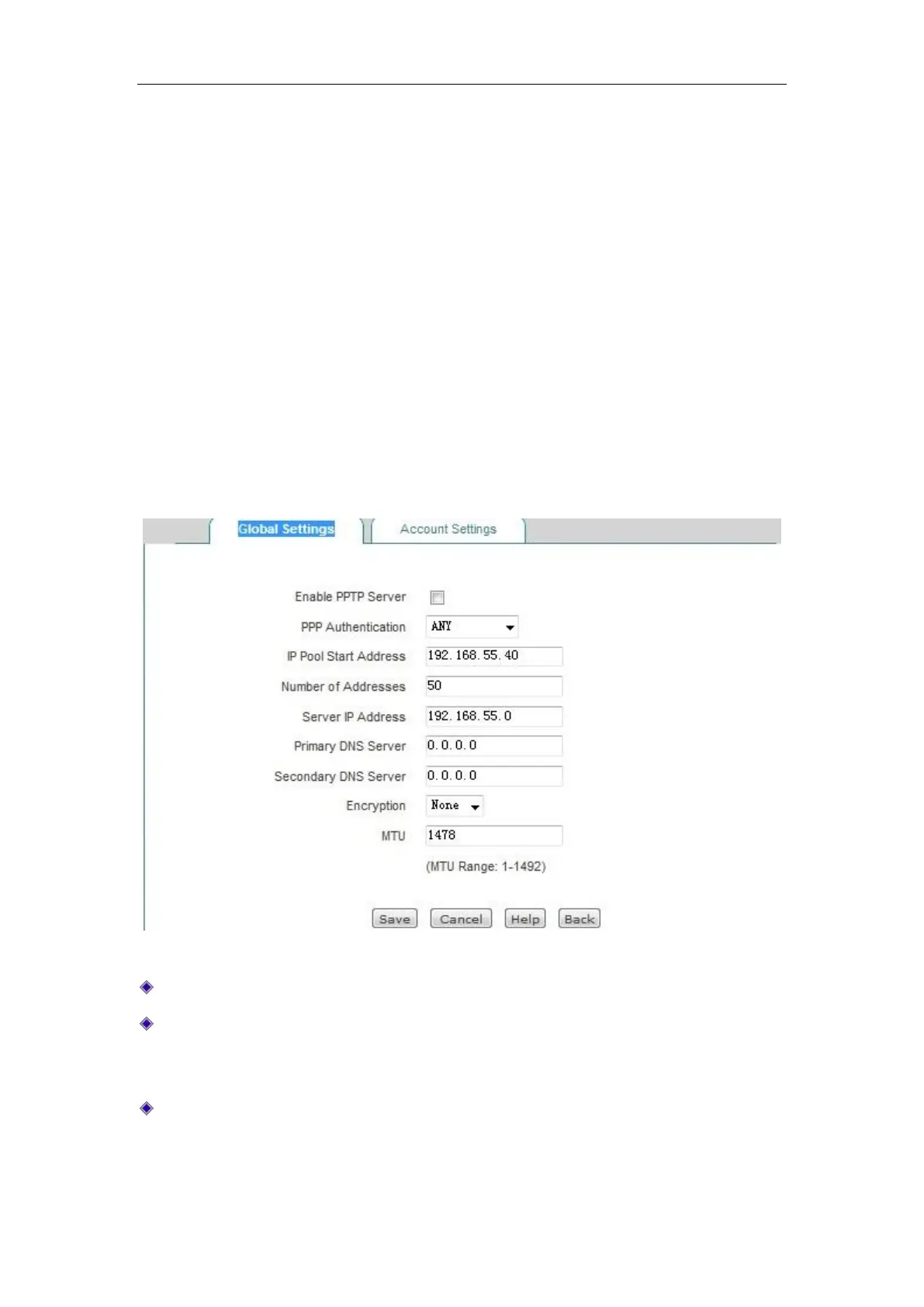
Figure 12_3 PPTP server - Global Settings
Enable PPTP server: Check to enable the service.
Password authentication mode: Sets the password authentication mode to establish PPTP
VPN. The options include MS-CHAPV2, PAP, CHAP, ANY (automatically negotiate with the
peer device on password authentication mode).
Address pool starting address: Configures the starting IP address assigned by the PPTP server
to the PPTP client, to ensure that the network segment to which the address belongs does not
repeat with any of the network segments in LAN.



 To Next Page