iPonic 624® Manual PN 995-1124-00
3.5.1.6 Advanced Room 1 or Room 2 — Advanced Stage Settings
3.5.1.5 Advanced Room 1 or Room 2 — Air Exchange Settings
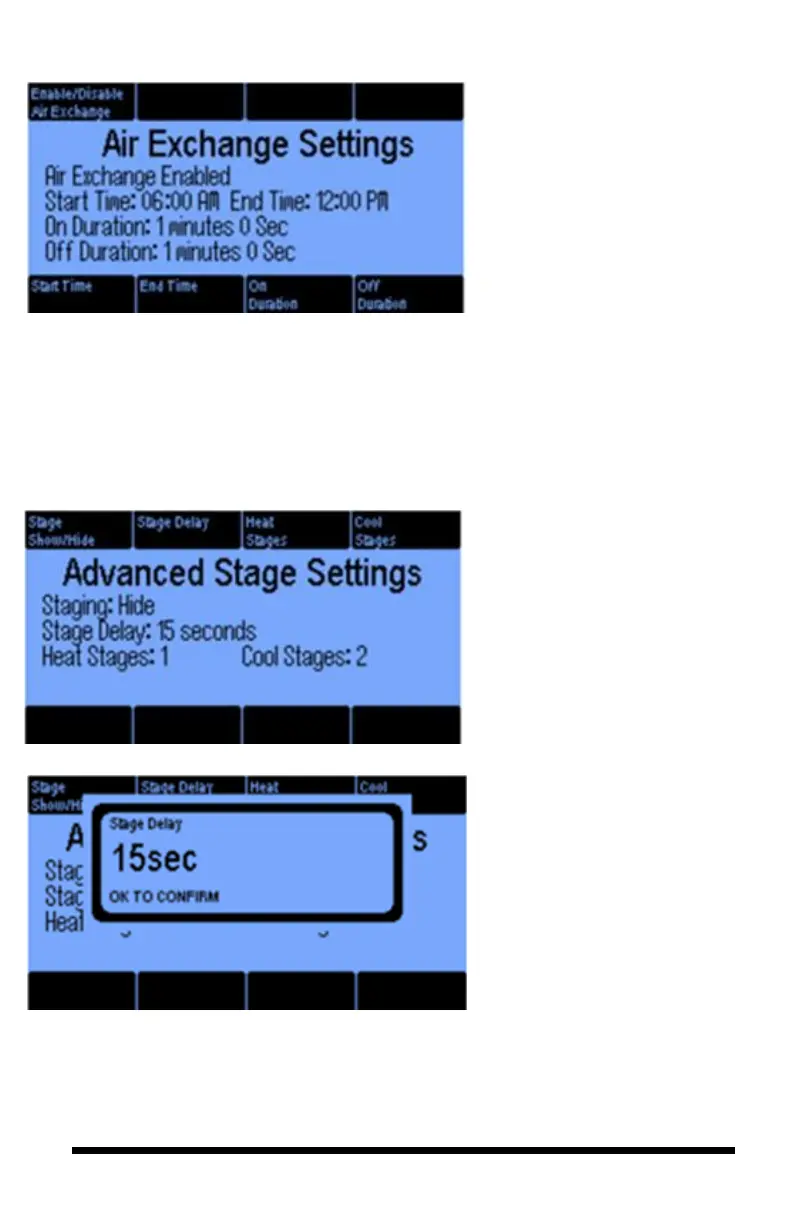
The Air Exchange Settings allows
you to program your ventilation
system to circulate fresh air inside
your growing environment. Air
Exchange only works with the
Vent Fan equipment type.
Button #1 is to enable or disable
the air exchange option. Buttons #5
& 6 set start and end time, and
buttons #7 & #8 cycle the air
exchange within the enabled time
window.
The Advanced Stage Settings
option lets you program settings for
when you have more than one
heating and cooling stage.
Pressing button 1 and selecting the
“Show” option will add a 5
th
line
to the Main Menu (page 67) called
“Stages”. This will enable you to
quickly setup your equipment for
temperature and your humidity
stages.
The Stage Delay is the minimum
time for the system to change
stages. In this example, it will
have to remain in the current stage
for at least 15 seconds.
If you have a room with vents,
dampers and fans, you will want
the vents and dampers to open
before fans are turned on.
Otherwise, you might have a static
pressure problem/ To achieve this,
program the vents and dampers in
the first stage of cooling and the
fans in a higher stage.



 To Next Page