iPonic 624® Manual PN 995-1124-00
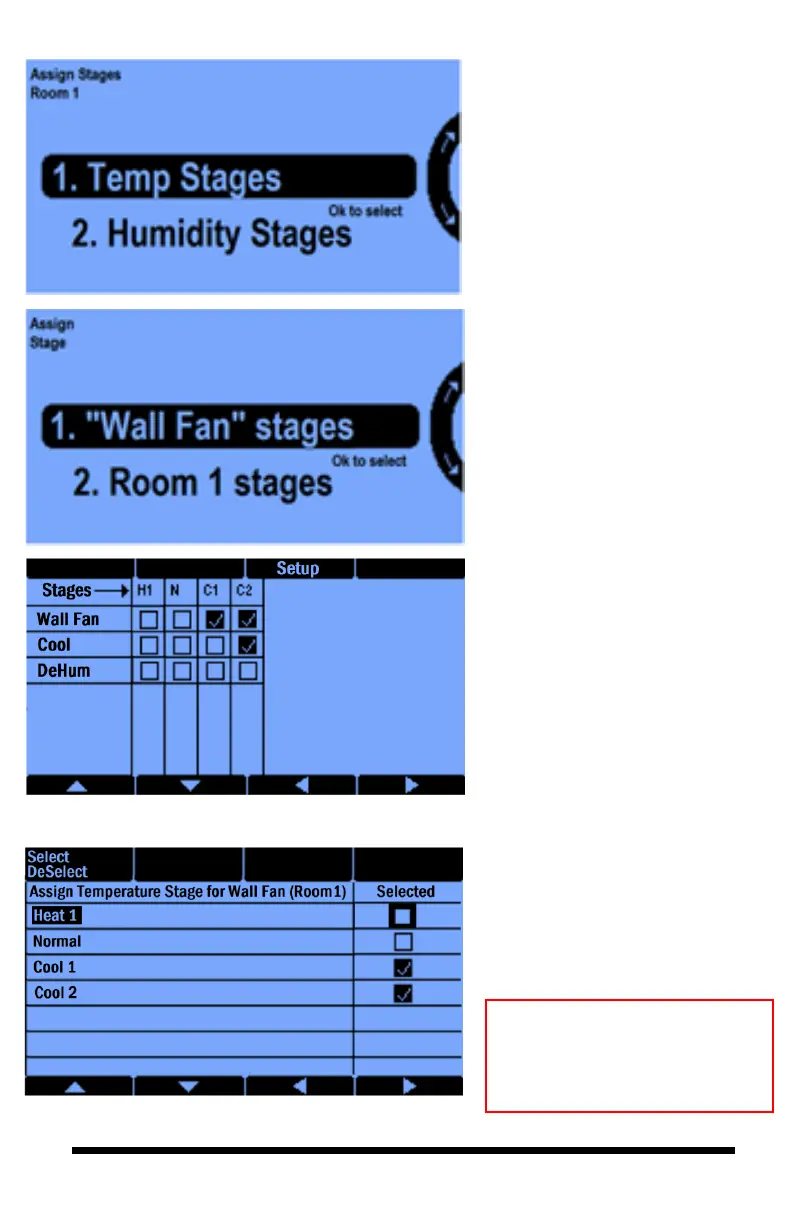
3.1.2.2.3 Equipment Setttings — Assign Stage
Going back to the Equipment
Settings screen and pressing button
#4 will get you the Assign Stage
screen. Here you will set the
options to view and change your
stage settings for Temperature and
relative Humidity.
1, is for assigning the stages of
operation for the particular
equipment.
2, is where you can assign the
stages for all the temperature and
humidity related equipments in the
particular room.
In this screen you can assign the
temperature stages that you want
the Wall Fan to be ON.
In this example, we have 1
heating stage and 2 cooling
stages. To set the number of
stages, you would need to go back
to the “Main Menu”, select
“System Setup”, “Advanced”,
“Room”, and then “Adv Stage
Settings.”
Selecting Room 1 stages option
you will get the next screen:
Here you can setup all the On/Off
equipment for Room 1. In other
words, which stage you want
which equipments to be ON.
Note: You will get the same
screens by going to 5. Stages on
the Main Menu which is
covered in section 5.



 To Next Page