iPonic 624® Manual PN 995-1124-00
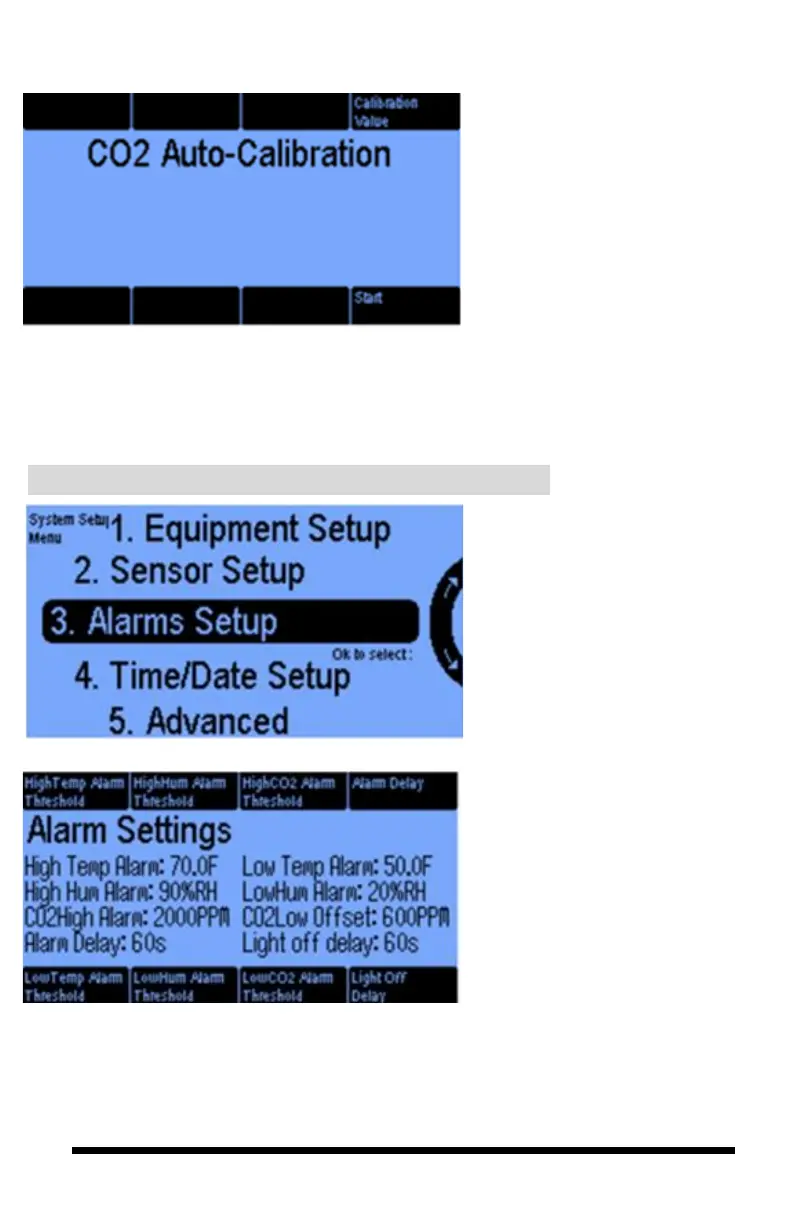
If you go back to the Sensor Setup
screen, and you select the Auto-
Calibrate CO
2
button you will get
this screen. You can calibrate the
sensor to a specific CO
2
measurement reading. One way to
do this is by placing the sensor
outdoors and pressing Start. It will
automatically calibrate to the
outdoor CO
2
level which is always a
default setting of 400. This default
setting is adjustable.
3.3 SYSTEM SETUP Menu ─ Alarms Setup
The Alarm Settings features 6
alerts that can be designated to
warn you of high / low
temperatures, humidity, and/or
CO
2
levels. An Alarm Delay
(button 4) is the amount of time
an undesirable condition must
persist before the alarm is
triggered.
Pressing button #8 takes you to
the light off Delay.
Select 3. for Alarms Setup.
You will then select the Room
number after which you will get
the following screen.



 To Next Page