iPonic 624® Manual PN 995-1124-00
3.7 SYSTEM SETUP Menu ─ Communication
Setup
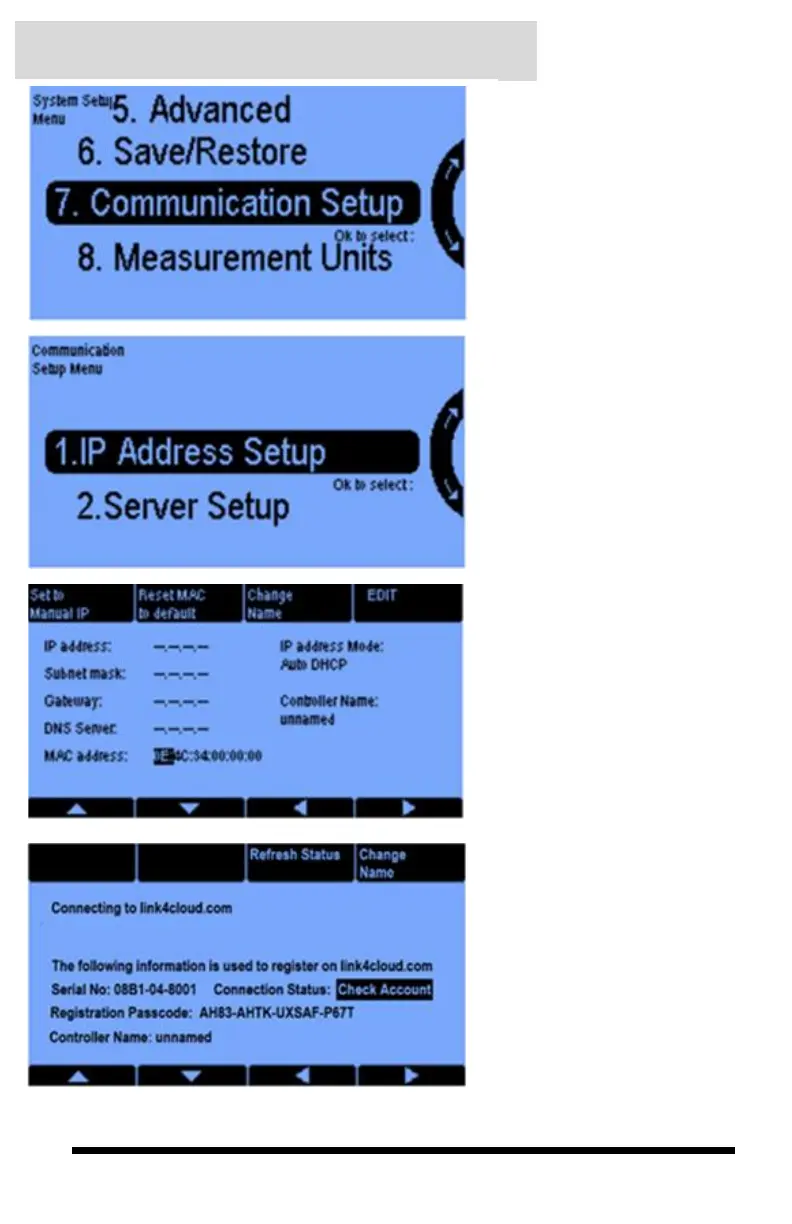
Communication Setup allows
you to configure your iPonic 624
controller to connect to the
Internet for remote access
through the iPonic Cloud.
From the Communication Setup
Menu, you can configure your
iPonic 624 controller to be
accessible from any internet
connected device with the IP
Address on your router.
The IP Address Setup screen
allows you to remotely access
your iPonic 624 controller through
the iPonic Cloud. Using Auto
DHCP, the settings from your
router will appear once you plug
in your Ethernet cable. You can
also Manual IP by pressing soft
button No 1., then manually input
your router information.
From the Server Setup screen,
you will enter the Registration
Passcode and Serial Number
to add your iPonic 624
controller to the iPonic Cloud.
The connection status after
adding your controller to the
cloud should change from
Check Account to OK.



 To Next Page