Appendix A — CO
2
Fuzzy Logic
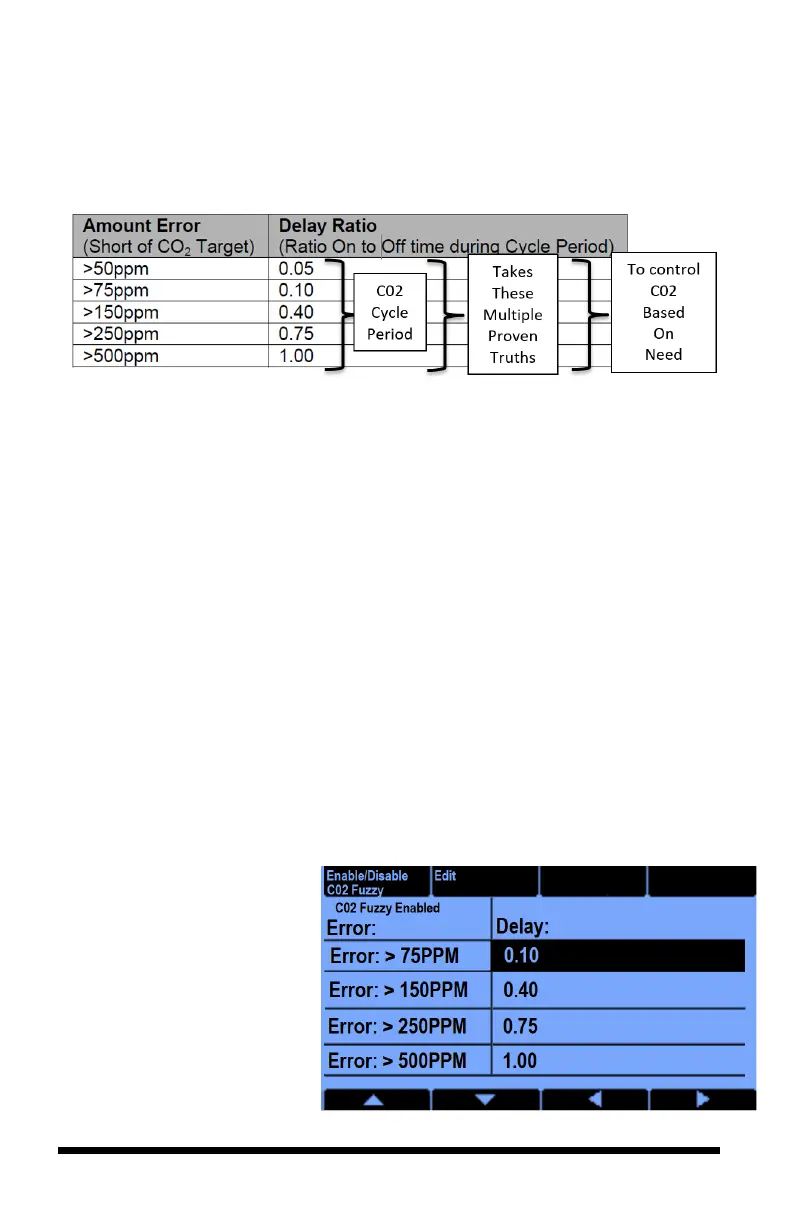
Employing “Fuzzy Logic” with your iPonic 624 controller’s advanced settings
will allow your CO
2
target to be met based on the amount of CO
2
needs, rather
than treating every situation where the CO
2
falls below your setpoint target as
equal.
This is done by taking into consideration the size of the CO
2
error (in parts per
million (ppm)) and assigning the error range a ratio which translates to the actual
percentage of time the CO2 equipment is programmed on during a CO
2
cycle.
When you enable Fuzzy Logic, there is already a default program in the
controller’s system to get you up and running.
When you enable Fuzzy Logic, you will also enable a CO
2
cycle period that you
will need to set. The ratio of time the CO
2
tank is on to time off will always be a
function of the amount of CO
2
error measured by the sensor. This CO
2
budgeting
will keep you from constantly overshooting your CO
2
target.
Enabling and Creating Your Fuzzy Logic Settings
To enable, from the Home screen, Press Ok button
Press 3 or use menu wheel to select 3. System Setup, press OK
Press 5 or use menu wheel to select 5. Advanced, press OK
Select Room 1 or 2 (the room you want it to be enabled in), press OK
Select Button 7. Adv.
Setpoint settings
Select Button 4. followed by
Button 1. Enable/Disable
CO2 fuzzy
Highlight Enabled and press
OK



 To Next Page