iPonic 624® Manual PN 995-1124-00
P
r
e
s
s
i
n
g
1
w
i
l
l
y
i
e
l
d
t
h
e
f
o
l
l
o
w
i
n
g
m
e
n
u
:
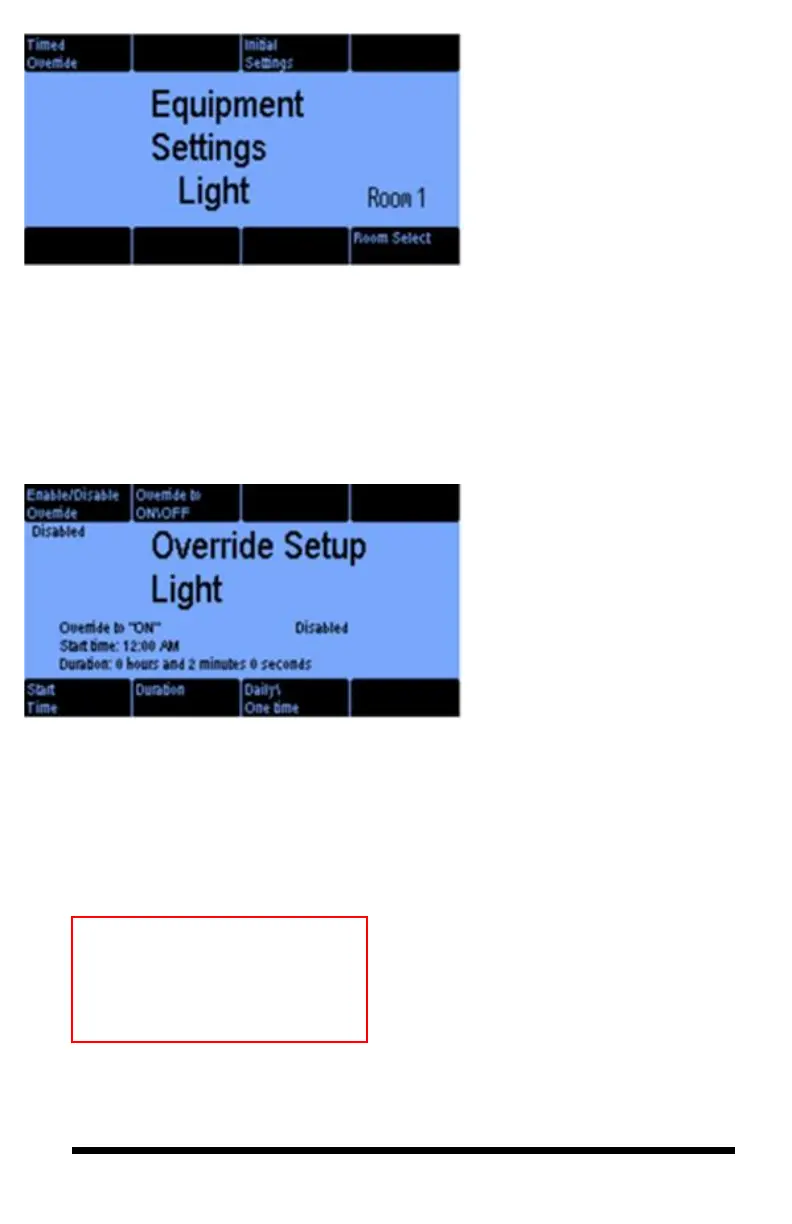
The Equipment Settings Light
screen allows you to set a Timed
Override (button #1), Initial
Settings (button #3), and select
which room (Room Select)
(button #8) you want the output to
control.
Selecting button 1 takes you to the
following screen:
3.1.2.1 Equipment Settings — Timed Override
The Override Setup Light
screen allows you to force the
equipment to turn on [Override
On] or off [Override Off]
regardless of the programmed
setting.
P
r
e
s
s
i
n
g
1
w
i
l
l
y
i
e
l
d
t
h
e
f
o
l
l
o
Button 1 – enable or disable the
override.
Button 2 – select whether you
want the override to force the
output ON or OFF.
Button 5 – select the Start Time
for the override.
Button 6 – set the override
duration.
Button 7 – select either a daily
override or a one-time override.
P
r
e
s
s
i
n
g
1
w
i
Note: You can get to this
same screen from the Home
screen by pressing Soft
Button #1.



 To Next Page