Using the Main Menu16
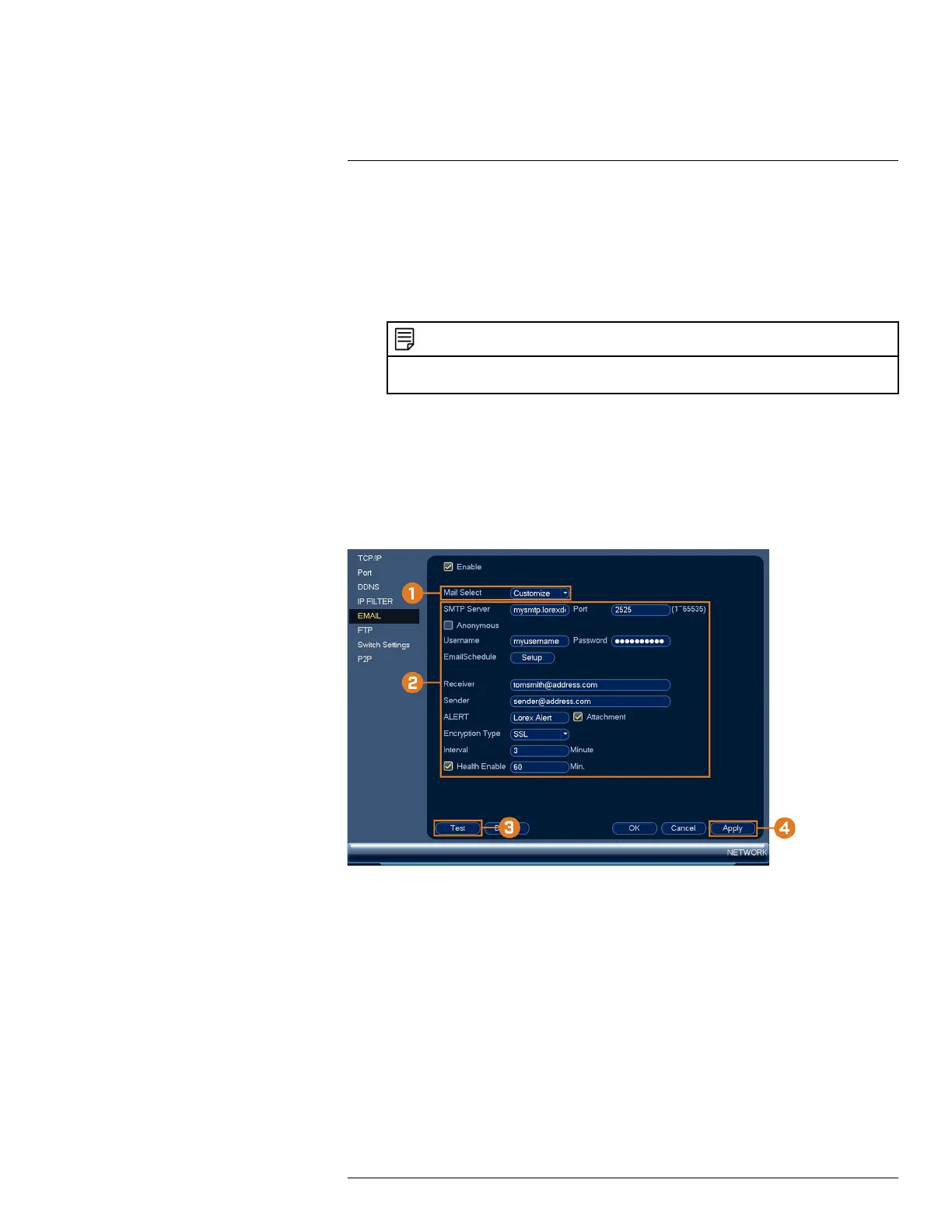
2. Configure the following:
• Email Schedule: Configure time periods during which email alerts will be sent.
• Receiver: Enter the email address that will receive alerts.
• Sender: Enter the sender’s email address.
• ALERT: Enter the subject line for the email alert.
• Attachment: Check to include an image attachment of the camera.
NOTE
You must enable the Snapshot option for motion detection on each camera you would to receive attach-
ments. For details, see 12 Motion Detection, page 42.
• Interval: Enter the interval between alert emails.
• Health Enable: Check to enable health check emails. Health check emails will be sent pe-
riodically to ensure that the system is functioning normally. Enter the interval in minutes
for health check emails.
3. Click Test to send a test email.
4. Click Apply to save settings.
If you want to use your own email server (advanced):
1. Under Mail Select, select Customize.
#LX400113; r. 1.0/56015/56022; en-US 78


 To Next Page