43
0698-651 Operating unit - 04/2021
en
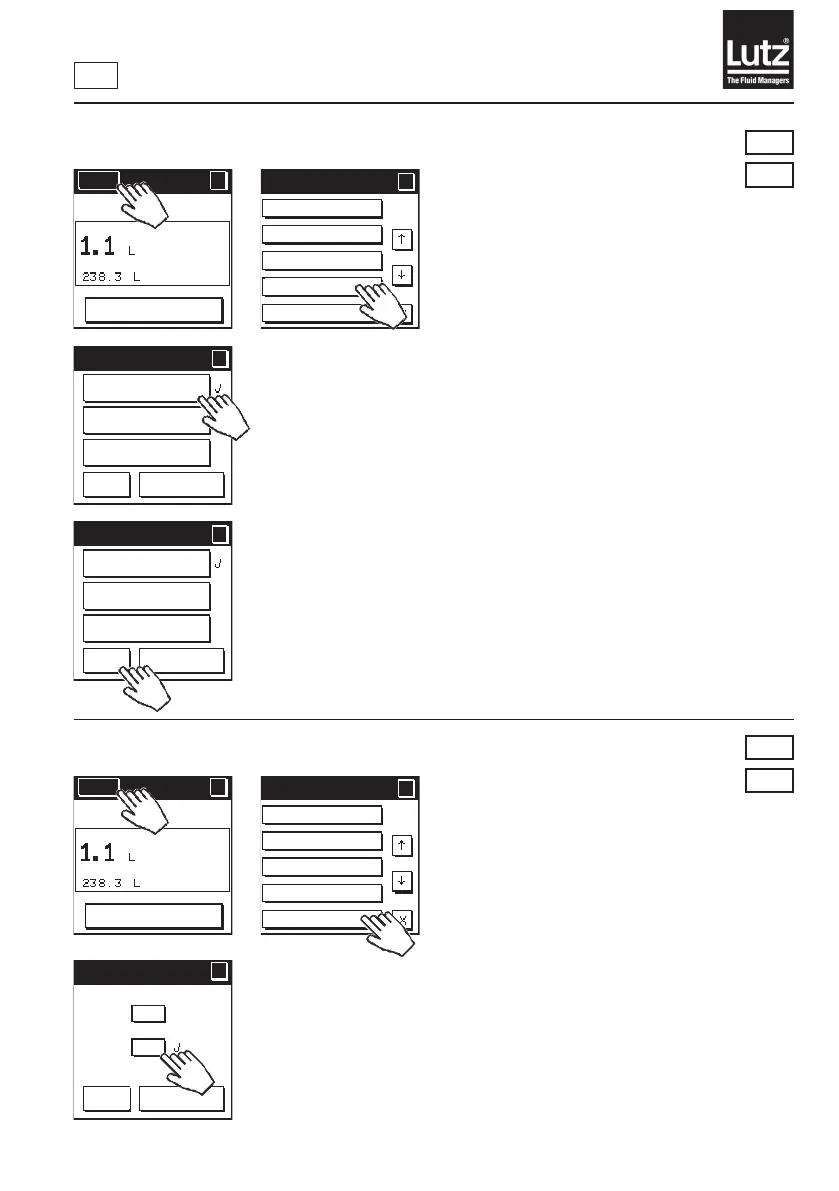
9.12 Change energy save mode
Switch o display completely
Thefunctionwiththelowestcurrentconsumption.Theowmetercom-
pletelyswitchesthedisplayoifitisnotusedformorethan1minute.The
displaycomesbackonwhenuidisdetectedagainorifyoutouchtheuser
interface.
Switch o display partially
Thefunctionwiththeaveragecurrentconsumption.Theowmeterswitches
othetoptitle/menubarandthebuttonsifitisnotusedforlongerthan1
minute.Thedisplaycomesbackoncompletelywhenuidisdetectedorif
you touch the user interface. This is the factory setting.
Switch o display never
Thefunctionwiththehighestcurrentconsumption.Theowmeternever
switchesothedisplayifitisnotbeingused.
9.13 Lighting On/O
Press "On" to switch the display's background lighting on.
Press "O"toswitchthedisplay'sbackgroundlightingo.Thisisthefactory
setting.
Press "OK" to save the selection and return to the menu level.
Press "Cancel" to retain the setting and return to the previous menu level.
RM
NG
RM
NG
Language
Unit of measure
Decimal places
Economy
Backlight
Menu 2/5
?
?
Economy
?
?
OK
Cancel
Switch off
display compl.
Switch off
display part.
Switch off
display never
Economy
?
?
OK
Cancel
Switch off
display compl.
Switch off
display part.
Switch off
display never
Menu
?
RESET
MAN
Menu
?
RESET
MAN
Language
Unit of measure
Decimal places
Economy
Backlight
Menu 2/5
?
?
Backlight
?
?
OK
Cancel
On
Off



 To Next Page