60
0698-651 Operating unit - 04/2021
en
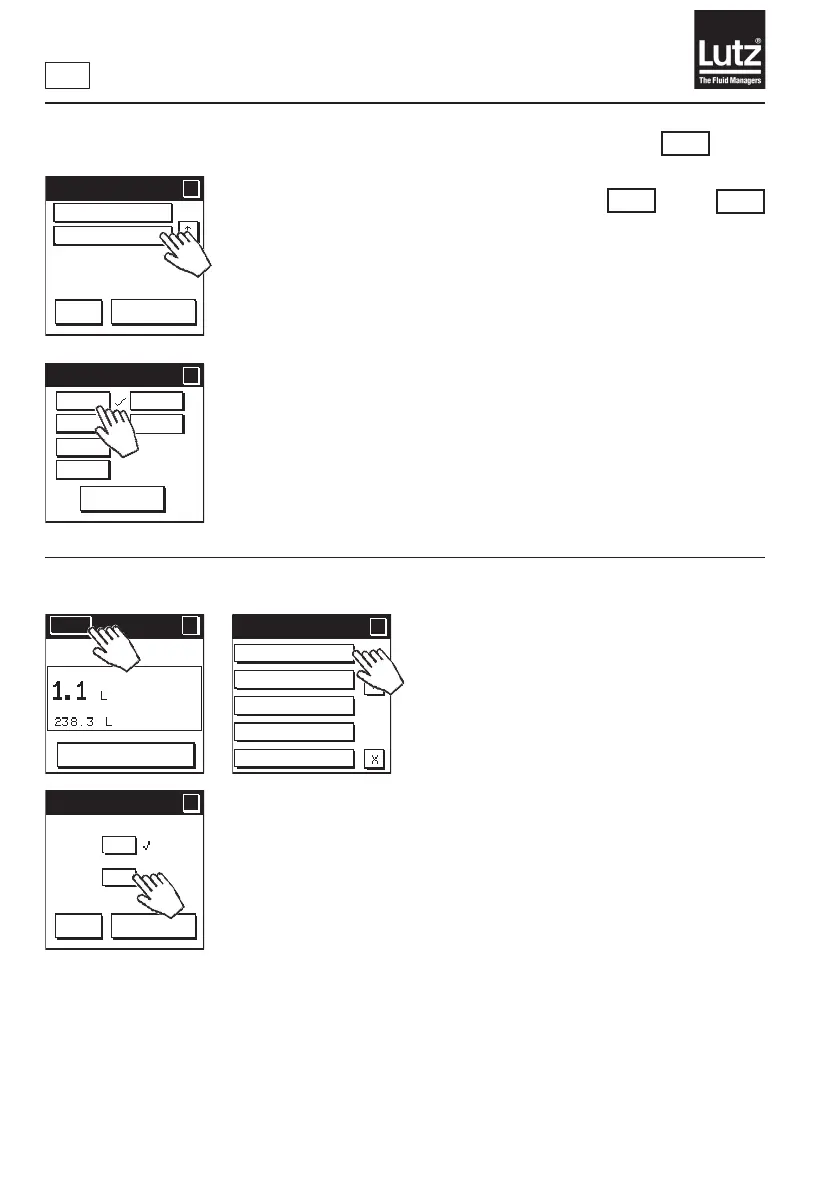
9.23.6 Simulation of pulse output
KM
RM
NG
and
or
Press "O"toswitchthesimulationonthepulseoutputo.
Press "0 Hz" to switch the pulse output to the rest state.
Use the buttons "2 Hz" to "1 kHz" to switch on the respective signal
frequency on the pulse output. The simulated signal is symmetrical (pulse/
pause ratio = 1:1).
Press "Cancel" to end the simulation.
9.24 Measurement On/O
Press "On"toswitchtheowmeteronforthemeasurementandsimulation
functions. This is the factory setting.
Press "O"toswitchthemeasurementandsimulationfunctionsoftheow
metero.
In this state, the following applies:
• Flow display = 0
• The total volume remains on the last value.
• The analog output is set to 0 mA, 4 mA, or 0 V when switched on, depend-
ing on the setting.
• The pulse output is at the reset level.
• Thealarmoutputiso.
Simulation 2/2
?
?
OK
Cancel
Analog output
Pulse output
Simulation Pulse
Simulation Pulse
?
?
Cancel
Off
100 Hz
1 kHz
0 Hz
2 Hz
10 Hz
Meas. on/off
Coupling mod
ules
Programming
lock
Factory settings
SW version
Menu 5/5
?
?
Menu
?
RESET
MAN
Meas. on/off
?
?
OK
Cancel
On
Off



 To Next Page