19
0698-651 Operating unit - 04/2021
en
8.3 Separate installation of the operating unit
Duetothemodularconstructionoftheowmetersystem,itispossibletoinstalltheoperatingunitwith
orwithoutrelaymoduleseparatelytothebasicowmeteritself.Aprotectioncaporapulseconverter,an
intermediate plate and a data line are required in addition.
NOTICE
►Use the supplied Allen key SW3 for the screws.
►Only tighten the screws hand-tight.
►Use a pulse converter instead of a protection cap if the data line
is longer than 5 m.
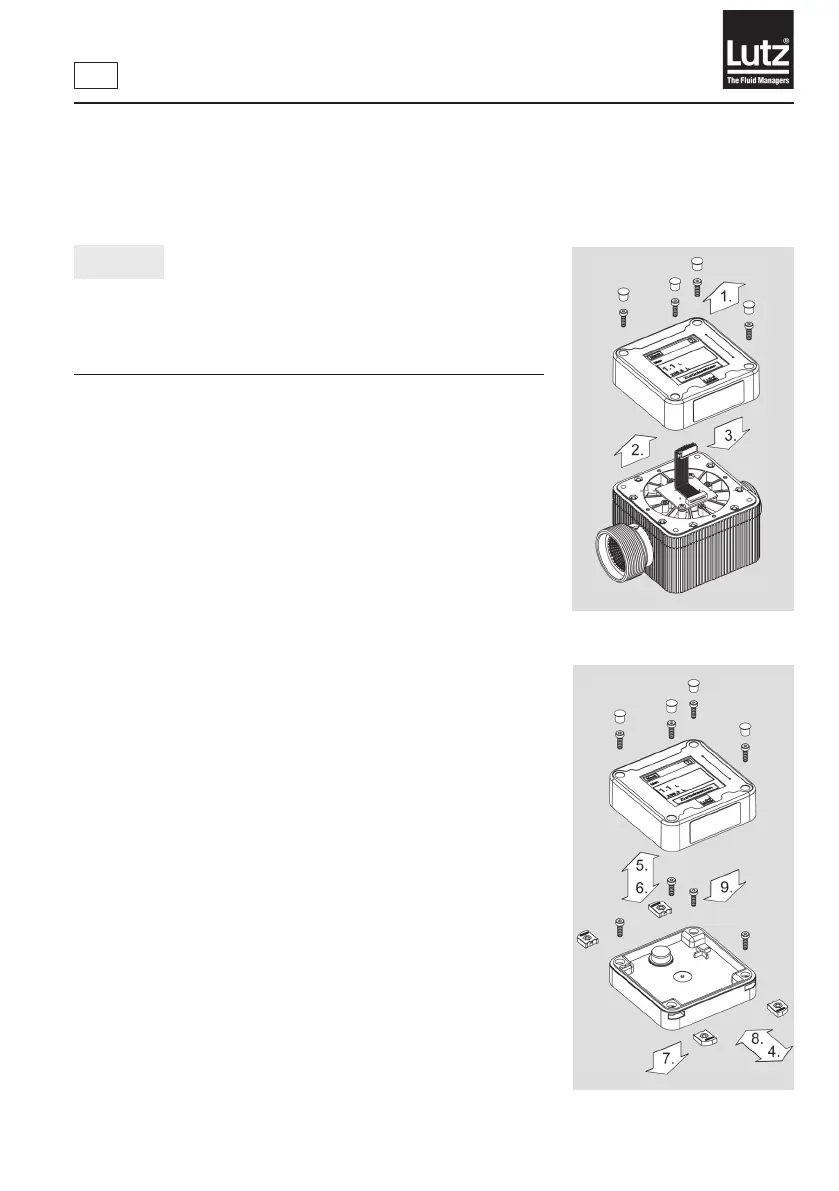
Mounting steps:
1. Remove the caps and release the screws.
2. Carefullylifttheoperatingunit.Payattentiontocablelength!
3. Release the plug.
4. Removethelateralsealingcoversincludingtheangenuts.
5. Remove the screws.
6. Insert screws suitable for the base (max. 5 mm thread diameter,
not included in the scope of supply).
7. Mounttheintermediateplateonarmandlevelbase.
8. Insertthelateralsealingcoversincludingtheangenuts.Make
surethattherearetwodierentversions.
9. Attach the operating unit onto the intermediate plate and mount
the caps.
Fig. 7b - Separate installation of the
operating unit
Fig. 7a - Separate installation of the
operating unit



 To Next Page