66
0698-651 Operating unit - 04/2021
en
10. Maintenance and servicing
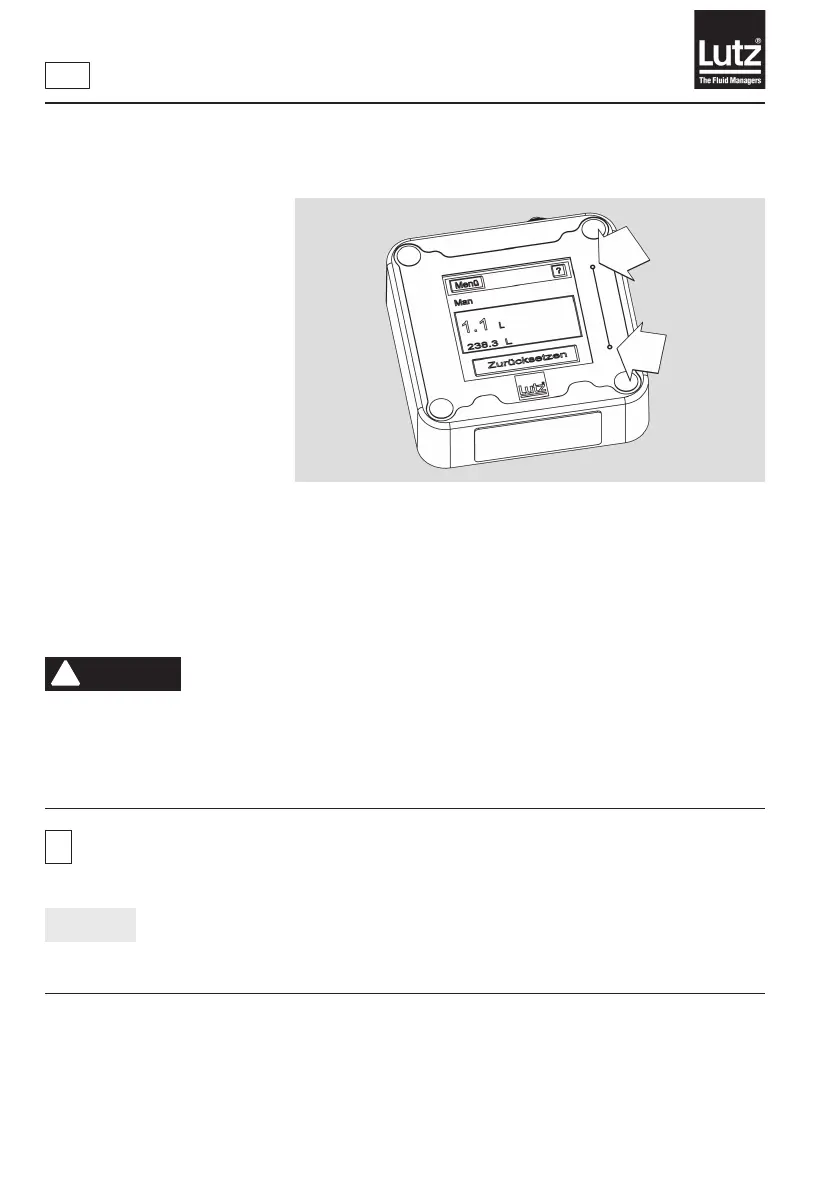
10.1 Reset function
If the operating unit no longer
responds in count mode or
when buttons are pressed, you
can restart the system. To do
so, press both "Reset" buttons
on the operating panel for 5
seconds at the same time.
Fig. 10 – Pressing reset
10.2 Changing the batteries
Theowmeterisoperatedwithalithiumthionylchloridebattery.TheLCDdisplayindicatestheapproach-
ing end of the battery life with the indication "Change battery".
!
DANGER
When changing the batteries in explosion hazard areas danger of explosion occurs!
Blast wave: Flying parts can kill you.
►Change of battery only outside of hazardous location.
►Only use the battery type Tadiran SL-760, 3.6V, size AA when operating the system in explosion hazard
areas.
i
Removethebatteriesiftheowmeterwillnotbeusedforalongerperiodoftime.Thevaluesand
settingsarenotaectedbythis.
NOTICE
►Use the supplied Allen key SW3 for the screws.
►Only tighten the screws hand-tight.



 To Next Page