61
0698-651 Operating unit - 04/2021
en
This display appears instead of the measured values when the measurement
isswitchedo.
Press "OK" to save the selection and return to the menu level.
Press "Cancel" to retain the setting and return to the previous menu level.
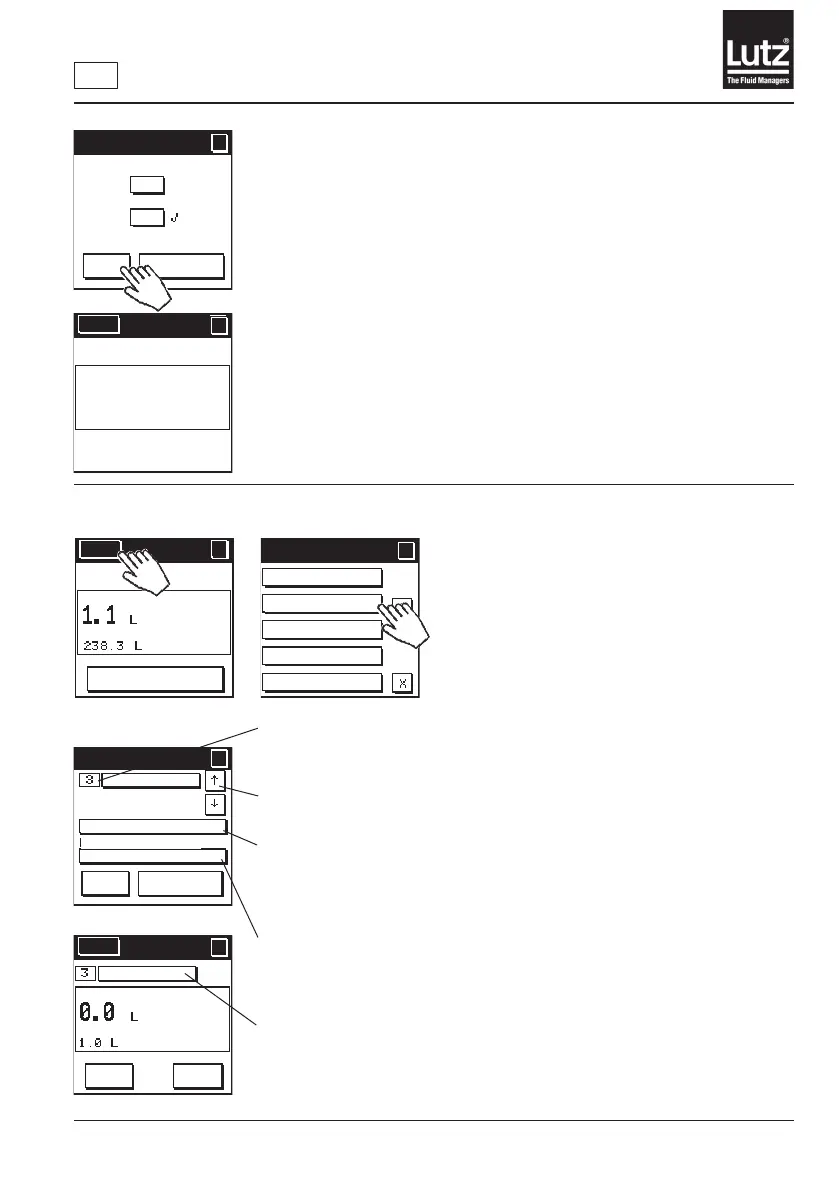
9.25 Coupling the modules
Thebasicowmetersinstalledinthesystemarenumberedsequentiallyin
orderofinstallation.Thisnumbershowswhichbasicowmeteryouhave
selected in the system.
Use the buttons "↓” and “↑" to switch between the coupled units of basic
owmeterandrelaymodule.
Press "Relay module" to open a list of relay modules connected to the
system. From this list, select the relay module to be coupled with the basic
owmeter.
The serial number of the selected relay module is displayed.
Press "Basic meter” toselectthecorrectbasicowmetertypeforthe
displayed serial number. This assigns the appropriate factory settings to the
basicowmeter.
Thisbuttonisdisplayedifmultiplebasicowmetersorrelaymodulesare
installed in the system. It shows you the module combination with which this
operating unit is currently working. Press this button to reach the screen for
coupling modules.
Menu
?
?
Measurement off
Meas. on/off
?
?
OK
Cancel
On
Off
Meas. on/off
Coupling mod
ules
Programming
lock
Factory settings
SW version
Menu 5/5
?
?
Menu
?
RESET
MAN
Coupling modules
Coupling modules
?
?
OK
Cancel
Ser.No. 12345 000001
Ser.No. 12345 000001
Name
Relay module
Basic meter
Menu
?
?
START
Change
volume
Name



 To Next Page